Enterprise application deployment guide 2026 for IT leaders

Deploying enterprise applications is one of the most complex and high-stakes tasks facing IT leaders today. A single misstep can cascade into operational disruptions, security vulnerabilities, and lost revenue. Yet with the right strategies, you can transform these deployments into engines of efficiency and digital transformation. This guide walks you through preparation steps, execution methods, troubleshooting techniques, and verification best practices that elite teams use to achieve near-zero downtime and rapid recovery. You will learn how to select deployment architectures, implement risk-mitigating strategies, automate testing, handle edge cases, and measure success through industry-standard metrics.
Table of Contents
- Understanding Deployment Architectures And Prerequisites
- Choosing And Implementing Deployment Strategies
- Best Practices For Automation, Testing, And Edge Case Handling
- Troubleshooting Common Deployment Challenges And Verifying Success
- Boost Enterprise Deployments With YS Lootah Tech Solutions
- How Do I Choose The Best Deployment Strategy For My Enterprise?
- What Are Key Metrics To Track After Deploying An Enterprise Application?
- How Can Enterprises Mitigate Risks During Application Deployment?
- What Role Does Testing Play In Enterprise Application Deployment?
Key takeaways
| Point | Details |
|---|---|
| Multi-tier and containerized architectures | These topologies ensure high availability, scalability, and security across on-premises and cloud environments. |
| Blue-green and canary deployments | These strategies enable near-zero downtime and gradual rollouts, reducing risk and allowing instant rollback. |
| DORA metrics benchmark performance | Elite teams deploy multiple times daily with under one-hour recovery, measuring frequency, lead time, and failure rates. |
| Automation and staging prevent failures | Automated scripts, staging environments, and rollback plans reduce human error and deployment risks. |
| Edge case testing ensures reliability | Boundary testing and diverse datasets identify hidden failures that standard benchmarks miss. |
Understanding deployment architectures and prerequisites
Before you execute any deployment, you need a solid architectural foundation. Enterprise deployments typically use multi-tier topologies with hardware load balancers and distinct tiers for availability and security. These traditional structures separate web, application, and data layers to isolate failures and scale components independently. In on-premises environments, high-availability clustering ensures redundancy through failover mechanisms and shared storage. Cloud environments, however, favor containerized Kubernetes strategies that offer elasticity, automated scaling, and simplified orchestration.
When designing your deployment architecture, evaluate infrastructure readiness first. Do your servers meet capacity requirements? Are network configurations optimized for traffic spikes? Is your security posture aligned with compliance standards? These questions form the backbone of architectural planning. Scalability matters because enterprise applications must handle growing user bases without performance degradation. Security is non-negotiable, especially when handling sensitive data or regulatory requirements. Elasticity in cloud environments allows you to scale resources dynamically based on demand, reducing costs during low-traffic periods.
Your enterprise application guide should align with your deployment topology. If you are building a new system, consider cloud-native tools early. Kubernetes, Docker, and serverless architectures simplify deployment pipelines and reduce operational overhead. For legacy systems, hybrid approaches that integrate on-premises infrastructure with cloud services can bridge the gap. The enterprise deployment overview provides additional context on topology selection.
Pro Tip: Evaluate cloud-native tools early in your planning phase to optimize deployment architecture and avoid costly migrations later.
Here is a comparison of common deployment topologies:
| Topology | Best For | Key Benefit | Complexity |
|---|---|---|---|
| Multi-tier on-premises | Legacy systems with strict compliance | Full control over infrastructure | High |
| Containerized cloud | Modern apps needing elasticity | Auto-scaling and orchestration | Medium |
| Hybrid | Gradual cloud migration | Flexibility and risk reduction | High |
| Serverless | Event-driven workloads | Zero server management | Low |
Key prerequisites for successful deployment include:
- Infrastructure readiness with adequate compute, storage, and network resources
- Architectural design that separates concerns and isolates failures
- Security configurations aligned with industry standards and compliance requirements
- Monitoring tools integrated to track performance and detect anomalies
- Documentation covering topology diagrams, runbooks, and escalation procedures
Understanding cloud computing strategies helps you choose between public, private, or hybrid deployments. Public clouds offer rapid provisioning and global reach. Private clouds provide enhanced security and control. Hybrid models balance both, allowing sensitive workloads to remain on-premises while leveraging cloud scalability for other services. Refer to enterprise app development steps to align your deployment with development best practices.
Choosing and implementing deployment strategies
Once your architecture is ready, selecting the right deployment strategy becomes critical. Blue-green and canary deployments are preferred for zero-downtime in critical systems, enabling instant rollback and gradual rollout to reduce risk. Each strategy offers distinct advantages depending on your business continuity needs, risk tolerance, and infrastructure capabilities.
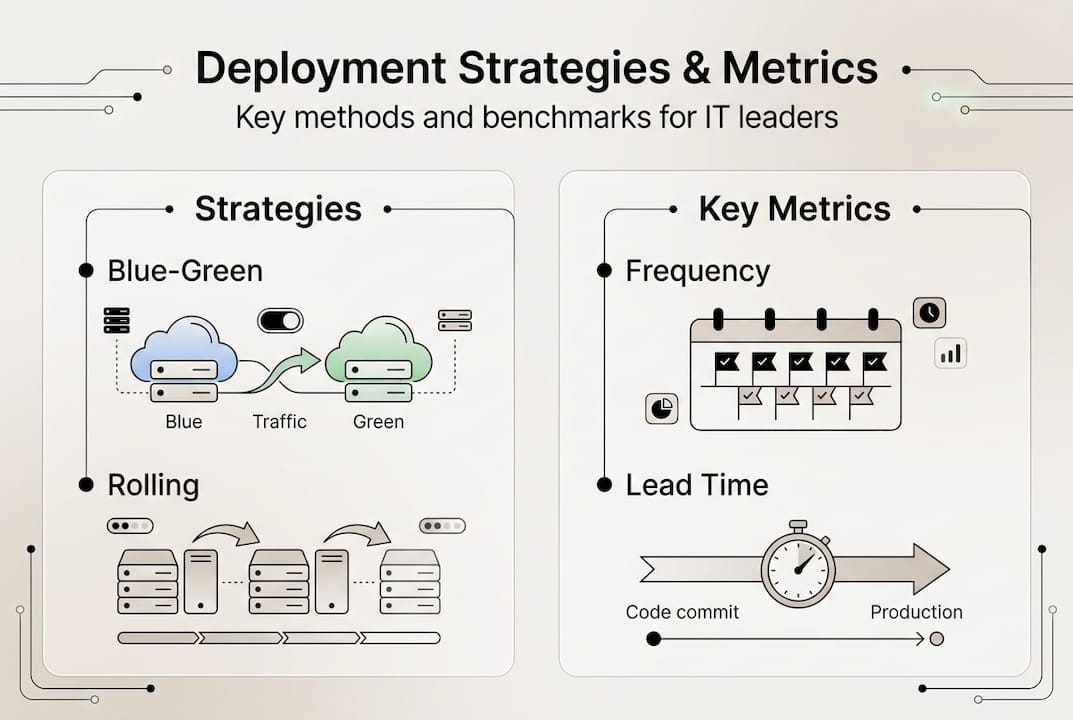
Rolling deployments update instances incrementally, replacing old versions one at a time. This approach minimizes downtime but can create version inconsistencies during the rollout. Blue-green deployments maintain two identical environments, switching traffic from the old version to the new one instantly. If issues arise, you can revert traffic immediately. Canary deployments release updates to a small subset of users first, monitoring for issues before expanding to the full user base. Recreate deployments shut down the old version completely before starting the new one, resulting in downtime but simplifying rollback. Big bang deployments replace everything at once, suitable only for low-risk or non-critical systems.

Here is a comparison of deployment strategies:
| Strategy | Downtime | Rollback Speed | Risk Level | Best Use Case |
|---|---|---|---|---|
| Rolling | Minimal | Moderate | Medium | Gradual updates without full duplication |
| Blue-green | Zero | Instant | Low | Critical systems needing instant rollback |
| Canary | Zero | Fast | Low | Testing with real users before full rollout |
| Recreate | High | Slow | High | Non-critical systems with simple rollback |
| Big bang | High | Slow | High | Low-risk environments or one-time migrations |
To implement a blue-green deployment:
- Set up two identical production environments labeled blue and green.
- Deploy the new version to the inactive environment while the active one serves traffic.
- Run comprehensive tests on the inactive environment to verify functionality.
- Switch the load balancer or DNS to route traffic to the newly updated environment.
- Monitor for issues and keep the old environment running as a rollback option.
- Decommission the old environment once the new version is stable.
For canary deployments:
- Deploy the new version to a small percentage of infrastructure or users, typically 5 to 10 percent.
- Monitor key metrics like error rates, response times, and user feedback.
- Gradually increase traffic to the new version in increments if metrics remain healthy.
- Roll back immediately if anomalies or failures are detected.
- Complete the rollout once the new version handles 100 percent of traffic successfully.
Pro Tip: Automate deployment scripts using CI/CD pipelines to reduce human errors and ensure consistency across environments.
These strategies emphasize operational continuity and risk reduction. Enterprise deployment examples show how organizations achieve zero-downtime updates through careful planning and execution. The application deployment guide offers additional implementation details. For ongoing support after deployment, explore the IT support services guide to maintain system health and quickly resolve issues.
Best practices for automation, testing, and edge case handling
Reliable deployments require rigorous testing, intelligent automation, and proactive edge case handling. Automation reduces human errors, ensures consistency, and accelerates deployment cycles. Manual processes introduce variability and increase the likelihood of configuration mistakes. By scripting deployments, you create repeatable, auditable processes that teams can execute confidently.
Key testing types include:
- Boundary testing to validate behavior at input limits and extreme conditions
- Regression testing to confirm new changes do not break existing functionality
- Integration testing to verify components interact correctly across system boundaries
- Acceptance testing to ensure the application meets business requirements and user expectations
Measuring deployment performance through DORA metrics provides objective benchmarks. DORA metrics benchmark elite performers with frequent deployments, fast recovery, and low failure rates. These metrics include deployment frequency, lead time for changes, mean time to recovery, and change failure rate. Elite teams deploy multiple times per day, achieve lead times under one day, recover from incidents in less than one hour, and maintain change failure rates below 15 percent.
Here is a DORA metrics comparison:
| Metric | Elite Performers | Average Performers |
|---|---|---|
| Deployment Frequency | Multiple times per day | Once per week to once per month |
| Lead Time for Changes | Less than one day | One week to one month |
| Mean Time to Recovery | Less than one hour | One day to one week |
| Change Failure Rate | 0 to 15 percent | 16 to 30 percent |
Edge cases require boundary testing, human-in-loop evaluation, and diverse datasets for accurate validation. Edge cases represent scenarios that fall outside normal operating parameters but can cause catastrophic failures if unhandled. Examples include resource exhaustion when memory or CPU limits are exceeded, API version mismatches between integrated services, unexpected input formats that bypass validation, and network latency spikes that trigger timeouts.
Handling edge cases effectively requires:
- Diverse datasets that reflect real-world variability and corner cases
- Boundary testing to probe system limits and failure thresholds
- Human-in-loop validation for AI models to close the evaluation-deployment gap
- Chaos engineering to simulate failures and test recovery mechanisms
- Continuous monitoring to detect anomalies that indicate edge case triggers
Pro Tip: Implement human-in-loop evaluation in critical AI model deployments to identify edge cases that automated testing misses, closing the gap between evaluation and production performance.
Automation and edge case handling are not optional extras. They are foundational practices that separate elite deployment teams from average performers. Investing in these areas pays dividends through reduced downtime, faster recovery, and higher user satisfaction.
The software development guide emphasizes testing throughout the development lifecycle. For performance standards and benchmarks, review deployment performance standards. Additional insights on large-scale deployments are available in enterprise deployment lessons.
Troubleshooting common deployment challenges and verifying success
Even with meticulous planning, deployments encounter challenges. Challenges include data migration issues and integration dependencies; best practices promote automation, staging, rollback plans, and process standardization. Data migration errors occur when schema changes are incompatible or data transformations fail. Integration dependencies break when APIs change unexpectedly or third-party services experience outages. Change management resistance from users or stakeholders can derail adoption. Performance degradation under load reveals capacity planning gaps.
Troubleshooting checklist:
- Verify all environment variables and configuration files are correctly set.
- Check logs for error messages, stack traces, and warning indicators.
- Test database connections and confirm schema migrations completed successfully.
- Validate API endpoints and ensure version compatibility across integrated services.
- Monitor resource utilization for CPU, memory, disk, and network bottlenecks.
- Review recent changes to identify potential causes of new issues.
- Engage stakeholders and users to gather feedback on observed problems.
Rollback plans are essential safety nets. Create rollback plans by documenting the exact steps to revert to the previous version, including database schema rollbacks, configuration changes, and traffic routing adjustments. Store rollback scripts in version control alongside deployment scripts. Test rollback procedures in staging environments to ensure they work under pressure. Execute rollback immediately if critical issues arise, prioritizing system stability over completing the deployment.
Verifying deployment success involves multiple checkpoints. Monitor application logs for errors and exceptions that indicate functional problems. Run performance checks to confirm response times, throughput, and resource usage meet expectations. Conduct user acceptance testing with real users to validate that the application meets business requirements. Track key performance indicators like uptime, error rates, and user satisfaction scores. Compare post-deployment metrics against pre-deployment baselines to identify regressions.
Best practices to prevent common mistakes:
- Use staging environments that mirror production to catch issues before they reach users
- Implement automated smoke tests that run immediately after deployment
- Maintain clear communication channels between deployment teams and stakeholders
- Document deployment procedures and update them after each release
- Schedule deployments during low-traffic periods to minimize user impact
- Keep rollback plans accessible and tested regularly
The application development services team at YS Lootah Tech can help you navigate these challenges. For specific deployment scenarios and lessons learned, consult Azure deployment challenges for cloud-specific insights.
Boost enterprise deployments with YS Lootah Tech solutions
Implementing the deployment strategies outlined in this guide requires expertise, robust tooling, and ongoing support. YS Lootah Tech specializes in application development services that align with deployment best practices, ensuring your enterprise applications are built for reliability, scalability, and seamless updates. Our team designs architectures that support blue-green and canary deployments, integrates automated testing pipelines, and implements monitoring solutions that track DORA metrics in real time.

Our AI and machine learning services enhance deployment scenarios by automating anomaly detection, predicting system failures before they occur, and optimizing resource allocation dynamically. Advanced AI models identify edge cases during testing, reducing the risk of production failures. Post-deployment, our UX/UI design services ensure that users adopt new features smoothly, minimizing change management resistance and maximizing ROI.
Key benefits of partnering with YS Lootah Tech:
- Customized deployment solutions tailored to your infrastructure and business needs
- Scalability built into every architecture, supporting growth without performance degradation
- Expert support throughout planning, execution, and post-deployment phases
- Proven track record across industries including fintech, healthcare, and industrial management
Whether you are modernizing legacy systems or deploying cloud-native applications, our comprehensive approach ensures operational efficiency and digital transformation success. Contact us to discuss how we can optimize your enterprise deployment strategy.
How do I choose the best deployment strategy for my enterprise?
Choosing the right deployment strategy depends on your business continuity needs, risk tolerance, and infrastructure capabilities. If your application is mission-critical and downtime is unacceptable, blue-green or canary deployments are ideal because they enable instant rollback and gradual user exposure. For less critical systems where brief downtime is acceptable, rolling or recreate strategies simplify the process. Evaluate your team's automation maturity, as advanced strategies require robust CI/CD pipelines and monitoring tools. Consider your user base size; canary deployments work best when you can segment users for gradual rollout. Review enterprise app development steps to align deployment choices with your development lifecycle and organizational readiness.
What are key metrics to track after deploying an enterprise application?
Track deployment frequency multiple times per day for top performance, as elite teams achieve this cadence through automation and streamlined processes. Lead time for changes under one day indicates efficient delivery from commit to production. Mean time to recovery under one hour signals quick issue resolution and robust monitoring. Change failure rate below 15 percent demonstrates thorough testing and reliable deployment practices. Additionally, monitor application-specific metrics like response times, error rates, throughput, and user satisfaction scores to ensure the deployment meets business objectives and user expectations.
How can enterprises mitigate risks during application deployment?
Automate repeatable deployment tasks to avoid human errors that cause configuration mistakes and inconsistencies. Use staging environments that mirror production to test changes safely before exposing them to real users. Have clear rollback plans documented and tested regularly so you can revert quickly if critical issues arise. Implement canary or blue-green strategies to limit exposure and enable instant recovery. Conduct thorough testing including boundary, regression, and integration tests to catch issues early. Maintain robust monitoring and alerting systems that detect anomalies immediately, allowing rapid response before problems escalate.
What role does testing play in enterprise application deployment?
Boundary and edge case testing identify hidden failures that standard benchmarks miss, ensuring your application handles extreme conditions and unexpected inputs gracefully. Dynamic testing in production-like environments ensures real-world reliability beyond synthetic test scenarios. Regression testing confirms that new changes do not break existing functionality, maintaining system stability across updates. Integration testing verifies that components interact correctly, catching issues at system boundaries where failures often occur. Acceptance testing validates that the application meets business requirements and user expectations, reducing the risk of post-deployment dissatisfaction and costly rework.