Step by Step Cloud Migration: A 2026 Guide for IT Teams

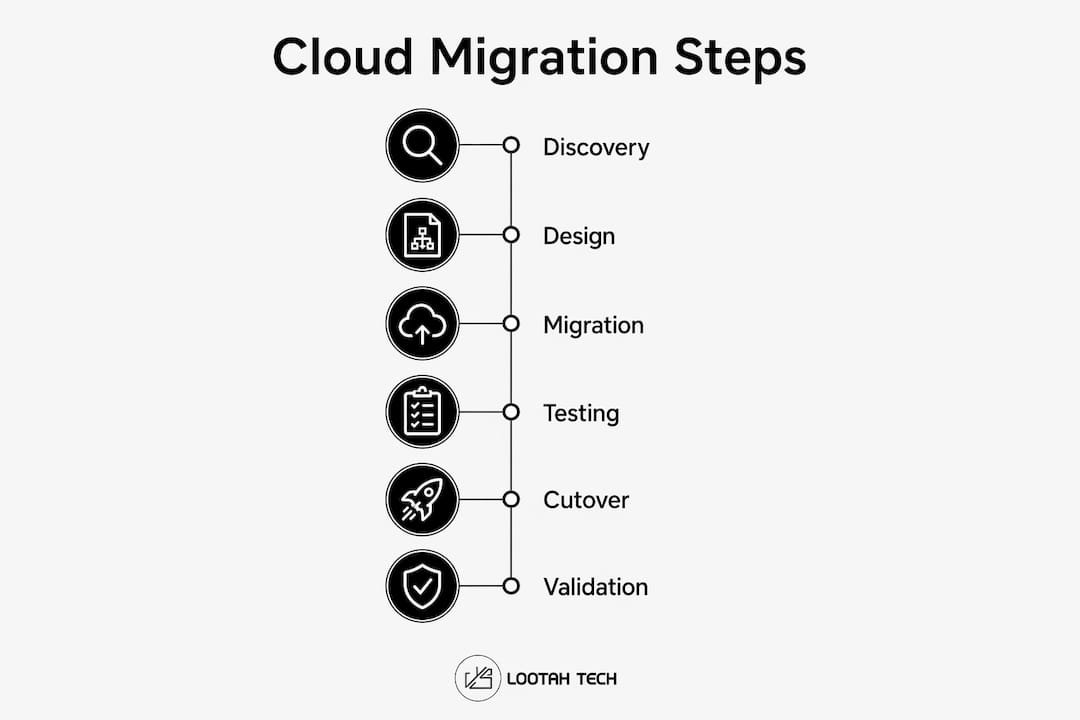
A successful cloud migration follows a deliberate sequence: discover what you have, design a secure foundation, execute in waves, validate before going live, and govern continuously after. Skip any phase and you are not cutting corners — you are scheduling a future outage. The cloud migration process breaks down into five core phases, each with specific deliverables that gate the next.
Here is the sequence at a glance:
- Discovery: Inventory applications, map dependencies, define KPIs, and assign the 6Rs strategy per workload.
- Design and planning: Select your cloud provider (AWS, Microsoft Azure, or Google Cloud), establish a secure Landing Zone, and schedule migration waves.
- Migration execution: Move workloads in dependency-grouped waves, replicate data, test thoroughly, and execute cutover with a tested rollback plan ready.
- Going live: Validate performance metrics, run parallel environments temporarily, and confirm stability before decommissioning on-premises resources.
- Ongoing support: Right-size resources, enforce FinOps cost controls, and maintain security and governance continuously.
Two concepts underpin every phase: dependency mapping and rollback readiness. Teams that treat these as optional extras consistently run into production failures that could have been caught in planning.
What does the discovery phase actually involve?
Discovery is where migrations are won or lost before a single server moves. The goal is building an inventory that is operationally useful, not a spreadsheet that collects dust after the kickoff meeting.
For each application in scope, capture:
- Owner: both a business owner (accountable for uptime and cost) and a technical owner (accountable for architecture and runbooks).
- Criticality: revenue impact, customer-facing exposure, and compliance obligations.
- Runtime: language, OS, container or VM, batch schedules, and peak traffic patterns.
- Data: databases, file stores, data classification, retention policies, and RTO/RPO targets.
- Dependencies: upstream and downstream services, network flows, DNS dependencies, and third-party API chains.
- Ops readiness: existing dashboards, alerting, log coverage, and on-call rotation.
Dependency mapping deserves its own focus. Failure to map external API calls and dependency chains during discovery is a leading cause of migration failures after the move. Application A calls Application B, which reads from Database C. Migrate A without B and you now need hybrid network connectivity that nobody planned for.
Pro Tip: Run automated discovery tools against your environment rather than relying on documentation alone. Documentation is almost always out of date. Tools like AWS Application Discovery Service or Azure Migrate surface live network flows that no architecture diagram captures.
Once the inventory is complete, assign each application one of the 6Rs migration strategies: Rehost (lift-and-shift for quick moves), Replatform (minor changes to use managed services), Refactor (redesign for cloud-native patterns), Rearchitect (deeper structural transformation), Repurchase (replace with SaaS), or Retire/Retain (decommission or keep on-premises due to constraints). The 6Rs prevent the "one-size-fits-all" trap where every workload gets treated as a lift-and-shift because it is the fastest option.
KPI development belongs here too. Define what "done" looks like before you invest in the Landing Zone. Business outcomes might include exiting a data center by a specific date, reducing infrastructure costs, or meeting a new compliance requirement. Non-functional targets — availability, latency budgets, RTO/RPO — give the technical team measurable thresholds to design toward.
How do you design a cloud architecture and choose the right provider?
Design and planning translates discovery findings into a buildable architecture. Three decisions dominate this phase: which cloud provider, which deployment model, and how to structure the Landing Zone.

Choosing between AWS, Microsoft Azure, and Google Cloud
Each of the three major platforms has genuine strengths, and the right choice depends on your existing technology stack and business requirements.
| Provider | Core strength | Best fit |
|---|---|---|
| AWS | Broadest service catalog, mature tooling for large-scale migrations | Organizations with diverse workloads and need for maximum service choice |
| Microsoft Azure | Deep integration with Microsoft products, Active Directory, and hybrid environments | Enterprises already running Windows Server, SQL Server, or Microsoft products |
| Google Cloud | Data analytics, machine learning, and Kubernetes-native workloads | Teams prioritizing data pipelines, AI workloads, or container-native apps |
Deployment model selection (public, private, or hybrid) follows from your data residency requirements, latency constraints, and regulatory obligations. Hybrid is common for organizations that cannot move certain workloads due to legal or vendor constraints.
Building a secure Landing Zone
A Landing Zone is the standardized foundation every workload inherits. Without it, each team builds its own cloud configuration, which creates security gaps and governance nightmares within months. Establishing a secure Landing Zone is critical for standardized identity, networking, logging, and security guardrails across all workloads.
A production-ready Landing Zone covers:
- Account and subscription structure: separate production from non-production, with a dedicated security account.
- Identity: SSO integration, MFA enforcement, and a privileged access model.
- Networking baseline: VPC or VNet design, subnets, routing, and egress controls.
- Logging and auditing: centralized log aggregation with defined retention periods.
- Guardrails: policy-as-code rules such as encryption required by default, no public storage buckets, and mandatory resource tagging.
- Infrastructure as Code (IaC): reusable modules with code review and drift detection.
A rollback plan is mandatory and must be tested before any migration wave begins. Define rollback criteria and procedures first — automate them in CI/CD pipelines using tools like Azure Pipelines or GitHub Actions, and simulate failures in staging to confirm the plan actually works. A rollback plan that has never been tested is not a plan; it is a hope.
Migration wave planning and cost estimation
Migration waves should group dependent applications to limit disruption and preserve functional integrity. A practical wave structure looks like this: Wave 0 establishes the Landing Zone and networking baseline; Wave 1 moves low-risk applications to validate patterns; Wave 2 scales to the broader portfolio; Wave 3 handles the highest-criticality systems after the operations model is proven.
Cost estimation belongs in this phase, not after. Build a total cost of ownership model that includes compute, storage, networking egress, licensing changes (especially for Windows and SQL Server), and the operational cost of running parallel environments during cutover windows. Governance frameworks — defining who approves spending, who owns cost allocation tags, and how budget alerts are configured — prevent the bill shock that derails post-migration confidence.
How do you execute the migration without breaking production?
Execution is where planning meets reality. The technical steps vary by migration approach, but the operational pattern is consistent across every workload.

Data migration methods and their tradeoffs
Three data migration patterns cover most scenarios:
- Offline migration: stop writes, export data, import to cloud, restart. Simple and reliable, but requires a planned downtime window. Best for non-critical workloads or systems with scheduled maintenance.
- Online replication: continuous sync between source and target, with a short cutover window to flip traffic. More complex to set up, but near-zero downtime for customer-facing systems.
- Hybrid dual-write: selective writes to both environments during transition. Highest complexity; use only when neither offline nor online replication fits the architecture.
For rehost migrations, tools like AWS Application Migration Service (AWS MGN) handle server replication. For databases, AWS Database Migration Service (AWS DMS) or Azure Database Migration Service manage continuous replication with schema conversion support.
Testing before cutover
Testing migration in non-production environments with representative data is the single most effective way to avoid production outages. Run four test categories before any cutover window opens:
- Functional testing: top user journeys end-to-end.
- Integration testing: queues, webhooks, third-party APIs, and internal service dependencies.
- Performance testing: latency and throughput baselines compared against pre-migration measurements.
- Security testing: IAM permission checks, secret usage audits, and exposure scanning.
Integration testing catches the failures that unit tests miss. An upstream service that cannot resolve the new cloud IP address will not show up in functional tests — it only surfaces when the full dependency chain runs.
Cutover procedures and rollback readiness
Cutover is the riskiest moment in any migration. Keep the window short, execute during low-traffic periods, and have every role assigned before the call starts. A cutover runbook must specify: who is on the call and who holds rollback authority, exact steps with timestamps and pause points, go/no-go criteria (error rate thresholds, latency limits, saturation signals), and tested rollback triggers with documented steps.
DNS and load balancer changes are the most common cutover mechanisms. Set DNS TTLs low well before the cutover window so that traffic shifts quickly when you flip the record.
Pro Tip: Do not decommission on-premises resources the moment cutover succeeds. Keep the source environment running in parallel and monitor application logs, performance metrics, and error rates before pulling the plug. Premature decommissioning is one of the most common and most avoidable migration errors.
What happens after you go live?
Going live is not the finish line. The first 30–90 days after a migration wave determine whether the move delivers its intended value or creates a new set of operational problems.
Cutover validation starts immediately after traffic switches. Monitor application logs, performance metrics, error rates, and user-reported issues in real time. Define explicit go/no-go thresholds before the cutover window opens so the team is not making judgment calls under pressure at 2:00 AM.
Running on-premises resources in parallel with the new cloud environment for at least one week post-cutover reduces risk and prevents premature shutdown errors. This parallel period is not wasted spend; it is insurance against the dependency issues that only surface under real production load.
Post-migration responsibilities include:
- Right-sizing: review compute and memory utilization after a few weeks of real traffic. Initial sizing is almost always conservative; right-sizing typically recovers meaningful cost.
- Reserved capacity and savings plans: commit to reserved instances or savings plans for stable workloads once utilization patterns are understood. Paying on-demand rates indefinitely is the most common post-migration cost mistake.
- Cloud-native refactoring: rehosted workloads are a starting point. Progressively move toward managed services, serverless functions, and cloud-native databases to reduce operational overhead.
- FinOps governance: cost control measures like right-sizing and reserved capacity keep cloud operational expenses aligned with business objectives. Assign cost ownership to application teams, not just a central IT budget.
- Incident response: define escalation paths, on-call rotations, and runbooks for the cloud environment before the parallel period ends.
- Security compliance: run continuous Cloud Security Posture Management (CSPM) scans and review IAM permissions quarterly. Permissions granted during migration are often broader than needed and should be tightened post-stabilization.
Change management runs alongside all of this. Stakeholders need regular updates on migration progress, cost trends, and any incidents. Teams that communicate proactively during the post-migration period build the organizational trust that makes future waves easier to execute. For deeper guidance on securing workloads post-migration, a structured security review cycle is worth building into the governance calendar from day one.
What do experienced teams do differently?
The gap between migrations that succeed and those that stall is rarely technical. The technical work — moving servers, configuring networks, refactoring applications — represents a minority of the total effort. The larger share is discovery, planning, stakeholder management, and process change. Teams that treat cloud migration as purely a technology project consistently underestimate this and pay for it in delays and rework.
The most common pitfalls
- Hidden dependencies discovered post-cutover. Automated discovery tools reduce this risk, but they do not eliminate it. Build a dependency review checkpoint into every wave's pre-migration checklist.
- Rollback plans that exist on paper but have never been tested. A rollback plan that has not been rehearsed in staging is not a safety net. Test it. Simulate a failure. Fix the gaps before the production window.
- Premature decommissioning. Shutting down on-premises resources before the cloud environment has proven stable under real load is a recurring mistake. The parallel period exists precisely to catch what testing missed.
- Insufficient testing scope. Functional tests pass; integration tests reveal the actual failure modes. Skipping integration testing to save time is one of the most reliable ways to create a production incident.
Security as enforced defaults, not manual audits
Security must be enforced as default policies with IAM least privilege, MFA, secrets management, and encryption, rather than relying on periodic manual checks. Automated guardrails prevent misconfiguration at scale. Zero Trust principles — verify every request, grant minimum access, assume breach — should be built into the Landing Zone from the start, not retrofitted after incidents occur. For teams new to cloud security architecture, cloud security basics provide a practical starting point for IAM and encryption policy design.
Pro Tip: Assign a dedicated security review to every migration wave, not just the final production cutover. Catching an overly permissive IAM role in Wave 1 is a minor fix. Finding it after Wave 3 means auditing every workload you have already moved.
Stakeholder engagement and organizational readiness
Effective stakeholder communication follows a simple rule: no surprises. Share the migration schedule, downtime windows, and rollback criteria with business owners before each wave begins. Document the business justification for each workload's migration approach and present tested rollback procedures with specific timeframes and success criteria. Teams that understand system migration implications for their business context tend to engage more constructively throughout the process.
The cultural side of migration is real. Operations teams need training on cloud tooling. Development teams need to understand new deployment pipelines. Finance teams need visibility into cloud cost models. Building these capabilities in parallel with the technical migration, rather than after it, is what separates organizations that thrive in the cloud from those that simply survive the move.
Key Takeaways
A phased, dependency-aware cloud migration with tested rollback procedures and continuous security enforcement is the most reliable path to a stable cloud environment.
| Point | Details |
|---|---|
| Discovery gates everything | Map all dependencies and assign a 6Rs strategy per workload before any planning begins. |
| Landing Zone first | Establish identity, networking, logging, and security guardrails before migrating a single workload. |
| Test rollback before cutover | A rollback plan must be rehearsed in staging; an untested plan offers no real protection. |
| Run parallel environments | Keep on-premises resources live for at least one week post-cutover to catch issues under real load. |
| FinOps starts at go-live | Right-size resources and commit to reserved capacity once utilization patterns are clear. |
Ready to plan your cloud migration?

Yslootahtech works with IT teams and business decision-makers to plan and execute cloud migrations that stay on schedule and within budget. From Landing Zone design to post-migration governance, the team brings hands-on experience across AWS, Microsoft Azure, and Google Cloud environments. Whether you need application development support to refactor workloads for cloud-native architectures or end-to-end digital transformation guidance, Yslootahtech builds the technical and organizational foundations that make migrations stick. Reach out to start a conversation about your migration roadmap.