Prove Legacy System Migration in 90–120 Days: IT Leaders' Playbook

Start with a thorough discovery phase and a short pilot, not a big bang rewrite; for practical guidance on integrating new tech within programs, see Integrating New Technologies into Your Business Strategy. Pick a low risk pattern like rehost or a strangler fig approach depending on your constraints, prove it on one workload, then scale. This guide maps the seven common migration approaches, a phased roadmap, and the checklists you need to run a legacy system migration that survives contact with production.
TL;DR:
- Prioritizing migration based on recovery objectives, compliance risks, strategic value, and maintenance costs ensures efforts target the most impactful systems first.
- A phased, wave-based roadmap involving discovery, low-risk pilot, and incremental waves reduces operational risk and supports smoother transition.
- Data migration techniques like change data capture and reconciliation minimize freeze windows and prevent data loss during cutover.
- Common migration risks include undocumented business logic, dependencies, vendor lock-in, and operational gaps, which can be mitigated through thorough mapping and planning.
- Governance should be led by a steering group with clear KPIs, and successful pilots depend on precise planning, monitoring, and stakeholder alignment.
Table of Contents
- What Is Legacy System Migration and When Should You Do It?
- How Do You Decide When to Migrate and Build the Business Case?
- What Are the 7 Rs of Legacy Migration?
- What Does a Phased Migration Roadmap Look Like?
- What Are the Best Data Migration Techniques for Cutover?
- What Are the Biggest Migration Risks and How Do You Mitigate Them?
- Which Architecture Patterns Actually Reduce Migration Risk?
- Who Should Own Governance and What Metrics Matter?
- How Do You Structure a 90 to 120 Day Migration Pilot?
- What Do Migration Projects Actually Teach You?
- How Yslootahtech Helps With Legacy System Migrations
- Sources
What Is Legacy System Migration and When Should You Do It?
Legacy system migration means moving an application, its data, and its business logic off an aging platform onto infrastructure that supports current security, performance, and integration standards. That's narrower than "modernization," which can include rewriting UX, changing business processes, or launching new products on top of old data. Migration is the plumbing work. Modernization is everything built on top of it.
Three signals usually force the decision: the vendor stops patching security holes, the platform can't scale to meet demand, or the cost of keeping specialists on staff for a dying language outpaces the cost of moving. A fourth, quieter signal is speed to market. If a competitor ships features in weeks and your team needs quarters because every change touches a monolith nobody fully understands, that gap compounds.
Executives don't care about the migration itself. They care about what changes afterward:
- Lower total cost of ownership, measured against licensing, hosting, and specialist labor costs combined
- Faster release cadence, from monthly or quarterly deploys to weekly or continuous delivery
- Better availability and recovery times, tracked against actual incident data, not vendor promises
- Reduced audit and compliance exposure, particularly for systems handling regulated data
Frame the project around those four outcomes from day one. A migration pitched as "get off the mainframe" competes for budget against every other IT initiative.
How Do You Decide When to Migrate and Build the Business Case?
Not every legacy system deserves the same urgency. Score each candidate system against a small set of criteria and let the score, not politics, decide the sequence.
- Recovery objectives. Systems with tight recovery time and recovery point objectives (RTO/RPO) that the current platform can't meet move to the top of the list.
- Compliance exposure. Anything storing regulated data on unsupported software carries audit risk that grows every quarter you wait.
- Strategic value. Systems tied to revenue growth or new product lines justify a rearchitect. Systems that just need to keep running justify a cheaper approach.
- Maintainability cost. Track how much you spend annually on workarounds, manual patches, and tribal-knowledge fire drills.
For the business case, sketch a rough return on investment by comparing current run costs (licensing, hardware refresh cycles, specialist salaries, incident response hours) against projected costs on the new platform, plus migration spend amortized over three years. You don't need a perfect model. You need a credible one that survives a finance review.
Package the options in tiers: quick wins that pay back in months (rehosting a low-risk app), and strategic rearchitects that take longer but unlock new capability. Giving executives both a fast win and a long-term bet makes approval easier than asking for one giant budget line.
What Are the 7 Rs of Legacy Migration?
The industry has converged on seven approaches, often called the 7 Rs: Rehost, Replatform, Refactor, Rearchitect, Repurchase, Retain, and Retire. Choosing among them comes down to urgency, how critical the application is, and how much long-term flexibility you actually need versus what you can afford right now.
| Approach | What it means | Best fit | Trade-off |
|---|---|---|---|
| Rehost | Move as-is to new infrastructure ("lift and shift") | Time-pressured moves, stable apps with few dependents | Fast and cheap, but keeps existing technical debt |
| Replatform | Move with minor optimizations (managed database, container runtime) | Apps that need modest performance or cost gains without a rewrite | Some engineering effort for real but limited upside |
| Refactor | Restructure code without changing external behavior | Systems with real business value but poor internal quality | Requires characterization tests and skilled engineers |
| Rearchitect | Redesign the application's architecture, often to microservices | Strategic systems expected to scale or change frequently | Highest cost and duration, highest long-term payoff |
| Repurchase | Replace with a commercial or SaaS product | Commodity functions (HR, CRM, ticketing) | Fast, but risks vendor lock-in and data migration friction |
| Retain | Leave in place for now | Systems nearing end of life or awaiting a bigger initiative | Defers cost but doesn't reduce risk |
| Retire | Decommission entirely | Duplicate or unused systems found during discovery | Immediate savings, but requires clean data archival |
A payroll system with three years left on its contract might get Retained this cycle. A homegrown inventory tracker duplicating a purchased ERP module gets Retired. A customer-facing order system tied to revenue growth is the one worth a full Rearchitect.
Pro Tip: Run the 7 Rs scoring exercise in a workshop with both engineering and finance in the room. Engineers overweight technical debt; finance overweights short-term cost. The argument between them is usually more useful than either group's answer alone.
What Does a Phased Migration Roadmap Look Like?
Migrations that survive production follow a sequence, not a sprint. The wave-based refactoring model groups discovery, analysis, and implementation into repeatable waves, sequenced by dependency count, business priority, and complexity.
- Discovery. Build a full inventory of applications, data stores, and integrations. Map dependencies so you know what breaks if a component moves. Extract business rules buried in code, especially undocumented logic nobody has touched in years. Score each system for risk.
- Pilot. Pick one low-risk, low-dependency workload. Define success criteria before you start (performance thresholds, error rates, user acceptance). Build a test plan, set up observability, and verify your rollback path actually works before you need it.
- Wave-based execution. Group remaining systems into waves based on shared dependencies and complexity, not alphabetical order. Each wave gets deployment gates: a system doesn't move to the next wave until it clears defined checks. CI/CD pipelines and monitoring need to be in place before the first wave, not bolted on after.
- Cutover. Use blue/green deployment to run old and new systems in parallel, canary releases to shift a small percentage of traffic first, or a full parallel run for systems where a wrong answer is expensive. Every cutover plan needs a documented rollback runbook, tested in advance, not written the night before.
- Decommission. Archive data per your retention policy, run a final reconciliation between old and new systems, and document what happened. Skipping this step is how companies end up paying for two systems for years.
This structure works because it treats risk as something to sequence, not eliminate. Deep discovery and incremental delivery consistently separate migrations that ship on schedule from the ones stuck in indefinite "stabilization."
What Are the Best Data Migration Techniques for Cutover?
Data is where migrations quietly fail. Code moves cleanly; data has history, edge cases, and users who won't tolerate losing a transaction.
- Bulk copy plus change data capture (CDC). Move the historical dataset in bulk, then use CDC to stream ongoing changes from the old system until the actual cutover moment, keeping both systems in sync without a long freeze window.
- Schema migration. Use versioned transformation scripts and maintain backward compatibility during the transition window so old and new schemas can coexist without breaking either side.
- Reconciliation. Run checksums and statistical sampling against both datasets after migration, then automate validation so discrepancies surface immediately rather than during a customer complaint three weeks later.
- Regulatory considerations. Confirm data residency requirements, encryption in transit and at rest, and audit trail continuity before you move a single record, particularly for regulated industries.
A short freeze window during final cutover, sometimes measured in minutes rather than hours, is achievable with CDC done well. Teams that skip CDC and rely on a single bulk copy tend to need multi-hour maintenance windows, which is often the real reason a "simple" migration ends up scheduled for 2 AM on a Sunday.
What Are the Biggest Migration Risks and How Do You Mitigate Them?
Most migration failures trace back to one of four recurring problems.
- Undocumented business logic. Code written a decade ago often encodes rules nobody remembers approving. Build characterization tests that capture current behavior before you touch anything, then validate the new system against those tests rather than against a spec someone wrote from memory.
- Tightly coupled dependencies. A system that looks isolated on paper often has a dozen silent integrations. Map dependencies explicitly and sequence your waves around that map, not around convenience.
- Vendor lock-in. Encapsulate proprietary logic behind well-documented interfaces and prefer open data formats where practical. Lock-in is a spectrum, not a binary; the goal is preserving your ability to switch later, not avoiding every vendor relationship.
- Operational risk. Downtime, data loss, and rollback failures happen when nobody owns observability during cutover. Bring your site reliability team in early, write runbooks before the cutover date, and define rollback criteria in writing so nobody has to make that call under pressure.
Pro Tip: Write your rollback runbook before you write your deployment plan. Teams that plan the exit first tend to plan the entry more carefully too.
Which Architecture Patterns Actually Reduce Migration Risk?
Three patterns show up repeatedly in migrations that avoid painful outages.
- Transitional architecture. Temporary components like anti-corruption layers, event transformers, and data mimics let you displace a legacy system gradually while keeping the business running. These pieces are meant to be torn down later, but they need documentation like any permanent component, or teams forget why they exist.
- Model-driven migration. An enriched, technology-agnostic intermediate model can drive semi-automated transformations for standard components, cutting manual rewrite effort substantially for repetitive code patterns while flagging bespoke sections for human review.
- AI-assisted discovery. Newer tooling can extract business rules and generate characterization tests automatically, which speeds up the discovery and validation phases considerably. It doesn't replace human review for bespoke logic or highly coupled modules; treat it as an accelerant, not an autopilot.
The pattern worth remembering is that automation handles the boring 80%, freeing your best engineers to focus on the 20% that actually requires judgment: the bespoke screen, the undocumented edge case, the integration nobody wrote down.
Manual adaptation still matters most where a system was built to handle one client's odd requirement from eight years ago. No model catches that reliably.
Who Should Own Governance and What Metrics Matter?
A migration without clear ownership drifts. Assign a steering group with a program sponsor (executive accountable for outcomes), a technical lead (owns architecture decisions), and a delivery lead (owns the roadmap and vendor coordination). Track progress against KPIs, not vibes:
- Percentage of inventory migrated per wave, against plan
- Incident count and severity during and after cutover, compared to baseline
- Actual downtime versus the rollback runbook's tolerance
- Cost variance against the original business case
For programs spanning multiple vendors, enterprise migrations tend to succeed when leadership forces early collaboration between providers rather than letting each vendor optimize its own slice. A shared playbook, visible decision gates, and information radiators (dashboards everyone can see, not status reports buried in email) keep multiple partners aligned instead of working from different assumptions.
How Do You Structure a 90 to 120 Day Migration Pilot?
Pick a pilot candidate with real but bounded complexity: enough dependencies to prove the process, few enough that a mistake doesn't take down revenue.
- Confirm the pilot meets minimum criteria: known dependencies, a defined rollback path, and a business owner who can sign off on downtime windows.
- Complete inventory and dependency mapping for the pilot system specifically.
- Write characterization tests covering current behavior before changing anything.
- Set up monitoring and observability before the pilot goes live, not after.
- Draft and test the cutover plan, including the rollback runbook.
- Get stakeholder signoff on success criteria before declaring the pilot done.
A step-by-step cloud migration playbook can help you translate this timeline into task-level detail for your own environment.
What Do Migration Projects Actually Teach You?
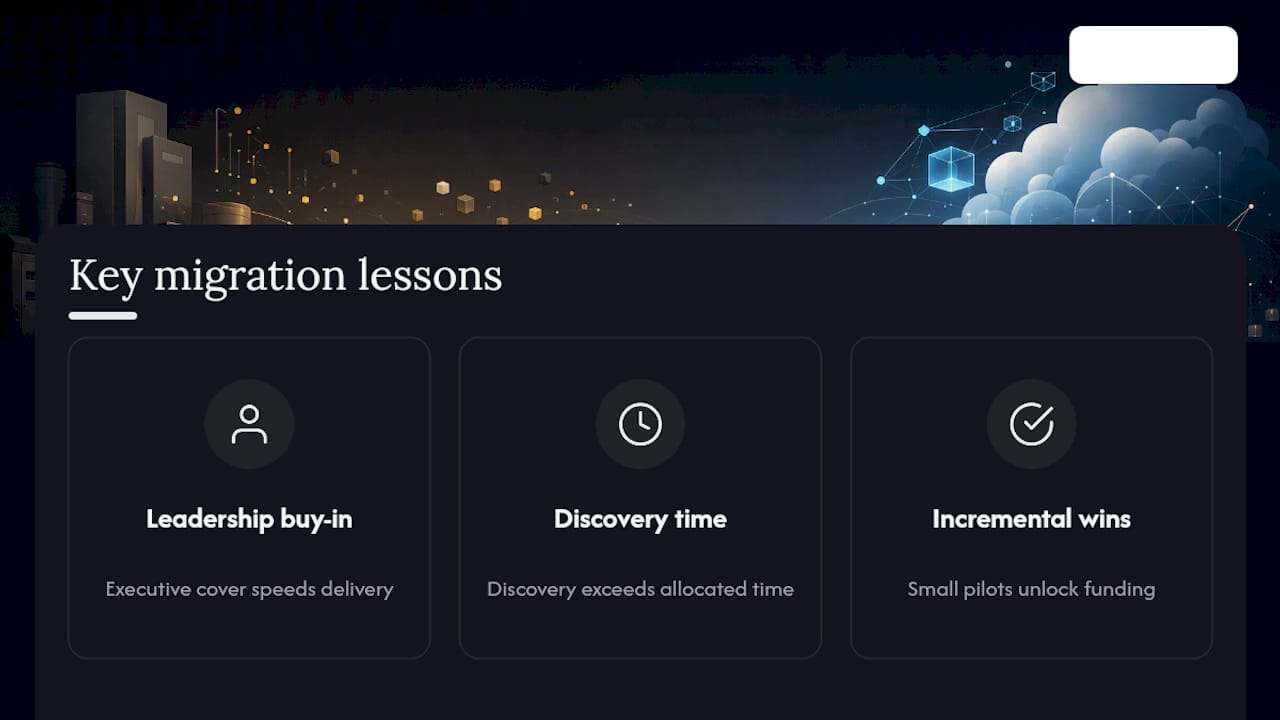
Three lessons repeat across almost every migration worth studying. First, discovery always takes longer than anyone budgets for. Second, leadership buy-in matters more than any technical decision. A team with executive cover moves fast; a team fighting for scope approval every sprint stalls. Third, incremental wins build the trust that funds the next phase.
One mid-size migration we've seen play out stalled for months over architecture debates until the team shipped one small, low-risk workload first. That single win, more than any slide deck, unlocked budget for the rest. Run your pilot checklist before committing major spend.
— YS
How Yslootahtech Helps With Legacy System Migrations
Our company offers a coordinated alternative to hiring a patchwork of freelance specialists or relying on a single vendor contract. We run migrations the way this guide describes: discovery first, a scoped pilot second, then wave-based execution with real rollback plans instead of hope.

Our team handles legacy assessment, pilot builds, full migration execution, and post-migration support, covering everything from application development for refactored or rearchitected systems to UX/UI design work that keeps user-facing components stable through the transition. For migrations where the front end itself needs a rebuild, our website development services cover replatformed portals and customer-facing systems too.
Getting started means a short initial assessment: we look at your systems, score urgency the way this guide outlines, and come back with a pilot recommendation rather than a generic proposal. If you're weighing whether to rehost, refactor, or rearchitect, that conversation is the fastest way to find out. Reach out to Yslootahtech to scope your pilot.
Sources
- From legacy to cloud: lessons from the trenches (McKinsey)
- Model-driven migration experience report (arXiv)
- Transitional architecture (Martin Fowler)
- Legacy code migration guidance (IBM)