90–180 Day SAP Integration Best Practices: ISA‑M Checklists for Teams

Treat SAP integration as a strategic, governable capability, not a series of one-off connections between systems. Follow the SAP Integration Solution Advisory Methodology's four phases (assess, design a hybrid platform, define dos and don'ts, enable) and start now with a maturity assessment, a hybrid platform policy, a short list of golden rules, and a named governance owner. The detailed checklists, blueprints, and rollout plan below turn that verdict into something your team can execute this quarter.
TL;DR:
- Most SAP integration issues stem from lack of ownership and follow-through, not from missing or new tools.
- Implementing a disciplined approach with clear roles, regular audits, and documented best practices prevents technical debt.
- A structured hybrid platform policy and blueprints streamline decision-making, reduce custom development, and improve consistency.
- Robust monitoring, credential hygiene, and testing practices are critical to catching failures early and maintaining high quality.
- Following a phased 90 to 180-day plan ensures scalable integration governance, reduces risks during migrations, and embeds continuous improvement.
Table of Contents
- What Are the Best Practices for SAP Integration Right Now?
- What Is ISA-M and How Do You Apply Its Four Phases?
- How Do You Design a Hybrid Integration Platform?
- Which Integration Dos and Don'ts Actually Matter?
- What Architecture Blueprints Should You Reuse?
- What Development Standards Keep Integration Artifacts Maintainable?
- How Do You Set Up Integration Governance and a CoE?
- How Do You Secure SAP Integration Connections?
- What Should You Monitor to Catch Integration Failures Early?
- How Do You Protect Integration Quality During an S/4HANA Migration?
- What Does a 90 to 180 Day Implementation Roadmap Look Like?
- How Does Yslootahtech Apply These Practices in Real Projects?
- Three Integration Mistakes That Keep Coming Back
- Ready to Assess Your SAP Integration Landscape?
- Sources
What Are the Best Practices for SAP Integration Right Now?
Every integration team asks the same question eventually: what should we actually be doing differently? The answer rarely involves new tools. It usually comes down to discipline around a short list of practices that determine whether an integration landscape stays manageable or turns into a maintenance burden within two years.
Here's a checklist you can run against your current environment today. Each item includes who typically owns it and a fast way to check if you're compliant.
- Run a maturity assessment before building anything new. Owned by the integration architect or CoE lead. Health check: can you name your current integration patterns and their failure rates without pulling a report?
- Pick a default integration style per use-case category and document the exception path. Owned by the platform architect. Health check: does a developer know which technology to reach for without asking?
- Favor near-real-time distribution over batch for anything customer-facing or inventory-sensitive. Owned by the integration lead. Health check: are batch jobs older than 18 months still running for data that changes hourly?
- Use packaged, prebuilt content before writing custom flows. Owned by developers, reviewed by architects. Health check: what percentage of your flows are custom versus SAP-delivered or partner-delivered?
- Enforce naming conventions across all integration artifacts. Owned by the CoE. Health check: can a new hire guess what a flow does from its name alone?
- Version every integration artifact like application code. Owned by DevOps/platform engineering. Health check: do you have rollback capability for the last three deployments?
- Monitor message volume, latency, and error rate for every production flow. Owned by operations. Health check: do you get an alert before a business user reports a failure?
- Rotate credentials and secrets on a fixed schedule, not an ad hoc one. Owned by security/IT ops. Health check: when was the last rotation, and is it logged?
- Document architecture decisions, not just configurations. Owned by architects. Health check: can someone explain why a pattern was chosen six months after it shipped?
- Test integrations at the interface level, not just at the application level. Owned by QA and integration developers. Health check: do you have automated regression tests for your top 10 business-critical interfaces?
- Review your integration inventory quarterly for deprecation candidates. Owned by the CoE. Health check: how many flows exist that nobody remembers building?
Most of this fails not because teams don't know it. It fails because nobody owns the follow-through. That's what governance solves, and we'll get to that shortly.
What Is ISA-M and How Do You Apply Its Four Phases?
SAP's Integration Solution Advisory Methodology defines four phases: assess, design a hybrid integration platform, define integration best practices, and enable a practice of empowerment. It's less a rigid framework and more a sequence of questions, each producing a deliverable that feeds the next phase.
Assess starts with an honest inventory: what integration technologies are already in use, how mature is each capability, and where are the pain points. The output is a maturity scorecard, usually scored across dimensions like architecture, security, and operations. Most teams discover during this phase that they have more integration tools in production than anyone realized, often accumulated through separate project decisions over years.
Design a hybrid platform takes that scorecard and turns it into a target-state architecture. This is where you decide which technologies handle which integration styles going forward, and how on-premise middleware coexists with cloud integration services. The deliverable is a reference architecture diagram plus a technology decision matrix.
Define best practices is where the dos and don'ts, naming standards, and development guidelines get written down. SAP's own advisory material frames architecture blueprints, integration policies, and development guidelines as the core components of this phase. Skip this phase and you get a good architecture that nobody follows consistently.
Enable builds the organizational muscle: training, a CoE, and enforcement mechanisms so the practices survive staff turnover.
Should you follow ISA-M strictly or adapt it? Adapt the depth to your scale. A team with 30 interfaces doesn't need the same governance overhead as one running 800. But skipping phases entirely, especially the assessment, is how organizations end up designing platforms around technology preferences rather than actual integration needs.
How Do You Design a Hybrid Integration Platform?
A hybrid integration platform isn't a single product. It's a documented policy for deciding which technology handles which job, and SAP positions this kind of hybrid platform design as central to integration strategy and governance. The practical tool is a mapping matrix: use case on one axis, candidate technology and decision criteria on the other.
A simplified version looks like this:
| Use case | Candidate technology | Decision criteria |
|---|---|---|
| Real-time order sync between S/4HANA and e-commerce | Cloud integration platform (API-based) | Low latency required, external-facing, needs monitoring dashboard |
| Nightly financial consolidation across subsidiaries | Batch/file transfer | High volume, tolerant of latency, cost-sensitive |
| Legacy on-premise middleware extension | On-premise process orchestration | Existing investment, low change frequency, no cloud dependency |
| Partner B2B document exchange | Managed EDI/API gateway | Compliance requirements, external partner SLAs |
Policies should read like rules, not suggestions. Something like: default to the cloud integration suite for anything new and API-based; alternative is on-premise orchestration only for systems slated for decommission within 24 months; avoid point-to-point custom connections between any two SAP systems when a packaged integration exists; exception requires architect sign-off and a written justification tied to a business constraint.
Persona requirements matter too. A citizen integrator building a simple approval workflow needs a low-code environment with guardrails, not direct access to the same tooling a senior integration developer uses for a high-volume financial interface. Provisioning access by role, not by department, keeps the platform usable without turning it into a free-for-all. Architects gain full design rights; business analysts get monitoring visibility and pre-approved templates; developers get sandboxed environments with promotion gates to production.
Which Integration Dos and Don'ts Actually Matter?
Golden rules work because they're memorable, not because they cover every edge case. SAP's template-based guidance for defining integration best practices lists concrete do's and don'ts that hold up across most enterprise environments.
Do prefer near-real-time distribution for anything that affects customer experience or operational decisions, like inventory levels or order status. Do switch to batch when the data volume is heavy, the tolerance for delay is high, and the cost of constant polling outweighs the benefit of freshness, such as monthly financial reporting feeds.
Do favor packaged, prebuilt integration content over custom-built flows whenever SAP or a certified partner already ships one. Custom flows accumulate maintenance debt fast; packaged content gets updated centrally.
Don't chain more than two or three runtime components together in a single flow. Every added hop is another point of failure and another place latency creeps in. If a flow needs five transformation steps, break it into modular sub-flows with clear handoffs instead of one long pipeline.
Don't default to synchronous calls for processes that don't need an immediate response. Synchronous integration ties the availability of one system to the availability of another, which is fine for a real-time price lookup and a liability for a background inventory update. Use asynchronous, message-based patterns whenever the caller doesn't need to wait.
Here's a quick reference:
- Near-real-time for customer-facing and operational data; batch for high-volume, delay-tolerant data.
- Modular flows over long chains; three components or fewer per flow is a reasonable ceiling.
- Packaged content first, custom development only when no packaged option covers the requirement.
- Asynchronous by default; synchronous only when the caller genuinely can't proceed without an immediate response.
Pro Tip: Before approving any new custom flow, ask whether the same requirement has already been solved somewhere else in the landscape. Duplicate flows built by different teams solving the same problem are one of the most common sources of technical debt in large SAP environments.
What Architecture Blueprints Should You Reuse?
Most SAP integration challenges fall into a handful of recurring shapes. Building a small catalog of blueprint patterns, rather than designing every interface from scratch, is one of the fastest ways to cut delivery time and reduce inconsistency.
SAP-to-SAP blueprints typically cover master data replication (customer, material, vendor records) between an S/4HANA core and satellite systems, usually via standard APIs or SAP's own replication tools rather than custom code. SAP-to-non-SAP blueprints handle the messier work: connecting to e-commerce platforms, CRM systems, or industry-specific applications, usually through an API gateway or integration suite acting as the mediation layer. Hybrid cloud blueprints address scenarios where on-premise SAP systems need to talk to cloud-native services, often requiring a secure connectivity component that bridges network boundaries.
Reusable building blocks make these blueprints practical rather than theoretical. Think in terms of a small pattern catalog: a standard error-handling wrapper every flow inherits, a common logging format, a shared authentication module, and a template for retry logic on transient failures. Once these blocks exist, new integrations get assembled rather than rebuilt.
Documentation is where most blueprint catalogs quietly fail. A blueprint that exists only in one architect's head isn't reusable. Each pattern needs a one-page reference covering when to use it, when not to, its dependencies, and a working example flow. Version the catalog itself. When a blueprint changes, teams using the older version need to know whether they should migrate or if the old version remains supported. Treating your pattern catalog with the same version discipline as application code prevents drift between what's documented and what's actually running in production.
A related resource worth reviewing if your landscape includes CRM or e-commerce connections is this breakdown of Salesforce integration architecture patterns, which walks through choosing the right pattern for a similar class of problem.
What Development Standards Keep Integration Artifacts Maintainable?
Developer-facing guidelines should cover naming conventions, content transport, testing, and release procedures as non-negotiable parts of any integration development practice. Skipping these is how a clean architecture turns into an unmanageable mess within a year.
- Adopt a consistent naming scheme for every artifact: flows, message mappings, value mappings, credentials. A pattern like
[SourceSystem]_[TargetSystem]_[Function]_[Version]lets anyone scan a list of hundreds of flows and understand what each one does without opening it. - Organize artifacts by domain, not by developer. Group flows by business capability (order management, finance, logistics) so ownership is clear even as team members change.
- Build a CI/CD pipeline for integration content, treating flows and mappings like application code with automated promotion through development, test, and production environments, gated by approval checkpoints.
- Apply a testing pyramid: unit tests for individual mapping logic, integration tests for full message flows, and end-to-end tests that validate data arrives correctly in the target system. Load testing belongs here too, particularly for high-volume interfaces where a spike in transaction volume could expose bottlenecks nobody noticed at normal load.
- Define a release and deprecation procedure. Every new flow needs a plan for what happens when it's replaced or retired, including a communication step so downstream consumers aren't surprised.
Regression testing deserves particular attention. Every time a core SAP system gets patched or a connected application changes its API version, previously working integrations can silently break. A documented regression suite that runs automatically after any environment change catches this before a business user does.
How Do You Set Up Integration Governance and a CoE?
Distributed teams building integrations independently, without a shared handbook, tend to produce siloed flows that become technical debt within 12 to 18 months. Governance is the mechanism that prevents that outcome, and it works best as a lightweight structure rather than a bureaucratic gate.
An Integration Center of Excellence typically needs three defined roles: an integration architect who owns the technology mapping matrix and blueprint catalog, an integration governance lead who maintains the dos-and-don'ts handbook and reviews exceptions, and domain owners embedded in business units who understand local requirements and escalate conflicts.
The CoE's charter should be short and specific: what decisions it makes, what it delegates to project teams, and how often it reviews the integration inventory. A quarterly review of the flow catalog, checking for duplicated logic, orphaned integrations, and deprecation candidates, catches problems long before they compound.
Training and audits keep the guidelines alive rather than theoretical. New developers should walk through the naming conventions and blueprint catalog before writing their first flow, and periodic audits, even informal ones, checking whether recent flows actually followed the documented standards, keep enforcement real. A roadmap resource worth pairing with this is Yslootahtech's guide to enterprise integration strategy, which lays out a phased approach that complements CoE structure with concrete milestones.
How Do You Secure SAP Integration Connections?
Every integration endpoint is a potential entry point, and the minimum bar for transport security should be non-negotiable: TLS/HTTPS for API traffic, SFTP rather than plain FTP for file transfers, and encryption at rest for any staged data touching sensitive fields like financial or personal information.
Credential management is where security often breaks down in practice. Hardcoded credentials in integration flows are still common in older landscapes, and they're one of the easiest fixes with the highest payoff. Move all credentials into a dedicated secrets management service rather than storing them in flow configuration, and set a fixed rotation schedule, quarterly at minimum for anything touching production data, rather than rotating only after an incident.
Authentication patterns should match the sensitivity of what's being accessed. OAuth 2.0 with client credentials works well for service-to-service API calls; certificate-based mutual TLS adds a stronger guarantee for high-value financial or partner-facing interfaces. Whichever pattern you choose, document certificate expiration dates centrally. Expired certificates causing unexpected production outages are one of the most preventable failure modes in enterprise integration.
Compliance checkpoints depend on your industry, but a baseline enterprise checklist includes verifying that every integration touching regulated data has a documented data flow diagram, that access logs are retained per your organization's policy, and that third-party connections have a signed data processing agreement where required. For a broader look at credential and secrets hygiene across an enterprise stack, this enterprise cybersecurity best practices guide covers the operational side in more depth.
What Should You Monitor to Catch Integration Failures Early?
Monitoring message volume, error rate, latency, and end-to-end transaction visibility is a baseline operational requirement for running integrations at any meaningful scale, not an optional add-on for mature teams.
The metrics that matter most are the ones tied directly to business impact: failed message count per flow, average processing latency compared to a baseline, and queue depth for anything asynchronous. A queue that's growing rather than draining is usually the earliest warning sign of a downstream problem.
Alerting thresholds should escalate, not just notify. A single failed message might just log a warning. Ten failures in five minutes on a customer-facing flow should page someone immediately. Building that escalation logic into the monitoring setup, rather than relying on someone noticing a dashboard, is what separates proactive operations from reactive firefighting.
Runbooks turn incident response from improvisation into a repeatable process. For common failure scenarios, a stalled queue, an expired certificate, a downstream system timeout, document the diagnostic steps and the fix, and automate what can be automated, like automatic retry with exponential backoff for transient network failures.
Dashboards aimed at business stakeholders, not just technical teams, build trust in the integration layer. A simple view showing order sync health or invoice processing status in plain language does more to justify governance investment than any technical uptime report. For teams scaling integration volume, this guide on scaling enterprise applications for efficiency covers the operational side of handling growth without losing visibility.
How Do You Protect Integration Quality During an S/4HANA Migration?
Migrations expose every weak integration in a landscape at once, which makes this the highest-risk moment for the practices covered above. The clean core principle is the guiding rule here: keep custom logic out of the SAP core and push it into the integration layer instead, where it's easier to test, version, and migrate independently of the ERP upgrade cycle.
Before cutover, inventory every interface touching the systems being migrated and classify each one: does it move to the new integration layer as-is, does it need rework because the target system's API differs from the source, or is it a candidate for retirement because the business process it supported no longer exists post-migration.
Coexistence patterns matter for organizations that can't cut over everything at once. Running old and new ERP cores in parallel for a transition period requires dual-write or synchronization logic that keeps master data consistent across both, usually through a middleware layer acting as the single source of truth during the transition rather than letting both systems write independently.
Data synchronization and reconciliation deserve a dedicated validation step, not an assumption that migrated data arrived correctly. Automated reconciliation reports comparing record counts and key field values between source and target catch discrepancies before they surface as a business problem weeks later.
Pilot the migration with a limited scope, a single business unit or product line, before a full rollout, and define a rollback plan before cutover, not during an incident. For guidance on cutover sequencing and operational readiness, this enterprise application deployment guide covers the broader deployment lifecycle in more detail.
What Does a 90 to 180 Day Implementation Roadmap Look Like?
Turning these practices into action works best as a phased rollout rather than a single big-bang initiative. Organizations that use integration assessment tools early in the process tend to reduce interface development costs and stabilize core processes faster than those who skip straight to building.
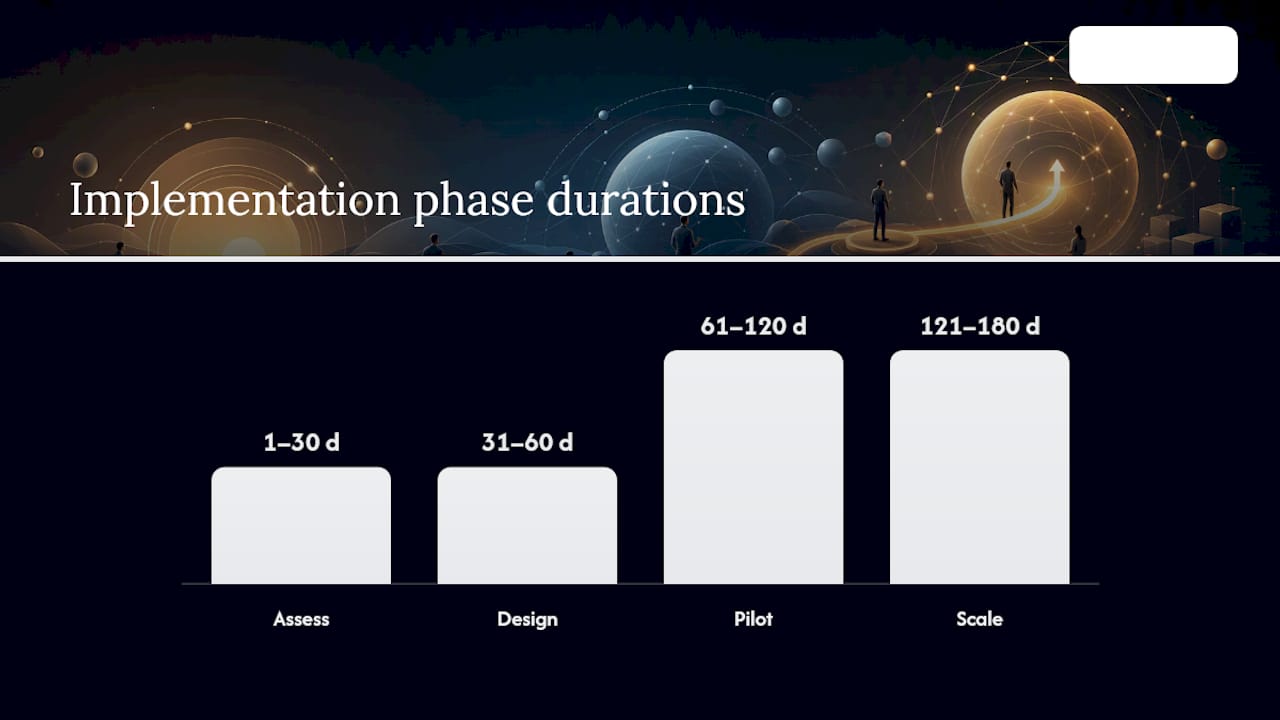
- Days 1 to 30: Assess. Inventory existing integrations, run the maturity scorecard, and identify the top five pain points. Deliverable: a baseline maturity report and a prioritized backlog.
- Days 31 to 60: Design. Build the hybrid platform technology matrix, draft the dos-and-don'ts handbook, and select an initial blueprint catalog covering your three most common integration scenarios. Deliverable: an approved reference architecture and policy document.
- Days 61 to 120: Pilot. Implement governance roles, stand up the CoE at minimum viable scope, and migrate two or three pilot interfaces to the new standards. Deliverable: working pilot flows plus a lessons-learned review.
- Days 121 to 180: Scale. Roll out naming conventions and CI/CD pipelines across the broader integration inventory, train development teams, and establish the recurring quarterly CoE review cadence. Deliverable: a fully governed integration landscape with documented KPIs.
Pro Tip: Track two KPIs from day one: the number of production incidents tied to integration failures per month, and average time from flow request to production deployment. Both should trend down measurably by day 180 if the rollout is working, and both are far easier to defend to leadership than an abstract maturity score.
Staffing wise, plan for the integration architect and governance lead roles to be filled before the design phase starts, not after. A CoE with no dedicated owner rarely survives its first organizational reshuffle.
How Does Yslootahtech Apply These Practices in Real Projects?
Building governed, well-architected SAP integrations requires the same discipline whether the work involves connecting S/4HANA to an e-commerce front end, synchronizing financial data across subsidiaries, or building the operational dashboards that make integration health visible to business stakeholders. Application development practices work directly with these building blocks: architecture blueprints, CI/CD pipelines for integration content, and the operational tooling that turns monitoring data into something a non-technical stakeholder can actually read.
The UX/UI design side of the business handles a piece that often gets overlooked in integration projects: the dashboards and interfaces that let operations teams and business owners see integration health without reading raw logs. A well-designed operational dashboard is often the difference between a governance program that gets adopted and one that sits in a folder nobody opens.
If your organization is somewhere between "we know our integrations are messy" and "we're planning an S/4HANA migration and worried about what breaks," a scoping conversation is usually more useful than another internal audit. That's a natural next step covered in the section below.
Three Integration Mistakes That Keep Coming Back
The biggest failures in SAP integration work rarely come from picking the wrong technology. They come from organizational blind spots that look small until they compound.
The first is treating integration ownership as a side responsibility rather than a real role. When "whoever built it last" is the de facto owner of a flow, knowledge walks out the door with staff turnover, and nobody notices a flow is broken until a business process stalls. The fix is boring but effective: name an owner for every production interface, even if that person also has other duties.
The second is writing tests that check whether a flow runs, not whether the data it moves is correct. A flow can execute successfully and still silently corrupt a field mapping. Data validation tests, comparing actual output values against expected results, catch far more real-world failures than execution-status checks ever will.
The third is building runbooks after the first serious incident instead of before. Teams consistently underestimate how much faster recovery goes when the diagnostic steps are already written down, even in rough form, versus figuring them out live while a business process is down.
None of these fixes require new tools. They require someone insisting that governance and monitoring get built alongside the integration itself, not bolted on after something breaks.
— YS
Ready to Assess Your SAP Integration Landscape?
Most of what separates a resilient SAP integration landscape from a fragile one isn't the platform you pick. It's whether someone owns the governance, tests the data and not just the flow, and builds the runbook before the incident instead of after. Application development teams work with organizations at exactly this stage: past the point of knowing something needs fixing, before the point of knowing where to start.

Our application development services cover the technical side of this work directly: architecture design, CI/CD pipelines for integration content, and the custom development needed to close gaps a packaged tool can't. When the front-end matters just as much as the backend, our website development work brings the two together into a single delivery track instead of two separate projects handed to two separate vendors.
If your team is weighing a migration, cleaning up a tangled integration inventory, or simply wants an outside read on where the risk actually sits, a technical scoping conversation is the fastest way to find out. Reach out through Yslootahtech to set up an integration health check and get a clear picture of what to prioritize first.
Sources
- Understanding the SAP Integration Solution Advisory Methodology (ISA‑M)
- SAP Integration Solution Advisory Methodology (pdf)
- SAP Integration Suite | Integration strategy and governance
- SAP Integration Suite: every system, every protocol, every pattern (community blog)