Why Choose Web Applications for Your Business in 2026

TL;DR:
- Web applications run entirely in browsers, offering businesses widespread access, lower costs, and simplified management. They support scalability and rapid updates but pose risks like offline access limitations and hardware integration challenges. For most SMBs, web apps enhance operational efficiency and customer engagement without the complexity of desktop software.
A web application is software that runs entirely in a browser, requiring no installation on any device. That single architectural fact explains why businesses across industries are choosing web applications over traditional desktop software at a growing rate. You get universal access, centralized updates, and lower infrastructure costs from day one. Platforms like Shopify, Salesforce, and Google Workspace all operate as web apps, and their adoption by millions of businesses is not accidental. The reasons to choose web applications come down to four core advantages: accessibility, cost efficiency, scalability, and simplified IT management.
Why choose web applications to improve operational efficiency?
Web applications eliminate one of the most persistent IT headaches for small and mid-sized businesses: version fragmentation. When software lives on individual machines, every update requires a separate installation on every device. With a web app, updates deploy server-side and every user gets the latest version the next time they open a browser. Your IT team stops chasing machines and starts focusing on actual product improvements.

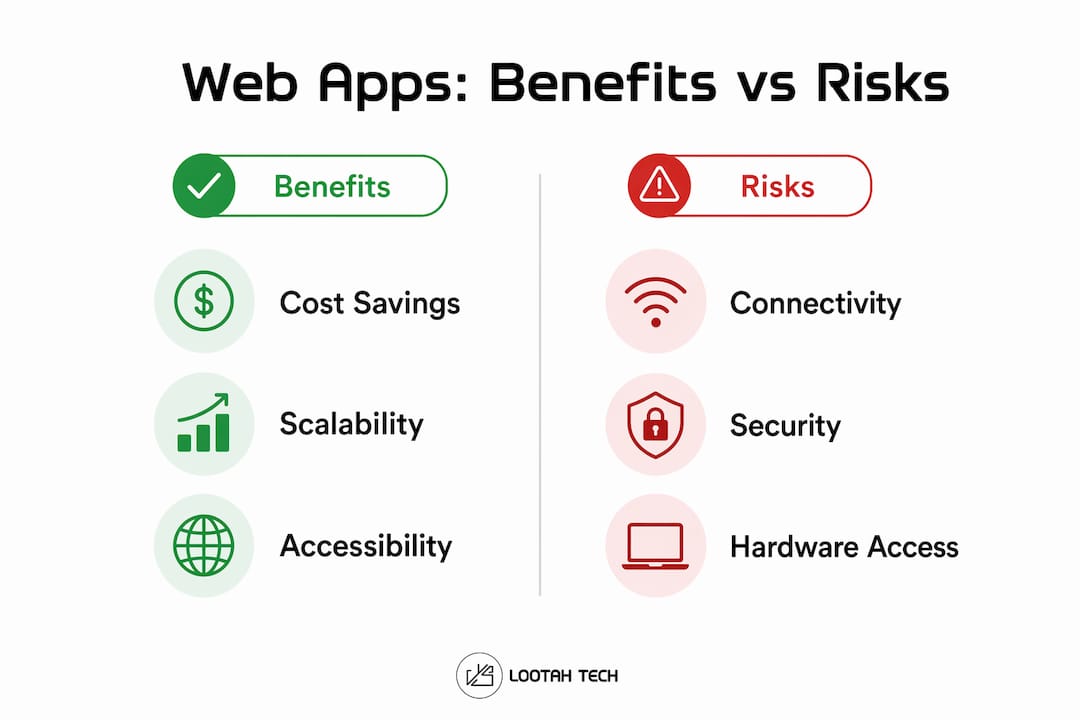
The cost impact is significant. Organizations that move to web and cloud-based systems report 30–40% lower total costs compared to maintaining traditional on-premise infrastructure. That reduction comes from lower hardware spend, fewer IT labor hours, and reduced licensing complexity. For a 50-person business, those savings compound quickly.
Remote and distributed teams also benefit directly. A web app runs from any internet-connected device, whether that is a laptop in Dubai, a tablet in a client's office, or a phone at a trade show. No VPN tunneling into a corporate server. No compatibility issues between operating systems.
Key efficiency drivers web applications deliver:
- No per-device installation: Deploy once, available everywhere instantly.
- Centralized IT management: Patch security vulnerabilities across all users in one action.
- Cross-device access: Employees work from any browser on any device without setup.
- Reduced hardware dependency: Thin clients and older machines can run modern web apps.
- Faster onboarding: New employees access all tools through a browser on day one.
Pro Tip: Plan your update release schedule around low-traffic windows. Even server-side updates can briefly disrupt active sessions, so staged rollouts during off-peak hours protect your users from unexpected interruptions.
Web apps vs desktop apps: which is right for your business?
The core architectural difference between web apps and desktop apps determines everything else. Desktop apps run logic locally on the user's machine. Web apps run logic on a server and deliver the interface through a browser. That distinction drives every trade-off in performance, maintenance, and reach.
Web apps win on deployment and reach. A single codebase serves Windows, macOS, Linux, iOS, and Android users simultaneously. Desktop apps require separate builds for each platform, multiplying development and maintenance costs. For businesses targeting customers across multiple device types, the cross-platform advantages of web apps are decisive.
Desktop apps retain an edge in specific scenarios. Applications requiring deep hardware integration, such as CAD software, video editing tools, or industrial control systems, still perform better natively. Offline functionality is also stronger in desktop apps, since web apps depend on an internet connection for most operations.
| Factor | Web applications | Desktop applications |
|---|---|---|
| Installation required | No | Yes |
| Cross-platform support | All browsers and devices | Requires separate builds per OS |
| Update process | Centralized, instant | Per-device installation |
| Offline capability | Limited | Full |
| Hardware integration | Limited | Deep access |
| Maintenance cost | Lower | Higher |
| Scalability | Cloud-based, elastic | Fixed to local resources |
For most SMB use cases, including CRM, project management, e-commerce, and communication tools, web apps deliver better value. Desktop apps remain the right choice only when offline access or hardware-level integration is a genuine business requirement, not just a preference.
How do web applications support scalability and flexibility?
Scalability is the ability to handle more users, data, or transactions without rebuilding your system from scratch. Web applications achieve this by running on cloud infrastructure, which adjusts computing resources dynamically. 87% of organizations cite scalability and flexibility as their primary reasons for adopting cloud platforms. That number reflects a real operational need, not a trend.
Consider a retail business running a seasonal promotion. Traffic spikes tenfold during a Black Friday campaign. A desktop-based system would crash or require expensive pre-provisioned hardware sitting idle the rest of the year. A web app on cloud infrastructure scales up automatically during the spike and scales back down when traffic normalizes. You pay for what you use.
The same logic applies to business growth. A 10-person team using a web-based CRM can grow to 200 users without migrating to new software or buying new servers. The application grows with the business. Yslootahtech has built this kind of elastic architecture for clients in fintech, e-commerce, and industrial management, where demand patterns are unpredictable by nature.
Flexibility extends beyond raw capacity. Web apps let product teams push new features continuously without requiring users to download anything. A business can test a new checkout flow, roll it out to 10% of users, measure results, and deploy broadly, all within days. That speed of iteration is simply not possible with traditional desktop software release cycles. For a deeper look at how this works at enterprise scale, the guide on scaling enterprise applications covers the architectural decisions in detail.
What risks should SMBs know before adopting web applications?
Centralized deployment is a double-edged advantage. The same mechanism that pushes updates to every user instantly also means a broken deploy affects all users simultaneously. A bug that slips through testing does not affect one machine. It affects your entire user base at once. That blast radius demands a more disciplined release process than most SMBs initially expect.
Offline access is the second major limitation. Web apps require an internet connection to function fully. Businesses operating in areas with unreliable connectivity, or workflows that must continue during outages, need to evaluate this honestly. Service workers and browser caching can partially address this, but they do not replicate full offline functionality.
Hardware integration is the third constraint. Web apps deliver strong cross-platform reach but limited access to device hardware. Printers, barcode scanners, biometric readers, and industrial sensors often require native app bridges or middleware to connect with a web-based system.
Mitigation strategies that work in practice:
- Staged rollouts: Deploy updates to a small percentage of users first, monitor for errors, then expand.
- Rollback plans: Maintain the ability to revert to the previous version within minutes of a failed deploy.
- Browser caching: Cache critical assets so the app remains partially functional during brief connectivity drops.
- Version coordination: Communicate update schedules to users to prevent confusion from interface changes.
Pro Tip: Before committing to a web app architecture, list your absolute non-negotiables: offline access, specific hardware integrations, and latency requirements. If any of those are genuine business requirements, a hybrid or native approach may serve you better than a pure web solution.
How SMBs can use web applications to drive customer engagement
Web applications give SMBs direct control over the customer experience in ways that installed software never could. An e-commerce business using a web-based storefront can update product pages, pricing, and promotions in real time without pushing a software update to customers. A service business using a web-based booking system gives clients 24/7 self-service access from any device.
Performance directly affects engagement. Google's Core Web Vitals framework measures three dimensions of user experience: loading speed, interactivity, and visual stability. Largest Contentful Paint, or LCP, is the key load performance metric that measures how quickly the main content of a page becomes visible. A slow LCP drives users away before they engage with your product. Web apps built with performance in mind, using CDN delivery, optimized assets, and efficient server responses, score well on LCP and retain users longer.
Continuous deployment also accelerates customer-facing improvements. A web app team can ship a new feature, gather user feedback, and iterate within a single week. That cycle is impossible with quarterly desktop software releases. Businesses that connect their web apps to AI-driven personalization tools see further gains, with recommendation engines, dynamic pricing, and automated support all running through the same browser-based interface. The guide on digital platforms and engagement covers how these performance and experience factors connect in practice.
Web apps also enable workflow-driven, form-based tools that replace paper processes and disconnected spreadsheets. A field service team using a web-based job management app submits reports, captures signatures, and updates inventory from a phone, without returning to the office.
Key Takeaways
Web applications are the most practical choice for SMBs that need accessible, cost-efficient, and scalable software without the overhead of traditional desktop deployments.
| Point | Details |
|---|---|
| No installation required | Web apps run in any browser, giving every employee and customer instant access. |
| Lower total cost | Cloud-based systems reduce infrastructure costs by 30–40% compared to on-premise software. |
| Cloud-powered scalability | 87% of organizations choose cloud platforms specifically for elastic scaling and flexibility. |
| Deployment risk management | Staged rollouts and rollback plans protect all users from broken centralized updates. |
| Performance drives engagement | Core Web Vitals metrics like LCP directly connect web app speed to customer retention. |
What I've learned from building web apps for growing businesses
The most common mistake I see SMBs make is treating the web vs. desktop decision as a technology preference rather than a business architecture decision. The question is never "which is better?" The question is "what does this specific business actually need to function?"
I have worked with businesses that chose web apps for the right reasons and thrived. I have also seen businesses adopt web apps because they sounded modern, only to discover their core workflow required hardware integrations the browser simply cannot support. Defining your non-negotiables before you build saves months of rework.
The insight that changed how I think about web app development comes from the application factory effect: every new app you build on a shared platform foundation gets faster to ship because you reuse integration connectors, business rules, and governance from prior apps. That compounding return is why businesses that commit to a web-based platform architecture pull ahead of competitors over time. The first app is the hardest. The fifth app takes a fraction of the time.
Governance matters more than most executives realize. When multiple web apps share a consistent design system, authentication layer, and data model, users move between them without relearning anything. That consistency is not a design luxury. It is a productivity multiplier that shows up in adoption rates and support ticket volume.
— YS
AI-powered web applications: what Yslootahtech builds for SMBs
Web applications become significantly more powerful when AI is embedded directly into the workflow, not bolted on as an afterthought.
Yslootahtech designs and builds web applications with AI and machine learning capabilities integrated from the architecture level. That means recommendation engines, predictive analytics, automated document processing, and intelligent customer support built into the same browser-based interface your team already uses. For SMBs in Dubai and across the region, this approach delivers enterprise-grade capability without enterprise-level complexity. If you are evaluating how AI can work inside your web applications, the AI and machine learning services page outlines what Yslootahtech offers and how those capabilities map to real business outcomes.
FAQ
What is a web application, exactly?
A web application is software that runs in a browser and does not require installation on the user's device. All processing logic runs on a server, and the interface is delivered through a standard web browser.
Are web apps cheaper than desktop apps for SMBs?
Web apps typically cost 30–40% less to operate than traditional on-premise desktop software. The savings come from reduced hardware spend, lower IT maintenance hours, and centralized update management.
What are the main limitations of web applications?
Web apps have limited offline functionality and restricted access to device hardware such as printers, scanners, and industrial sensors. Businesses with those requirements should evaluate hybrid or native app architectures before committing.
How do web applications scale with business growth?
Web apps run on cloud infrastructure that adjusts computing resources automatically based on demand. A business can grow from 10 to 1,000 users without migrating to new software or purchasing additional servers.
When should an SMB choose a desktop app over a web app?
Choose a desktop app when your workflow requires deep hardware integration, consistent offline access, or very low latency processing that a server-dependent architecture cannot reliably deliver.