AI Integration Guide for Business Leaders in 2026

TL;DR:
- AI integration in business involves embedding machine learning, NLP, and automation into workflows to enhance productivity and decision-making. Success relies on defining specific outcomes, preparing clean data, conducting structured pilots, and establishing governance to ensure scalable adoption. Organizations that focus on workflow problems and measured results tend to realize sustained value and avoid common implementation failures.
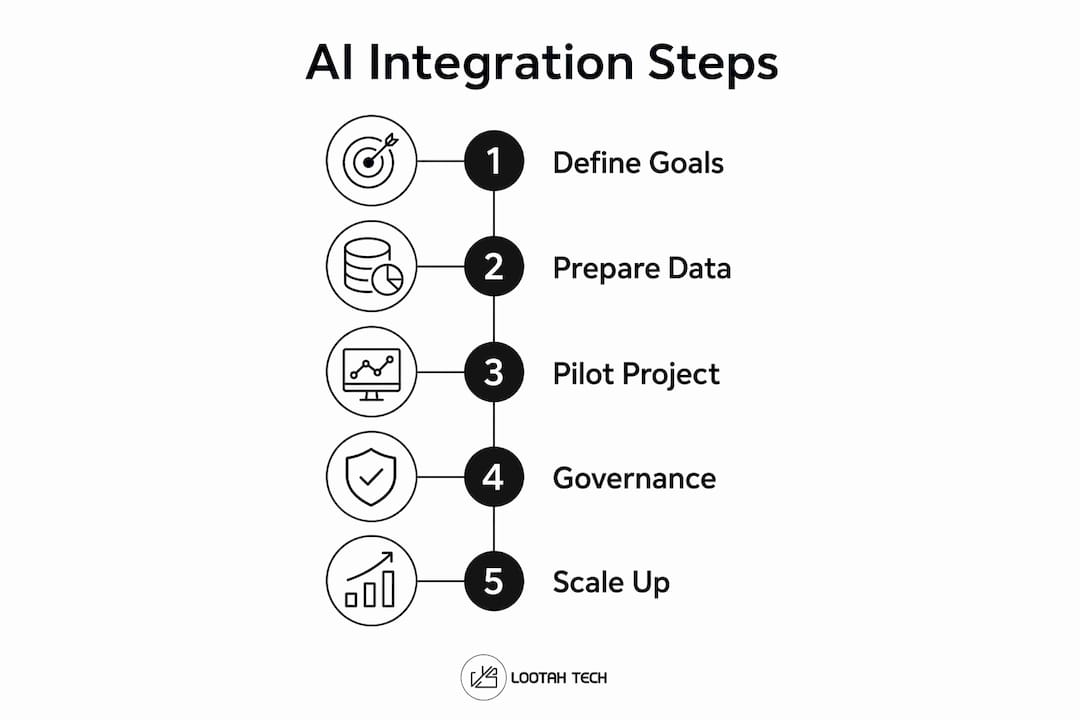
AI integration in business is a structured process of embedding machine learning, natural language processing, and automation tools into existing workflows to produce measurable gains in productivity, cost reduction, and decision quality. Done right, it delivers productivity gains of 20 to 40% and ROI between 3x and 10x in the first year. Tools like Salesforce Einstein, ChatGPT Enterprise, and Zapier are already delivering those results for organizations that approach implementation as an organizational shift, not a software install. This ai integration guide for business walks you through every phase: from defining outcomes to scaling with governance, using 2026 data and field-tested practices.
What business outcomes should guide your AI integration efforts?
Many AI projects fail because leaders start with a tool or vendor instead of a business problem. Selecting a model before defining success metrics is the single most common cause of wasted AI budgets. The right starting point is a specific, measurable operational problem your organization already tracks.
Outcome-driven business AI implementation looks like this:
- Reduce customer response time by 30% using an AI-powered support tool like Intercom or Zendesk AI
- Cut contract review time from 6 hours to 45 minutes using document intelligence platforms like Ironclad or Harvey
- Reduce email campaign drafting from 4 hours to 90 minutes using generative tools like ChatGPT Enterprise or Jasper
- Lower invoice processing error rates by 25% using automation platforms like UiPath or Microsoft Power Automate
Each of these is a before/after metric. That specificity is what separates funded, scaled AI programs from shelved pilots. When you frame the problem as "we want to use AI," you get demos. When you frame it as "we need to cut first-response time by 30%," you get a project with a clear success condition.
Vague goals also make it impossible to evaluate pilot performance. If you cannot define what "better" looks like before you start, you cannot prove the AI worked. Every AI initiative needs a baseline measurement, a target, and a timeline before any tool is selected.

Pro Tip: Write your AI goal as a sentence that includes a current metric, a target metric, and a deadline. "Reduce support ticket resolution time from 48 hours to 16 hours within 90 days" is a fundable, testable goal. "Improve customer experience with AI" is not.
For a broader view of where AI is creating the most business value right now, the 2026 enterprise AI trends analysis from Yslootahtech covers the use cases generating the highest returns across industries.
What data and infrastructure preparations are essential before AI implementation?
Before any AI tool goes live, you need to know what data you have, where it lives, and whether it is clean enough to train or feed a model. Skipping this step is one of the primary reasons AI projects fail at the data layer before they ever reach users.
A structured discovery phase of 2 to 4 weeks consistently improves project outcomes. Use that time to complete the following:
- Audit your data sources. Identify where customer, operational, and financial data is stored. Flag gaps, duplicates, and inconsistencies that would degrade model performance.
- Map your tech stack. Document your CRM (Salesforce, HubSpot), ERP (SAP, Oracle), and any APIs currently in use. AI tools need clean integration points to function reliably.
- Identify integration methods. No-code platforms like Zapier and Make can connect most business tools without engineering resources. For more complex workflows, REST APIs or middleware platforms like MuleSoft are the standard.
- Review security and compliance requirements. If you operate in regulated industries, confirm that any AI vendor meets your data residency, encryption, and access control requirements before signing contracts.
| Preparation area | Key action | Tools to consider |
|---|---|---|
| Data quality | Audit for completeness and consistency | Talend, Informatica |
| Tech stack mapping | Document all systems and APIs | Lucidchart, Miro |
| Integration layer | Connect tools without custom code | Zapier, Make, MuleSoft |
| Security and compliance | Verify vendor certifications | OneTrust, Vanta |
The table above is not a checklist to rush through. Each row represents a category where gaps create downstream failures. Organizations that skip the tech stack mapping step frequently discover mid-pilot that their CRM and AI tool cannot exchange data without a custom build, which adds weeks and cost.
Pro Tip: Before evaluating any AI vendor, produce a one-page data map showing your five most critical data sources, their formats, and their current integration status. This single document will cut your vendor evaluation time in half and expose blockers early.
How to design and run a high-impact AI pilot project?
A well-designed pilot is the difference between an AI project that scales and one that gets quietly discontinued after three months. The goal of a pilot is not to prove AI works in theory. It is to prove it works in your environment, with your data, for your team.
Follow these steps to structure a pilot that produces credible results:
- Select a high-impact, low-complexity use case. Customer service automation and document processing are proven pilot categories because they have clear inputs, outputs, and volume. Avoid use cases that require significant model customization in the first round.
- Define your baseline before day one. Measure current performance on the target metric for at least two weeks before the AI tool goes live. Without a baseline, your results are anecdotal.
- Set a 60 to 90 day timeline. Pilots in this range generate enough data to evaluate performance without dragging long enough to lose organizational momentum.
- Train the team before launch. Users who understand why the tool exists and how to give feedback produce better outcomes than users who receive a login and a user guide.
- Collect structured feedback weekly. Build a simple form or Slack channel where users report errors, friction points, and unexpected wins. This data drives your post-pilot decision.
Common pilot pitfalls to avoid:
- Measuring the wrong metric (measuring usage instead of business outcome)
- Selecting a use case that requires clean data you do not yet have
- Failing to assign a single owner accountable for pilot results
- Treating the pilot as a vendor evaluation rather than an organizational learning exercise
- Scaling before the pilot has produced statistically meaningful results
The pilot phase is also where you discover whether your team will actually use the tool. Adoption resistance surfaces here, and that is a good thing. Addressing it during a controlled pilot is far less costly than discovering it after a company-wide rollout.
What strategies ensure successful AI adoption and scaling?
Scaling AI across an organization requires governance, defined roles, and a phased approach. Organizations that skip governance before scaling frequently discover compliance gaps, inconsistent outputs, and no clear process for handling AI errors at volume.
| Scaling approach | What it looks like | Why it matters |
|---|---|---|
| Governance first | Define data use policies, error escalation, and audit trails before expanding | Reduces compliance risk and builds executive confidence |
| AI champions model | Assign owners per workflow with protected time | Champions drive sustained improvement and prevent tool abandonment |
| Phased expansion | Roll out in waves by department or function | Allows operational adaptation at each stage before the next |
| Human-in-the-loop | Keep human review for high-stakes outputs | Maintains accuracy and accountability during scaling |
| KPI review cycles | Review AI performance metrics monthly | Catches degradation before it affects business outcomes |
Assigning AI champions with at least two days per month of protected time is one of the highest-leverage decisions you can make. These are not IT staff. They are domain experts in sales, operations, or finance who own specific workflows and are accountable for AI performance within them. Without this role, AI tools drift toward underuse as initial enthusiasm fades.
The accuracy gap is also a scaling risk most executives underestimate. Most AI models perform at roughly 60% reliability in demo conditions. Reaching 95% accuracy in production requires structured evaluation, human review loops, and ongoing maintenance. That gap is not a vendor problem. It is an organizational process problem, and it requires a plan before you scale.
Human-AI collaboration as a strategic model means designing workflows where AI handles volume and pattern recognition while humans handle judgment, exceptions, and relationship-sensitive decisions. This division produces better outcomes than either full automation or minimal AI use.
Pro Tip: Build your governance framework as a one-page policy document before your second AI deployment. Cover four areas: who approves new AI tools, how errors are reported, what data AI can access, and how performance is reviewed. One page is enough to prevent the most common scaling failures.
Key takeaways
Successful AI integration requires defined business outcomes, clean data infrastructure, structured pilots, and governance before scaling.
| Point | Details |
|---|---|
| Start with the business problem | Define a specific, measurable outcome before selecting any AI tool or vendor. |
| Audit data and infrastructure first | A 2 to 4 week discovery phase prevents integration failures and data quality surprises. |
| Run a 60 to 90 day pilot | Use a high-impact, low-complexity use case with a clear baseline and weekly feedback loops. |
| Assign AI champions | Domain experts with protected time drive sustained adoption and workflow improvement. |
| Govern before you scale | Establish data use policies, error escalation, and audit processes before expanding AI across the organization. |
What I've learned from watching AI projects succeed and fail
Most AI failures I have observed share one trait: the decision to implement was made in a boardroom based on a vendor demo, not in an operations review based on a workflow problem. The demo looked impressive. The accuracy was around 60%. The team was told it would improve. It did not, because no one owned the improvement process.
The organizations that get lasting value from AI share a different pattern. They start with a workflow that is already documented and measured. They run a short pilot with a skeptical but willing team. They assign someone accountable for the result. And they treat the first deployment as a learning exercise, not a proof of concept to present to investors.
The role of AI in business strategy is not to replace decision-making. It is to give decision-makers better inputs, faster. That framing changes how you select use cases, how you measure success, and how you build the organizational capability to keep improving. Companies that treat AI as a capability to build, rather than a product to buy, consistently outperform those that do not.
One more thing worth saying directly: the organizations that rush to company-wide mandates before a single workflow is genuinely working at 95% accuracy are the ones that generate the most internal resistance. Visible wins in one department create pull. Mandates create friction. Start small, prove it, then let success do the selling.
— YS
How Yslootahtech accelerates your AI integration
Yslootahtech works with business leaders across the Middle East and beyond to move AI from concept to production, covering pilot design, data infrastructure, and phased scaling. The team brings hands-on experience across custom software, enterprise integrations, and AI-powered automation, so you are not starting from scratch.
Whether you are selecting your first use case or preparing to scale an existing pilot, Yslootahtech's AI and machine learning services provide the technical depth and strategic guidance to get there without the false starts. From CRM and ERP integration to model evaluation and governance frameworks, the team handles the complexity so your organization captures the value.
FAQ
What is AI integration in business?
AI integration in business is the process of embedding AI tools and models into existing workflows to automate tasks, improve decisions, and generate measurable operational gains. It is a strategic organizational process, not a one-time software installation.
How long does a business AI pilot typically take?
Most effective AI pilots run 60 to 90 days, which is long enough to generate reliable performance data and short enough to maintain organizational focus and momentum.
Why do so many AI implementations fail?
Over 60% of AI implementations fail because organizations treat AI as plug-and-play technology rather than an organizational shift requiring defined goals, clean data, and process ownership.
What AI tools are most commonly used in business?
Salesforce Einstein, ChatGPT Enterprise, Microsoft Copilot, Zapier, and UiPath are among the most widely deployed AI tools for business, covering sales intelligence, content generation, workflow automation, and robotic process automation.
How do you measure AI integration success?
Success is measured against the baseline metric defined before the pilot, such as response time, error rate, or processing speed. Monthly KPI reviews and structured user feedback loops track ongoing performance after deployment.