What Is Business Process Automation? 2026 Guide

TL;DR:
- Business process automation uses software and integrations to streamline complex workflows across multiple systems with minimal human intervention. It orchestrates entire processes, unlike task automation, which handles isolated actions, and connects existing tools through APIs for efficient operations. Implementing BPA improves accuracy, reduces costs, and enables scalable growth by automating manual tasks and incorporating human-in-the-loop controls.
Business process automation (BPA) is defined as the use of software, APIs, and integrations to automate complex, multi-step workflows that span multiple systems, teams, and decision points with minimal human intervention. Unlike simple task automation, BPA orchestrates entire workflows across platforms like CRMs, HR systems, and finance tools to eliminate manual handoffs and reduce human error. Platforms like Asana, Salesforce, IBM, and MuleSoft have made BPA accessible to organizations of every size. The result is faster cycle times, fewer errors, and staff freed to focus on work that actually requires human judgment. If you are a decision-maker asking what is business process automation and whether it belongs in your operations, the answer is almost certainly yes.
What is business process automation and how does it differ from task automation?
Business process automation is not the same as automating a single task. BPA covers whole process orchestration while robotic process automation (RPA) mimics discrete user actions, such as copying data between screens. BPA sits above both. It coordinates the entire sequence: from the moment a trigger fires to the moment a record is updated and a notification is sent.

Think of RPA as a single worker performing one repetitive action. BPA is the manager who assigns that worker, routes the output to the next team, flags exceptions for review, and logs everything for compliance. The scope is fundamentally different.
Zapier, Microsoft Power Automate, and Tines are common examples of platforms that operate at the BPA layer. They connect to your existing CRM, ERP, HR, and finance systems through APIs without replacing any of them. BPA acts as an orchestration layer sitting above your current tech stack, bridging data and processes across tools you already own.
This distinction matters for budget conversations. You are not buying a replacement system. You are buying the connective tissue between systems you already paid for.
How does business process automation work across departments?
BPA follows a structured workflow lifecycle. Understanding each stage helps you identify where your organization can apply it first.
- Process mapping. Document the current workflow in full, including every exception and edge case. Skipping this step is the most common mistake organizations make.
- Trigger definition. Identify the event that starts the process. A new customer record in Salesforce, an invoice received by email, or a form submission on your website can each serve as a trigger.
- Task orchestration. The BPA platform sequences automated steps across connected systems. It routes data, applies rules, and moves work forward without human input at each step.
- Human-in-the-loop controls. Not every decision can be automated. Human-in-the-loop models enable BPA to pause and route specific decisions to a person when the situation falls outside defined rules.
- Data write-back. Results are written back to source systems so every record stays current across your CRM, ERP, and finance tools simultaneously.
- Monitoring and improvement. Performance data feeds back into the process map. Teams identify bottlenecks and refine triggers or rules in the next cycle.
Pro Tip: Map your worst manual process first, not your easiest one. The highest-friction workflows deliver the clearest return on automation investment and build internal support for broader rollout.
What are the key benefits of implementing BPA?
The practical case for BPA comes down to three outcomes: fewer errors, lower costs, and better use of your people.
- Reduced manual handoffs. Every time a person manually moves data from one system to another, there is a chance for error. BPA eliminates those transfers entirely.
- Faster cycle times. Automated workflows run around the clock without delays caused by email queues, shift changes, or approval bottlenecks.
- Workforce focus. Effective BPA frees employees from repetitive busywork so they can focus on value-adding tasks, which directly improves workplace satisfaction and retention.
- Standardized, auditable workflows. Every automated step is logged. Compliance teams get a complete audit trail without anyone manually compiling records.
- Scalability without proportional headcount growth. BPA allows firms to scale operations without linear increases in headcount by automating routine "run the business" tasks.
The burnout angle is real and measurable. 29% of small business owners report automating as much as possible specifically to manage workload and avoid burnout. That figure reflects a broader truth: manual process overhead is a retention and productivity problem, not just an efficiency metric.
Pro Tip: Before calculating ROI, count the hours your team spends on manual data entry, status update emails, and approval routing each week. That number, multiplied by average hourly cost, is your baseline savings target for any BPA project.
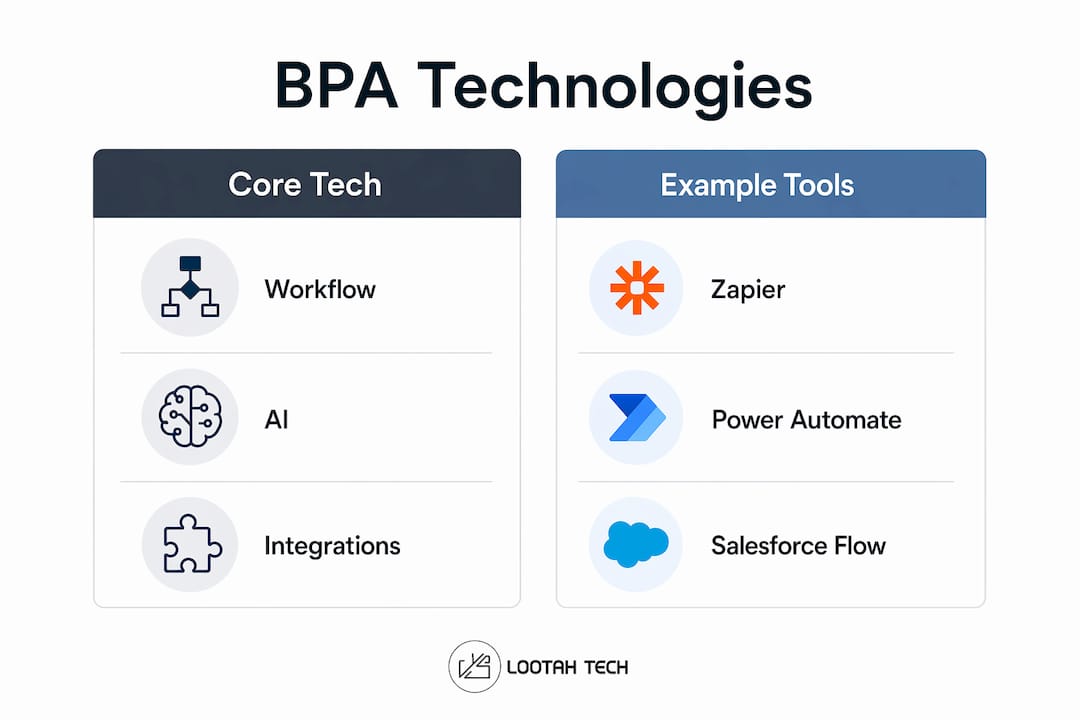
Which technologies and tools power business process automation?
BPA draws on several distinct technology categories. Knowing the difference helps you ask the right questions when evaluating vendors.
| Technology | What It Does | Example Platforms |
|---|---|---|
| Workflow orchestration | Sequences and routes multi-step processes across systems | Zapier, Microsoft Power Automate, Tines |
| APIs | Connect applications so data moves between them automatically | REST APIs, MuleSoft Anypoint |
| RPA | Mimics user actions in legacy systems that lack APIs | UiPath, Automation Anywhere |
| AI-driven decisions | Applies machine learning to classify, prioritize, or route work | IBM Watson, Salesforce Einstein |
| Human-in-the-loop | Routes exceptions to people when rules cannot resolve them | Built into most orchestration platforms |
Modern BPA solutions combine deterministic rules, AI, and human decisions to handle complexity while minimizing operational risk. This layered approach means you do not need a fully automated system to get value. You can start with rules-based orchestration and add AI-driven decision layers as your confidence and data quality grow.
For a practical breakdown of which tools fit which business sizes and use cases, the 2026 automation tools guide from Yslootahtech covers the selection criteria decision-makers need. Organizations exploring enterprise AI automation will also find that the most effective implementations layer AI on top of a solid orchestration foundation rather than leading with AI from day one.
The integration point is where most BPA projects succeed or fail. Your CRM, HR platform, and finance system each hold critical data. BPA tools connect them through APIs so that a change in one system propagates correctly to all others without manual intervention.
How do you successfully implement a BPA workflow?
Implementation follows the same six-stage lifecycle described earlier, but the execution details determine whether your project delivers results or stalls.
- Start with process mapping, not tool selection. Document the current state of the process in full before opening a vendor demo. Automating a broken process only makes it run inefficiently faster. Fix the logic first.
- Define clear triggers. Ambiguous triggers create inconsistent automation. A trigger should be a specific, observable event: a record created, a threshold crossed, or a form submitted.
- Build orchestration in stages. Automate the highest-volume, lowest-exception steps first. Add complexity incrementally rather than attempting full end-to-end automation in a single release.
- Design human-in-the-loop checkpoints deliberately. Automated workflows must pause gracefully for human judgment to avoid operational risks. Identify every decision point that requires context a rule cannot capture and route those to a person.
- Validate data write-back accuracy. Test that every system receiving updated data reflects the correct values before going live. Data inconsistency across systems is the most common post-launch problem.
- Monitor and iterate continuously. BPA is not a one-time deployment. Track cycle times, error rates, and exception frequency. Use that data to refine triggers and rules in each subsequent cycle.
For a deeper look at transforming existing workflows with these principles, Yslootahtech's guide on automating multi-step workflows walks through real-world architecture decisions.
Pro Tip: Assign a process owner, not just a technical owner, to every BPA workflow. The person who understands the business logic must stay involved after launch. Technical teams can maintain the automation, but only the process owner can identify when the rules no longer match reality.
Key takeaways
Business process automation delivers measurable operational gains only when organizations treat it as a workflow strategy, not a technology purchase.
| Point | Details |
|---|---|
| BPA vs. task automation | BPA orchestrates entire multi-step workflows across systems; RPA handles discrete repetitive actions only. |
| Six-stage lifecycle | Every successful BPA project follows mapping, triggers, orchestration, human controls, data write-back, and monitoring. |
| Map before you automate | Documenting current workflows, including exceptions, prevents automating broken processes that waste resources. |
| Human-in-the-loop is non-negotiable | Automated workflows must include deliberate pause points for human judgment to handle edge cases safely. |
| Burnout and scale | 29% of small business owners automate specifically to manage workload, proving BPA is a people strategy as much as a tech one. |
BPA is a strategy, not a software purchase
Most of the BPA projects I have seen struggle share one trait: the organization bought a tool before it understood its process. The tool becomes a solution looking for a problem, and six months later the team is back to spreadsheets.
The organizations that get real value treat BPA as a strategy to scale operations without proportional headcount growth. They start by asking which manual workflows create the most friction, cost the most time, or carry the highest error risk. Then they map those processes in detail before a single vendor is contacted.
The misconception I push back on most often is that BPA is about flashy AI. Successful BPA focuses on fixing manual workflow inefficiencies, not adopting the newest technology. AI adds value at specific decision points, but the foundation is always clean orchestration logic and reliable API connections.
The other underrated factor is the human-in-the-loop design. Teams that skip this step build brittle workflows that break on the first edge case. Teams that design it deliberately build systems that get smarter over time because humans are correcting the exceptions that rules cannot yet handle.
BPA done right does not replace your people. It removes the work that was wasting their time and gives them back the hours to do the work only they can do. That is the actual value proposition, and it is worth taking seriously.
— YS
Ready to automate your business workflows?
Yslootahtech works with organizations across the UAE and beyond to design and deploy BPA solutions that fit their existing systems and operational goals. Whether you are automating a single high-friction workflow or building an enterprise-wide orchestration layer, the approach starts the same way: understanding your process before touching any technology.

From custom API integrations to AI-driven decision workflows, Yslootahtech's digital transformation services cover the full implementation lifecycle. The team brings experience across fintech, e-commerce, industrial management, and digital health, so the solutions are built for your industry's specific requirements. If you are ready to move from manual overhead to automated efficiency, connect with the Yslootahtech team to start with a process audit and a clear roadmap.
FAQ
What is business process automation in simple terms?
Business process automation is the use of software to automatically execute multi-step workflows across different systems and teams without manual intervention at each step. It connects tools like CRMs, HR platforms, and finance systems through APIs to move work forward automatically.
How does BPA differ from RPA?
BPA orchestrates entire end-to-end workflows across multiple systems, while RPA mimics discrete user actions within a single application. RPA is a component that BPA can include; BPA is the broader orchestration layer above it.
What are common examples of business process automation?
Common examples include automated employee onboarding workflows that span HR, IT, and payroll systems; invoice processing that routes approvals and updates accounting records automatically; and customer support ticket routing that classifies and assigns cases without manual triage.
Which tools are most commonly used for BPA?
Zapier, Microsoft Power Automate, MuleSoft Anypoint, Tines, and Salesforce Flow are widely used BPA platforms. The right choice depends on your existing tech stack, the complexity of your workflows, and whether you need AI-driven decision layers.
How long does a BPA implementation take?
A single well-defined workflow can be automated in two to four weeks when the process is fully mapped and the required API connections exist. Enterprise-wide BPA programs typically run in phases over several months to allow for testing, iteration, and change management.