What is cloud computing? A practical guide for business leaders

Global public cloud spending is projected to surpass $1 trillion in 2026, and that number alone should tell you something important: the cloud is not a passing IT trend. It is the backbone of how modern organizations operate, compete, and grow. Yet many business leaders still think of it as simply "outsourced servers" or a cost-cutting measure for the IT department. That framing misses the point entirely. This guide breaks down what cloud computing actually is, the service and deployment models available, the real business benefits driving investment, the risks you need to manage, and the practical steps to move forward with confidence.
Table of Contents
- Defining cloud computing: More than just servers in the sky
- The main service models: IaaS, PaaS, and SaaS explained
- Deployment models: Public, private, hybrid, and multi-cloud
- Why business leaders are investing in the cloud
- Risks, challenges, and best practices: What leaders need to know
- Steps to get started with cloud adoption
- Accelerate transformation with expert cloud support
- Frequently asked questions
Key Takeaways
| Point | Details |
|---|---|
| Cloud is business-critical | Cloud computing is central to digital transformation and operational success. |
| Know your options | Understand the service and deployment models to align with your business needs. |
| Value with vigilance | Cloud offers agility and cost savings, but requires proactive governance to minimize risks. |
| Start smart | Begin cloud adoption with clear goals, a pilot, and strong stakeholder alignment. |
| Expert support matters | Partnering with specialists can accelerate results and reduce complexity for your business. |
Defining cloud computing: More than just servers in the sky
Cloud computing delivers on-demand access to shared computing resources, including servers, storage, databases, networking, software, and analytics, via the internet. You pay for what you use, provision resources in minutes, and scale up or down without buying physical hardware. That last point is what separates cloud from traditional IT, where capacity planning meant purchasing equipment months in advance and hoping your forecast was right.
The NIST definition describes cloud computing as "a model for enabling ubiquitous, convenient, on-demand network access to a shared pool of configurable computing resources that can be rapidly provisioned and released with minimal management effort or service provider interaction."
"Cloud computing is a model for enabling ubiquitous, convenient, on-demand network access to a shared pool of configurable computing resources that can be rapidly provisioned and released with minimal management effort." — NIST SP 800-145
For business leaders, the practical meaning is this: your teams get the tools they need, when they need them, without waiting on procurement cycles. Understanding the value of cloud computing goes beyond cost savings. It is about speed, flexibility, and building a foundation for digital transformation. A solid cloud technology overview shows just how broad the ecosystem has become.
The main service models: IaaS, PaaS, and SaaS explained
The three primary service models of cloud computing are Infrastructure as a Service (IaaS), Platform as a Service (PaaS), and Software as a Service (SaaS). Each one serves a different business need, and choosing the wrong model wastes money and slows teams down.
IaaS gives you raw computing infrastructure: virtual machines, storage, and networking. You manage the operating systems and applications. Think AWS EC2 or Microsoft Azure Virtual Machines. This model suits organizations that need maximum control over their environment.
PaaS adds a layer on top, providing a managed platform for developers to build and deploy applications without worrying about the underlying infrastructure. Google App Engine and Heroku are classic examples. This model accelerates development cycles significantly.
SaaS delivers fully managed software over the internet. Salesforce, Microsoft 365, and Slack are SaaS products. Your team logs in and works. No installation, no patching, no server management.
| Model | What you manage | Best for | Example |
|---|---|---|---|
| IaaS | OS, apps, data | Max control, custom environments | AWS EC2 |
| PaaS | Apps and data only | Fast development, less overhead | Google App Engine |
| SaaS | Nothing (just use it) | Productivity, standard workflows | Salesforce |
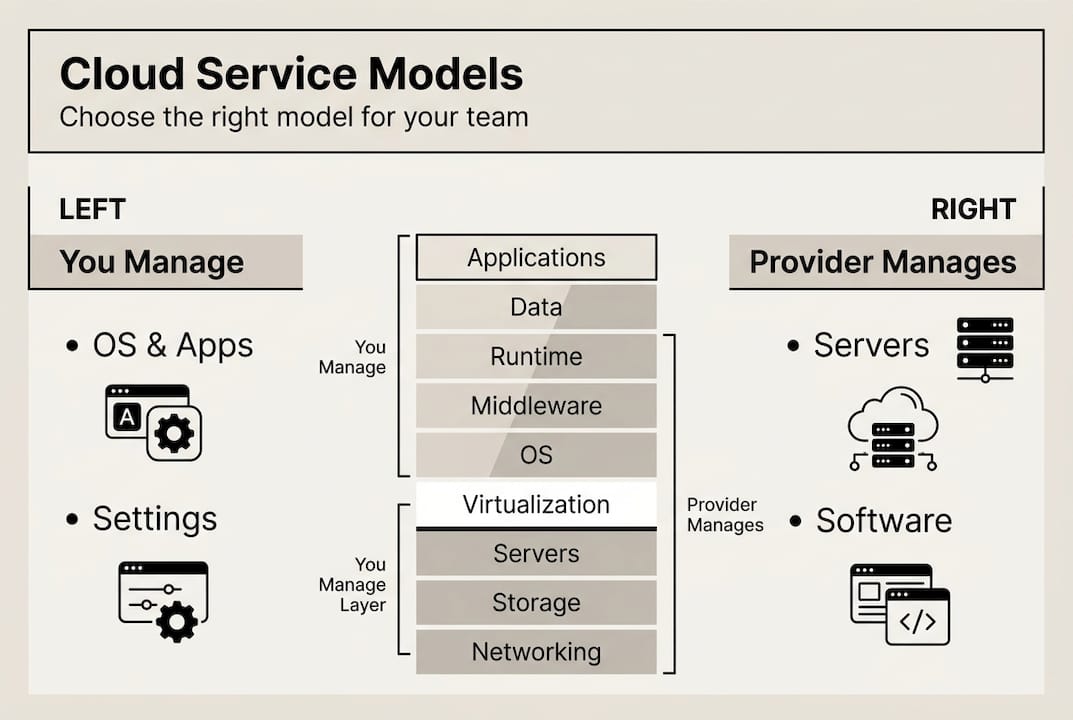
Exploring the full range of types of cloud services helps you match each model to the right team or workload.
Pro Tip: If your organization is early in its cloud journey, SaaS is the fastest way to capture value. As your technical capabilities grow, layer in PaaS for custom development and IaaS for specialized workloads.
Deployment models: Public, private, hybrid, and multi-cloud
Deployment models determine where your cloud infrastructure lives and who controls it. This decision directly affects your security posture, compliance obligations, and total cost.
Public cloud is owned and operated by a third-party provider like AWS, Azure, or Google Cloud. Resources are shared across many customers, which keeps costs low and scalability high. It is ideal for standard workloads and rapid growth.

Private cloud is dedicated to a single organization, either hosted on-premises or by a managed provider. It offers greater control and is often required for industries with strict data regulations, such as finance or healthcare.
Hybrid cloud combines public and private environments, letting you run sensitive workloads privately while using public cloud for everything else. Multi-cloud takes this further by using services from two or more providers, reducing dependency on any single vendor.
| Model | Cost | Control | Best use case |
|---|---|---|---|
| Public | Low | Low | Scalable apps, dev/test |
| Private | High | High | Regulated industries |
| Hybrid | Medium | Medium | Mixed workloads |
| Multi-cloud | Variable | High | Resilience, best-of-breed |
Factors to consider when choosing a deployment model:
- Regulatory requirements: Does your industry mandate data residency or specific security controls?
- Workload sensitivity: Which applications handle confidential customer or financial data?
- Budget: Private cloud carries higher upfront costs. Public cloud shifts spend to operational expenses.
- Vendor risk: Multi-cloud reduces lock-in but increases management complexity.
- Team capability: Hybrid and multi-cloud require skilled cloud operations teams.
Staying current on cloud trends for business helps you anticipate which deployment strategies are gaining traction in your sector.
Why business leaders are investing in the cloud
Cloud computing is the engine behind digital transformation, giving organizations the operational flexibility to launch new products faster, respond to market shifts, and reduce the drag of legacy infrastructure. The numbers back this up clearly.
$1 trillion+ in global public cloud spending is projected for 2026, with PaaS growing 37% year over year. That is not incremental adoption. That is a structural shift in how organizations build and run technology.
Here are five reasons business leaders are accelerating cloud investment:
- Agility: Launch new services in days, not months. Cloud removes the hardware procurement bottleneck entirely.
- Cost efficiency: Pay-as-you-go pricing eliminates idle infrastructure spend and converts capital expenditure to predictable operating costs.
- Innovation at scale: AI, machine learning, and data analytics tools are cloud-native. Access to these capabilities without building your own infrastructure is a competitive advantage.
- Business continuity: Cloud providers offer built-in redundancy and disaster recovery options that most on-premises setups cannot match.
- Global reach: Deploy applications closer to your customers anywhere in the world without opening a data center.
Understanding the digital transformation impact of cloud adoption helps leaders frame investment decisions in terms of business outcomes, not just IT metrics. And looking at cloud's role in innovation reveals how AI-driven and agent-based systems are making cloud infrastructure even more central to competitive strategy.
Risks, challenges, and best practices: What leaders need to know
High business value comes with real risks. Governance is essential to manage challenges like vendor lock-in, security misconfigurations, and cost overruns. Ignoring these issues does not make them go away. It just means you discover them at the worst possible time.
Public cloud offers agility but introduces concentration risk if you rely on a single provider. Hybrid and multi-cloud strategies improve resilience but add management complexity that requires skilled teams and clear governance frameworks.
The most common risks leaders face:
- Vendor lock-in: Proprietary services make it expensive to switch providers later.
- Security misconfigurations: Incorrectly configured storage buckets or access controls are a leading cause of data breaches.
- Cost overruns: Without visibility and controls, cloud spending can spiral quickly.
- Compliance gaps: Moving data to the cloud without understanding data residency rules creates regulatory exposure.
- Shadow IT: Teams adopting cloud tools without IT oversight creates security blind spots.
Actionable strategies to reduce these risks:
- Establish a cloud governance policy before migrating any workloads.
- Use cloud cost management tools to set budgets and alerts.
- Conduct regular security audits and access reviews.
- Standardize on open formats and APIs where possible to reduce lock-in.
- Train teams on shared responsibility models so everyone understands their security obligations.
Pro Tip: Start with a pilot project on a non-critical workload. Map each application to the environment that fits its risk profile before committing to a full migration. This approach surfaces hidden dependencies and builds team confidence.
A clear digital transformation roadmap makes risk management far easier by giving every stakeholder a shared view of priorities and timelines.
Steps to get started with cloud adoption
With risks in perspective, here is how decision-makers can take confident first steps. Over 55% of organizations already use two or more cloud providers, which means the question is rarely whether to adopt cloud but how to do it well.
- Assess your current state: Audit existing applications, infrastructure, and data. Identify which workloads are cloud-ready and which need modernization first.
- Align stakeholders: Cloud adoption is a business initiative, not just an IT project. Get finance, operations, legal, and executive leadership aligned on goals and success metrics from the start.
- Select your model and provider: Use the service and deployment model frameworks above to match your needs. Evaluate providers on security certifications, regional availability, and support quality.
- Run a pilot project: Choose a low-risk workload and migrate it. Measure performance, cost, and team experience. Use this as a learning exercise before scaling.
- Refine and expand: Use pilot results to update your migration plan. Define KPIs for each phase and review them regularly. Cloud adoption is iterative, not a one-time event.
Exploring innovative tech strategies gives leaders a broader view of how cloud fits into a wider technology agenda. For organizations in the UAE, a digital transformation starter guide provides region-specific context. A practical cloud adoption example illustrates how even specialized workloads can be moved to the cloud effectively.
Accelerate transformation with expert cloud support
Reading a guide is one thing. Executing a cloud strategy across a real organization, with real data, real teams, and real deadlines, is another challenge entirely. That is where the right technology partner makes a measurable difference.
At YS Lootah Tech, we work with business leaders across industries to design and deliver cloud-aligned digital solutions that produce results. Whether you need custom cloud application development to modernize legacy systems, website development services built on scalable cloud infrastructure, or AI and cloud integration to unlock intelligent automation, our team brings the technical depth and strategic perspective to move your organization forward. Reach out to start a conversation about your cloud roadmap.
Frequently asked questions
Is cloud computing safe for business-critical data?
Yes, with the right governance and provider selection, cloud computing can deliver strong security. However, risks like misconfigurations must be actively managed through regular audits and clear access controls.
How does cloud computing reduce costs for organizations?
Cloud computing uses pay-as-you-go pricing that eliminates idle hardware spend. Scalability and cost-efficiency allow businesses to match resource consumption directly to actual demand.
What's the difference between public, private, and hybrid cloud?
Public cloud is shared and highly scalable, private cloud is dedicated and offers greater control, and hybrid cloud blends both for organizations that need flexibility alongside tighter security for specific workloads.
What is multi-cloud and why is it growing?
Multi-cloud means using services from multiple cloud providers to avoid lock-in and improve resilience. Over 55% of organizations now use two or more providers, though this approach does increase management overhead.
Recommended
- Trends in Cloud Computing: Driving Business Innovation
- Future of cloud computing in 2026: enterprise IT guide
- Types of cloud computing services for digital success
- Key cloud computing trends to boost business in 2026
- The Ultimate Guide to AI Management: Everything You Need to Scale Your B2B Service Business – AI Management Agency