How to optimize cloud infrastructure for performance and cost

TL;DR:
- Effective cloud cost management requires ongoing processes focused on visibility, rightsizing, and continuous FinOps practices. Organizations must regularly analyze utilization, implement disciplined tagging, and adapt autoscaling and commitments to evolving workloads to sustain savings. Relying on one-time optimizations leads to cost erosion, making continuous review and organizational discipline essential.
Cloud infrastructure spending is growing faster than the value it delivers for many organizations. Gartner estimates that up to 30% of cloud spend is wasted on idle or misconfigured resources, yet most IT teams lack a repeatable process to catch and eliminate that waste. The gap between what companies pay and what they actually use is not a technology failure. It is a process failure. This article walks IT decision-makers through a structured, step-by-step framework covering visibility, rightsizing, autoscaling, and continuous FinOps practices to close that gap and turn cloud spending into a strategic advantage.
Table of Contents
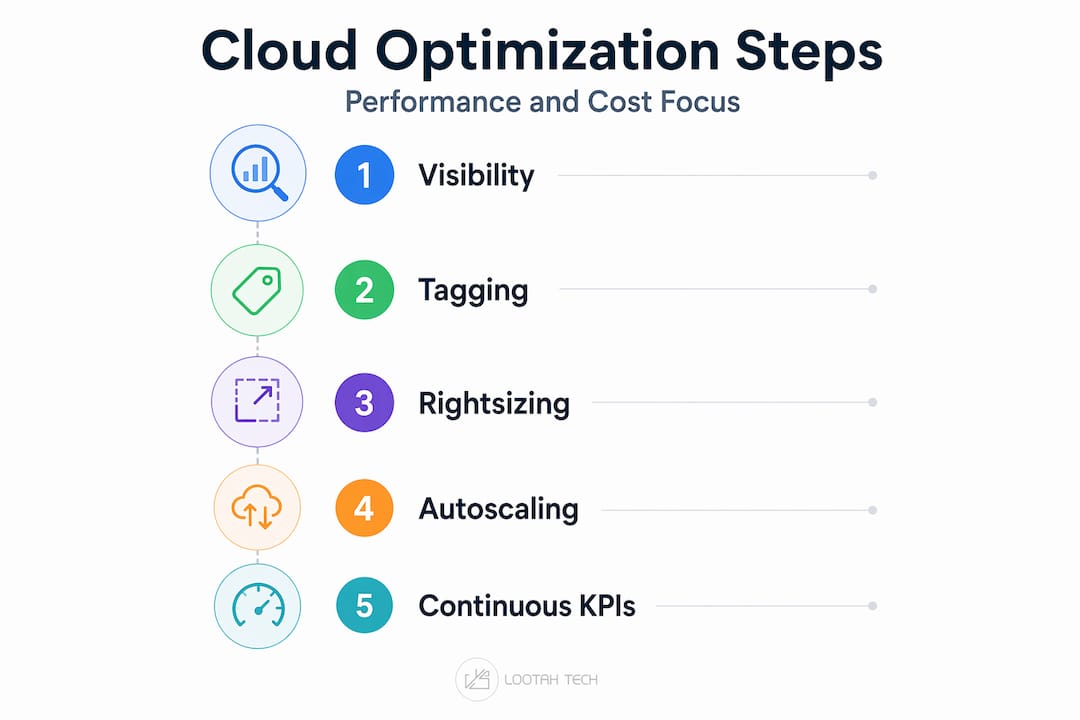
- Preparing for cloud optimization: Visibility, tagging, and data foundation
- Rightsizing and eliminating waste: Step-by-step resource optimization
- Optimizing variable workloads: Autoscaling, architecture, and scheduling
- Continuous optimization: FinOps KPIs, audits, and adapting to change
- Why the 'one-time fix' approach fails: Lessons from ongoing cloud optimization
- How YS Lootah Tech helps optimize your cloud infrastructure
- Frequently asked questions
Key Takeaways
| Point | Details |
|---|---|
| Visibility is foundational | Tagging and granular billing data are prerequisites for any successful optimization program. |
| Rightsizing drives savings | Adjusting workloads and eliminating waste are the fastest ways to cut cloud costs. |
| Autoscaling prevents over-provisioning | Autoscaling and architecture tuning reduce costs while maintaining performance for variable workloads. |
| Continuous optimization wins | Regular audits and KPI tracking ensure sustained improvements and adapt savings instruments to changing environments. |
| Avoid single-point fixes | Teams should build ongoing optimization into their process, not rely on one-time cost reviews. |
Preparing for cloud optimization: Visibility, tagging, and data foundation
You cannot optimize what you cannot measure. That statement sounds obvious, but a surprising number of organizations attempt to cut cloud costs before they have reliable, granular data on where those costs originate. The result is guesswork, and guesswork leads to cutting the wrong resources at the wrong time.
A practical cloud optimization program starts with cost and usage visibility through tagging and granular billing exports, then iterates through rightsizing, turning off idle resources, and eliminating specific waste paths. Skipping the visibility phase is the single most common reason that optimization efforts stall after the first few weeks.
Building your visibility stack
The three major cloud platforms each offer a native starting point:
- AWS Cost and Usage Reports (CUR): Granular, hourly billing data exportable to S3 and queryable via Athena or Redshift. This is the raw material for any serious cost analysis on AWS.
- Azure Cost Management + Billing: Offers budget alerts, cost allocation by resource group, and Power BI integration for custom dashboards.
- GCP Billing Export to BigQuery: Pushes detailed billing data into BigQuery, making it easy to join with usage metrics and build custom reports.
Understanding your cloud computing service types matters here because IaaS, PaaS, and SaaS resources each have different billing models that require different tagging strategies.
The recommended tagging taxonomy
| Tag key | Example values | Purpose |
|---|---|---|
| Environment | prod, staging, dev | Isolate non-production waste |
| Owner | team-name or email | Drive accountability |
| Cost center | fin-01, ops-02 | Enable chargeback or showback |
| Application | crm-api, data-pipeline | Group costs by product |
| Lifecycle | permanent, temporary | Flag disposable resources |
A consistent taxonomy across all regions and accounts is what separates actionable data from a pile of numbers. Refer to your cloud computing guide for foundational context before building this stack if your team is newer to cloud operations.
Pro Tip: Implement automated tagging policies at the account or subscription level so any new resource created without tags is flagged immediately. Pair this with a showback report sent weekly to team leads. Accountability accelerates optimization faster than any tooling change alone.
Once you know what needs tracking and have a data foundation, the next step is identifying and correcting inefficient resource allocations.
Rightsizing and eliminating waste: Step-by-step resource optimization
Rightsizing is the process of matching the compute, memory, and storage allocated to a workload with what that workload actually consumes. It is consistently the highest-impact optimization tactic available to infrastructure teams. Not because the concept is novel, but because most organizations deploy resources at maximum expected load and never revisit those allocations once the workload is live.

Rightsizing paired with commitment strategies like Reserved Instances and Savings Plans is most effective when you analyze real utilization data first, then apply commitments to the steady-state baseline to capture discounts without overcommitting. That sequence is critical. Committing before analyzing locks you into costs you may not need.
Step-by-step rightsizing process
- Pull 30 to 90 days of utilization data for all compute instances. Focus on peak CPU, average CPU, memory utilization, and network throughput. Single-day snapshots create misleading baselines.
- Segment workloads by behavior. Steady-state workloads (e.g., core API servers) are candidates for Reserved Instances. Spiky or unpredictable workloads should not be committed until patterns are confirmed.
- Identify overprovisioned instances. Any instance running below 20% average CPU and below 40% average memory for 30 days is almost certainly a downsize candidate. Use AWS Compute Optimizer, Azure Advisor, or GCP Recommender to automate this step.
- Test downsizes in staging first. Resize one instance type, run load tests at peak traffic simulation, confirm latency and error budgets are maintained, then proceed to production.
- Shut down idle non-production environments. Dev and staging environments running 24/7 are one of the most common sources of hidden waste. Schedule them to stop during off-hours using automation scripts or native scheduling tools.
- Audit orphaned resources. Unattached EBS volumes, unused Elastic IPs, old snapshots, and forgotten load balancers accumulate silently. A monthly sweep of these resources consistently recovers 5 to 15% of billing.
Kubernetes and EKS workload rightsizing including ARM and Graviton instance adoption can reduce worker-node spend by 30 to 50%. Graviton3 instances on AWS offer roughly 25% better price-performance than equivalent x86 options for most containerized workloads.
Commitment instruments compared
| Instrument | Discount potential | Flexibility | Best for |
|---|---|---|---|
| Reserved Instances (1yr) | Up to 40% | Low | Stable, predictable workloads |
| Reserved Instances (3yr) | Up to 60% | Very low | Long-term steady-state systems |
| Savings Plans (compute) | Up to 66% | Medium | Mixed instance type usage |
| Graviton/ARM instances | 20 to 50% | High | Containerized, stateless workloads |
| Spot Instances | Up to 90% | Very high | Fault-tolerant, batch workloads |
To modernize IT infrastructure effectively, consider combining Savings Plans for your compute baseline with Spot Instances for elastic batch jobs. This hybrid commitment approach captures predictable discounts while preserving flexibility.
Pro Tip: Measure utilization across your full traffic cycle, not just a single business day. Workloads in retail, fintech, or healthcare often show weekly or monthly cycles. A 30-day average captures those patterns and prevents you from right-sizing into performance risk during peak periods.
The enterprise cloud deployment decisions you make today directly shape the optimization potential available tomorrow. Architectural choices made during deployment are far easier to adjust proactively than reactively.
Realizing the cloud computing benefits for business growth depends heavily on whether rightsizing and commitment strategies are revisited regularly as your workload mix evolves.
With resources properly sized and waste addressed, the next concern is optimizing for unpredictable or variable workload demands.
Optimizing variable workloads: Autoscaling, architecture, and scheduling
Variable workloads are the hardest problem in cloud optimization. They are too unpredictable for straightforward commitments and too critical for aggressive downsizing. The answer is autoscaling, but autoscaling done poorly creates its own category of problems.
Autoscaling and architecture-level changes can reduce both cost and performance risk for variable workloads, but they require careful tuning of policies and thresholds to avoid thrash or latency regressions. Thrash happens when scale-out and scale-in events fire too rapidly in succession, adding latency and occasionally degrading performance below baseline. Getting the thresholds right is not a set-it-and-forget-it task.
Autoscaling implementation principles
- Set scale-out aggressively and scale-in conservatively. It is always better to have slightly more capacity than to cause latency spikes. Scale out at 60% CPU, scale in only after 30 minutes below 30% CPU. This buffer prevents thrash.
- Use predictive scaling for known traffic patterns. AWS Auto Scaling and Azure Predictive Autoscale can look at historical patterns and pre-warm capacity before demand arrives, eliminating cold-start latency during ramp-up.
- Combine horizontal and vertical scaling. Horizontal scaling (adding instances) is better for stateless microservices. Vertical scaling (resizing the instance) can be more efficient for stateful workloads like databases where connection overhead from many small nodes adds up.
- Enforce minimum and maximum boundaries. Always define both a floor and a ceiling for your autoscaling groups. An uncapped scaling group triggered by a DDoS event or a runaway process will generate a billing event that no optimization framework can absorb.
- Use serverless where event-driven patterns fit. AWS Lambda, Azure Functions, and Google Cloud Run eliminate idle capacity costs entirely for workloads that are truly event-driven. The cloud computing trends for 2026 point clearly toward serverless-first architectures for new microservices builds.
Scheduling as a cost reduction lever
Beyond autoscaling, environment scheduling is one of the most underutilized tactics available. Batch analytics jobs, model training pipelines, and report generation workflows do not need to run during peak business hours. Scheduling them for off-peak windows captures significantly lower Spot Instance availability while keeping reserved capacity free for production traffic.
Statistic callout: Organizations that implement commitment automation, combining Savings Plans with dynamic on-demand management, typically report a 40 to 60% decline in on-demand compute costs within six months of deployment.
The future of cloud computing for enterprise IT increasingly involves AI-driven autoscaling that learns workload patterns automatically, removing much of the manual threshold tuning that consumes infrastructure team time today. Teams that build the discipline of manual tuning now will be in the best position to adopt and govern those autonomous tools. Following cloud innovation trends actively helps infrastructure leads anticipate when to evolve their approach.
Optimizations must be sustained and adapted as architectures evolve, especially in hybrid, edge, and multi-cloud contexts.
Continuous optimization: FinOps KPIs, audits, and adapting to change
Cloud environments change constantly. New services are deployed, teams grow, traffic patterns shift, and pricing models are updated by providers several times per year. A one-time optimization sprint captures savings for a few months before drift erodes them. The organizations that sustain strong cloud economics treat optimization as an ongoing operational discipline, not a project.
FinOps KPIs and benchmarks help decision-making by measuring savings and efficiency in a way that reflects actual optimization results rather than list-price discounts, and by tracking that effectiveness over time. Nubank, one of the world's largest digital banks, improved its Effective Savings Rate (ESR) significantly after implementing automated commitment management, demonstrating that continuous measurement drives better outcomes than periodic manual reviews.
Building a FinOps rhythm
- Weekly: Review cost anomaly alerts. Any resource or service that spikes more than 20% above its seven-day average should trigger an investigation before the billing cycle closes.
- Monthly: Run a full rightsizing review across all compute workloads. Reconcile Reserved Instance and Savings Plan coverage against actual usage. Sweep for orphaned resources.
- Quarterly: Audit commitment portfolio alignment. Check whether your Reserved Instances still match your current instance families and regions. Re-evaluate architectural decisions in light of new provider pricing.
- Annually: Conduct a full architecture review against your business roadmap. Workloads that have grown significantly may need to be re-architected, not just right-sized.
Continuous optimization and re-planning are necessary to keep commitments aligned with actual workloads. A Savings Plan purchased 18 months ago may now be covering instance types your team no longer uses at scale, while new workloads run entirely on-demand.
Edge and hybrid challenges
Edge and hybrid contexts add real constraints to optimization. Workload placement decisions, network egress costs between edge nodes and central cloud regions, and the limits of applying cloud-native autoscaling to on-premises hardware all require separate optimization tracks. In these environments, scheduling and workload placement become more important than instance type selection.
Aligning your cloud optimization KPIs with broader business outcomes, such as digital transformation KPIs, ensures that infrastructure efficiency is measured in terms of business value delivered rather than just cost lines reduced.
Pro Tip: Track Effective Savings Rate (ESR) as your primary FinOps KPI. ESR measures actual savings relative to on-demand costs for all eligible resources, removing the distortion caused by comparing discounted rates to list prices. It is the only metric that tells you how well your commitment portfolio truly fits your workload.
With structured, continuous optimization practices, IT teams avoid common pitfalls and maximize the return from their cloud investments.
Why the 'one-time fix' approach fails: Lessons from ongoing cloud optimization
Here is something most cloud cost articles will not tell you directly: the reason so many optimization projects fail is not technical. It is organizational. Teams treat cloud optimization as a project with a start date and an end date. They do a round of rightsizing, buy some Reserved Instances, celebrate the savings in a quarterly business review, and then stop. Six months later, costs have crept back to where they started, or higher.
Continuous optimization and unit economics tracking create more sustainable savings than relying on one-time discount procurement. This is not just a philosophical position. The data from high-performing FinOps teams is consistent: organizations with monthly review cycles outperform those with annual optimization sprints by a wide margin on cost efficiency metrics.
The teams that sustain excellent cloud economics share a few characteristics that go beyond tooling. They have a named owner for cloud cost efficiency, typically a FinOps practitioner or a senior platform engineer. They embed cost review into sprint planning, not as a burden but as a standard engineering quality gate. They treat unexpected cost increases with the same urgency as a production incident.
What we observe consistently across clients at various maturity stages is that the technical fixes are straightforward. Rightsizing a workload takes hours. The hard part is maintaining the discipline to check whether that workload has grown again 90 days later. Innovative tech strategies for business leaders consistently point to governance and process maturity as the differentiating factor between organizations that sustain cloud ROI and those that see it evaporate.
Pro Tip: Build cloud optimization review cycles directly into your engineering team's calendar as recurring events with a standing agenda. Treat skipped reviews as technical debt, because that is exactly what they are.
How YS Lootah Tech helps optimize your cloud infrastructure
Cloud optimization delivers its highest return when the right expertise is applied at every layer, from architecture design to ongoing FinOps governance. Most infrastructure teams have the intent but lack the bandwidth to execute and sustain optimization across all the dimensions covered in this article.

YS Lootah Tech works with IT leaders and cloud infrastructure managers to design, implement, and continuously improve cloud environments for both cost efficiency and performance reliability. Our application development services incorporate cloud-native architecture patterns from day one, reducing the optimization burden that accumulates when workloads are built without cost visibility in mind. For organizations ready to automate more of their optimization cycle, our AI and machine learning solutions bring intelligent workload analysis and anomaly detection directly into your cloud operations. Contact us to start a structured cloud optimization review aligned with your business goals.
Frequently asked questions
What are the first steps for cloud cost and performance optimization?
Start with granular cost and usage visibility by tagging resources consistently and exporting billing data to create a reliable baseline. Visibility and tagging are the foundation every other optimization tactic depends on.
How do Reserved Instances and Savings Plans impact optimization?
These commitment strategies can generate substantial discounts but must be matched to real utilization data to avoid locking in costs that exceed actual workload needs. Analyze real utilization first before applying any commitment instrument.
Why is autoscaling important for variable workloads?
Autoscaling dynamically matches resource capacity to actual demand, minimizing idle spend and reducing performance risk when correctly tuned. Autoscaling paired with architecture changes is the most effective approach for workloads with unpredictable traffic patterns.
How can organizations sustain cloud savings over time?
Continuous audits, KPI tracking with metrics like Effective Savings Rate, and regularly realigning savings instruments to current workloads will maintain results that a one-time review cannot. Continuous optimization and KPI tracking are what separate organizations with lasting cloud ROI from those that see savings erode within quarters.
What are common mistakes to avoid in cloud optimization?
Relying only on discount procurement, skipping regular audits, and misconfiguring autoscaling thresholds are the three most common mistakes that erode both savings and performance. Commitment mismatches and unchecked drift will consistently undo gains made during initial optimization efforts.