How to transform business process automation workflows

TL;DR:
- Manual data entry and approval delays drain business revenue and productivity. Implementing incremental workflow automation improves speed, accuracy, and employee morale while reducing costs. Success depends on proper preparation, measurable goals, and continuous optimization through disciplined, scalable steps.
Every day, your teams are losing hours to manual data entry, approval chains that stall in someone's inbox, and spreadsheets passed around by email. These aren't just minor inconveniences. They're revenue leaks. Research shows that organizations can waste up to 30% of their workday on tasks that could be automated, and that drag compounds every quarter. This guide walks you through the entire lifecycle of workflow automation: understanding what it really means, preparing your organization for change, executing automation in practical, manageable steps, and measuring whether it's actually working.
Table of Contents
- Understanding business process automation workflow
- Preparation: Setting the foundation for workflow automation
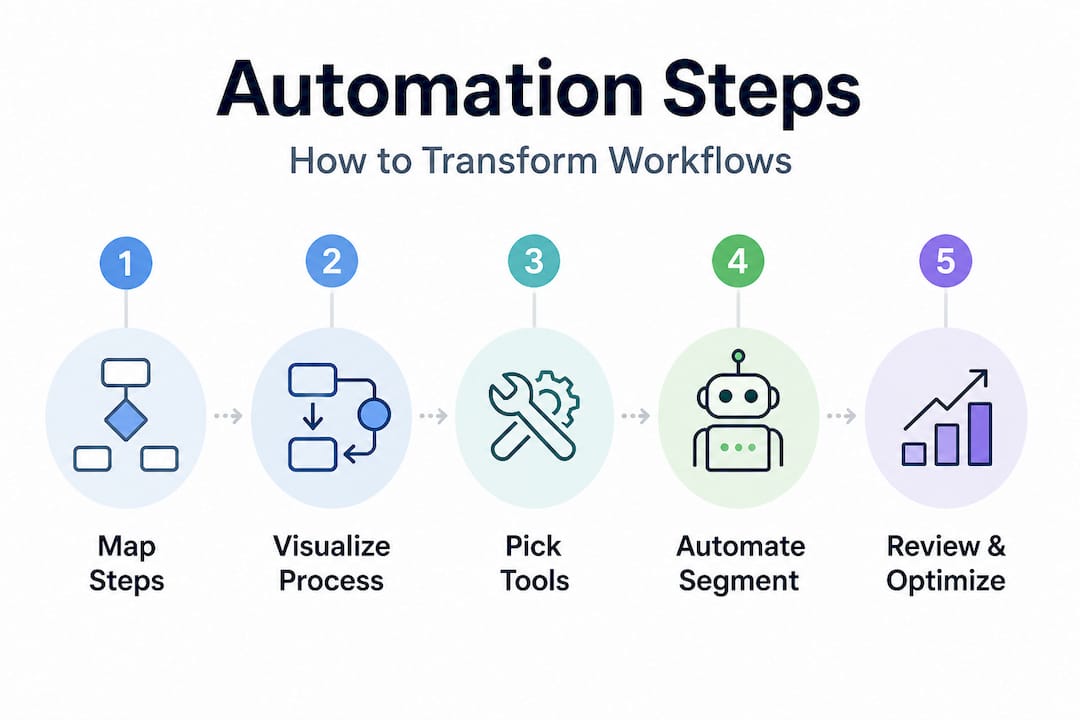
- Executing incremental automation: A practical step-by-step approach
- Verifying success: Measuring and optimizing your automated workflow
- The overlooked power of incremental automation: Our experience
- Accelerate your automation journey with expert support
- Frequently asked questions
Key Takeaways
| Point | Details |
|---|---|
| Focus on workflows | Start with mapping and incrementally automating business-critical workflows that impact performance. |
| Prioritize quick wins | Target simple, repetitive processes first for faster ROI and learning. |
| Measure and refine | Consistently track metrics to validate gains and fine-tune future automation rounds. |
| Communicate results | Share incremental automation wins to build organization-wide support. |
Understanding business process automation workflow
Business process automation workflow, often called BPA workflow, is the use of technology to execute a sequence of tasks within a business process with minimal or no human intervention. Think of it as replacing the relay race of manual hand-offs between people, systems, and departments with a single, coordinated engine that runs on rules and triggers.
The business case is strong. Organizations that invest in smart business solutions report faster turnaround times, fewer errors, and teams that are freed up for higher-value thinking. The enterprise application advantages go even further, connecting automation across finance, HR, operations, and customer service in a single ecosystem.
Typical automation impact on key business metrics:
| Metric | Before automation | After automation | Typical improvement |
|---|---|---|---|
| Invoice processing time | 5 days | 1 day | 80% reduction |
| Data entry error rate | 4% | 0.5% | 87% reduction |
| Employee hours on manual tasks | 15 hrs/week | 3 hrs/week | 80% time saved |
| Customer response time | 48 hours | 4 hours | 91% faster |
These numbers are representative averages from mid-size organizations, not outliers. The gains are real, but only if you approach automation correctly.
Here's where most organizations stumble. They try to automate everything at once. They spend months mapping every edge case of every process before touching a single workflow. That approach creates bureaucracy, not results.
CIO-level guidance emphasizes making process guidance practical and usable through one-page summaries that focus on essential steps, ownership, and decision points rather than exhaustive flowcharts. The same guidance recommends incremental automation rather than attempting full automation of complex workflows immediately.
The core benefits of BPA workflows done right include:
- Speed: Automated triggers execute in seconds, not days.
- Consistency: Every instance of a process follows the same rules, every time.
- Visibility: Digital workflows create audit trails that manual processes cannot.
- Scalability: An automated process handles 10 transactions or 10,000 with equal reliability.
- Staff morale: Teams stop drowning in repetitive tasks and start doing meaningful work.
"The goal is not to automate for automation's sake. The goal is to remove friction from your highest-impact business processes and give your people the capacity to do what machines can't."
Preparation: Setting the foundation for workflow automation
With the essentials of automation in mind, it's time to prepare your organization for a smooth workflow automation rollout. Skipping this phase is where projects fail. The difference between a successful automation initiative and a costly overhaul that gets abandoned is almost always preparation quality.
Step 1: Document what's actually happening. Before you can improve a process, you need to see it honestly. Walk through each process manually. Shadow the people doing the work. Most process documentation written by managers does not reflect what workers actually do, and that gap is where automation breaks down.
Step 2: Create visual process maps. Use tools like Lucidchart, Microsoft Visio, or even a whiteboard session to map out process steps, decision points, handoff moments, and approval gates. Keep each map to a single page. Following the practical guidance on incremental automation, one-page summaries that identify essential steps, ownership, and decisions are far more useful than exhaustive documentation.
Step 3: Assign ownership. Every process step needs a named owner, not a department. Ownership creates accountability and makes it possible to escalate when automated steps fail or produce unexpected results.
Step 4: Identify your bottlenecks and quick wins. Look for these signals in your current process maps:
- Tasks that require copying data from one system to another
- Approval steps that consistently wait longer than 24 hours
- Processes where errors are caught and corrected repeatedly
- High-volume, rule-based tasks where the output is always the same given the same input
- Steps that require three or more people to complete but add little unique human judgment
Use your custom software workflow guide as a reference for prioritizing which process segments to address first.
Comparing common workflow mapping and automation tools:
| Tool | Best for | Automation capability | Learning curve |
|---|---|---|---|
| Microsoft Power Automate | Microsoft 365 environments | High | Medium |
| Zapier | SaaS integration, SMBs | Medium | Low |
| UiPath | RPA (Robotic Process Automation) | Very high | High |
| Monday.com | Project and task workflows | Medium | Low |
| ServiceNow | Enterprise IT and HR workflows | Very high | High |
| Kissflow | Business process management | High | Medium |
The right tool depends on your existing tech stack, the complexity of your target processes, and your team's technical capacity.
Pro Tip: Don't chase the most powerful tool available. Chase the tool your team will actually use. A mid-tier automation platform deployed consistently outperforms an enterprise-grade platform that sits unused because adoption is too complex.
Executing incremental automation: A practical step-by-step approach
Preparation complete, here's how to move from mapping out to actually automating workflow segments without overwhelming your teams. The word "incremental" is doing a lot of heavy lifting in this section, and deliberately so.

CIO.com recommends shifting from exhaustive documentation to one-page key process summaries and adopting an intentional incremental approach for strategic automation: streamlining bottlenecks rather than pursuing full automation at first. This approach is not timid. It's the fastest path to real, sustainable gains.
Step-by-step automation execution sequence:
-
Select a single, high-impact process segment. Choose one workflow segment, not an entire process. For example, automate the invoice receipt and data entry portion of accounts payable before touching the approval workflow.
-
Define success metrics before you start. Document baseline numbers: current processing time, error rate, and cost per transaction. You cannot prove ROI without a baseline.
-
Configure the automation in a test environment. Build your workflow rules, triggers, and exception handling in a sandbox. Test with real data samples, including edge cases that humans currently handle manually.
-
Run a parallel period. Operate the automated workflow alongside the manual process for two to four weeks. Compare outputs. Look for gaps, errors, or cases the automation misses.
-
Deploy and assign a human checkpoint. Go live with the automation but assign a specific person to review exceptions and audit outputs daily for the first 30 days.
-
Document lessons before moving to the next segment. What worked? What surprised you? What would you do differently? Capture these answers in a short debrief before starting the next automation cycle.
-
Repeat for the next workflow segment. Only after the first segment is stable, performing well, and monitored do you move to the next target.
Referencing innovative automation strategies from leading technology implementations confirms that organizations following this cycle structure reach sustainable automation at roughly twice the speed of those attempting full-process overhauls.
Statistic to anchor your expectations: Organizations that automate a single high-volume workflow segment first see an average of 40 to 60% reduction in processing time for that segment within the first 90 days. Those gains build organizational confidence that makes subsequent automation phases easier to fund and faster to adopt.
Reviewing B2B automation trends shows that the companies outpacing competitors in operational efficiency are not the ones with the most automation. They're the ones with the most disciplined automation.
Pro Tip: At every step in your automation sequence, name the human decision point. Every automated workflow needs a clearly designated person responsible for reviewing exceptions, approving edge cases, and escalating failures. Automation without human oversight is a liability, not an asset.
Verifying success: Measuring and optimizing your automated workflow
Once automation is activated, securing visible, lasting gains requires vigilant monitoring and continual refinement. Deploying an automation and walking away is one of the most common and costly mistakes organizations make. The first 90 days post-deployment are as important as the planning phase.
Metrics to track after automation goes live:
- Throughput: How many transactions or tasks does the process now complete per hour or per day compared to baseline?
- Error rate: Are the outputs more accurate than manual processing? By how much?
- Cycle time: How long does it take from process trigger to completion?
- Exception rate: What percentage of cases are falling outside the automation rules and requiring human intervention?
- Employee satisfaction: Are the people affected by the change finding their work more or less manageable?
- Cost per transaction: Is the per-unit cost of completing this process actually dropping?
When something isn't working, the troubleshooting usually points to one of four causes. First, the automation rules were built on idealized process documentation rather than how the process actually runs. Second, exception handling was not planned thoroughly enough. Third, data quality entering the automated process is poor, creating failures downstream. Fourth, user adoption is incomplete because staff were not trained or included in the design phase.
CIO-level guidance consistently reinforces that practical, usable process design with clear ownership and decision points must be maintained throughout the post-deployment phase, not just at the start. Use your cybersecurity workflow steps framework as a model for structured post-deployment reviews in regulated or security-sensitive environments.
Workflow optimization: Lessons learned and best practices
| Challenge | Root cause | Best practice fix |
|---|---|---|
| High exception rate | Rules too rigid | Build tiered exception handling with human review escalation |
| Output errors | Poor input data quality | Add data validation at the process entry point |
| Staff resistance | Low involvement in design | Include end-users in testing and debrief sessions |
| Slow adoption | Inadequate training | Deliver role-specific, scenario-based training before go-live |
| Missed ROI targets | No baseline metrics | Define and document baselines before any deployment |
| Process drift | No ongoing monitoring | Schedule quarterly automation audits |
"Digital transformation is not a destination. It's an operating discipline. Organizations that treat automation as a one-time project rather than a continuous improvement cycle will always fall behind those that treat it as a core management practice."
Automation optimization is not a sign that the first deployment failed. It's evidence that you are running a mature, iterative program that gets better over time.
The overlooked power of incremental automation: Our experience
Here's an uncomfortable truth: the organizations that fail at workflow automation are often the most ambitious ones. They commission massive projects, hire consultants to map every conceivable process, build elaborate governance frameworks, and then, after 12 to 18 months, either run out of budget or lose executive support before a single automated workflow goes live.
We've seen this pattern repeatedly. And the solution isn't better project management. It's a fundamentally different philosophy.
The incremental approach recommended by CIO.com isn't a compromise. It's strategically superior. When you automate one segment, prove its value, and build on that win, you create something more valuable than efficiency: you create organizational belief. Your teams see automation working. Your leadership sees ROI before the next budget cycle. Your IT department learns the real-world quirks of your processes before they're embedded in a platform you can't easily change.
The contrarian insight here is that the "quick win" is not a stepping stone to the "real" transformation. It is the transformation. Dozens of well-executed, incrementally deployed automations across your operations create a foundation of efficiency that no single mega-project could ever match.
The way to communicate this to leadership is equally important. Don't present automation as a technology project. Present it as an operational improvement program with measurable financial outcomes. Show the baseline, show the post-automation result, and show the compounding effect of stacking those gains across process after process. That's a narrative that resonates in any boardroom.
For organizations ready to move forward, connecting this philosophy with a tech transformation planning framework ensures that incremental wins roll up into a coherent long-term strategy rather than a collection of disconnected automation experiments.
Accelerate your automation journey with expert support
Workflow automation done right requires more than the right tools. It requires experienced partners who understand how technology, people, and business processes interact in real organizations across real industries.

At YS Lootah Tech, we work with business executives and IT leaders across the Middle East and beyond to design, build, and deploy automation solutions that deliver measurable results from day one. Whether you need tailored application development services to power custom workflow automation, intelligent AI and machine learning solutions to handle complex decision logic, or intuitive UX/UI design experts to ensure adoption across your organization, we bring every capability under one roof. Reach out today to scope your first automation initiative or scale an existing program. Let's build something that performs.
Frequently asked questions
What is a business process automation workflow?
It's a structured sequence of tasks executed automatically across a business process to boost efficiency and reduce manual work. CIO-level guidance recommends building these workflows using practical, one-page process summaries focused on ownership and decision points.
How do I choose which processes to automate first?
Prioritize high-volume, repetitive tasks or clear bottlenecks where automation yields quick, measurable gains. Incremental automation guidance supports targeting individual segments rather than end-to-end processes from the start.
What are common pitfalls in workflow automation projects?
Rushing to automate every process at once and over-documenting before launching are the two most common causes of delays and cost overruns. Shifting to one-page process summaries and an intentional incremental rollout prevents both mistakes.
How can I measure the success of an automated workflow?
Track process completion time, error rates, exception volume, and employee satisfaction before and after deployment. CIO-level optimization practice frames measurability as a core pillar of any digital transformation initiative.
Is business process automation only for large enterprises?
No. Organizations of every size benefit from incremental automation built around their most critical workflows. Strategic incremental automation scales down just as effectively as it scales up, making it accessible and financially viable for mid-market and growing organizations alike.