Salesforce Integration Architecture: Choosing the Right Pattern

Start with the SLA, not the tool. If your integration needs sub-second consistency and a transactional guarantee, you need Request-Reply. If it needs to move records to a warehouse within minutes, Change Data Capture with a message queue wins. If a user just needs to see external data on a Salesforce page without owning a copy of it, Data Virtualization beats replication almost every time.
That's the decision tree in miniature. Before touching a platform event or provisioning middleware, map the job to one of these buckets:
- Data Virtualization (Salesforce Connect): huge, read-mostly external datasets accessed on demand.
- CDC + event-driven (Pub/Sub API): near-real-time propagation of changes to a data warehouse or downstream system.
- Request-Reply (synchronous API): transactional calls where the caller needs an immediate, consistent answer.
- Batch / ETL sync: large, non-urgent data loads that tolerate a nightly or hourly cadence.
- Fire-and-forget / publish-subscribe: one-to-many notifications where the sender doesn't need confirmation.
Three variables flip the decision every time: the SLA (how fast does the answer need to arrive), the volume (thousands of records or hundreds of millions), and security/compliance (does the data need to leave Salesforce at all, or can it stay put and be queried remotely). Get those three right before you pick a tool.
Key Takeaways
Choosing the right Salesforce integration architecture means matching SLA, data volume, and security requirements to a specific pattern before a single line of middleware configuration gets written.
| Point | Details |
|---|---|
| Match pattern to SLA first | Sub-second needs point to Request-Reply; minute-level tolerance favors CDC with a queue. |
| Virtualize before replicating | Salesforce Connect avoids replication cost for large, read-heavy external datasets. |
| Expect multiple middleware tools | Hybrid landscapes commonly mix iPaaS, ETL, and streaming platforms rather than one vendor. |
| Document the decision | An ADR capturing SLA, volume, and compliance inputs prevents re-litigating pattern choices later. |
| Build idempotency in from day one | CDC sequence numbers and dedupe keys prevent out-of-order or duplicate writes downstream. |
| Get expert implementation support | Yslootahtech helps enterprises design and build the middleware and application layers these patterns depend on. |
Table of Contents
- What Are the Core Salesforce Integration Patterns?
- When to Use Each Integration Pattern
- What Does a Scalable Reference Architecture Look Like?
- When Do You Need Middleware Instead of Native APIs?
- Building a Pattern Selection Checklist for Design Reviews
- How Should You Handle Security, Errors, and Monitoring?
- What Governance Structure Keeps Integrations Consistent?
- What Has YS Lootah Tech Learned From Regional Implementations?
- The Pattern-First Mindset Architects Keep Underrating
- Get Expert Help Designing Your Salesforce Integration
- Sources
What Are the Core Salesforce Integration Patterns?
Salesforce's own architecture guidance groups every integration into three pattern types: Process, Data, and Virtual, layered against a timing axis of synchronous or asynchronous execution. That taxonomy, laid out in Salesforce's Integration Patterns guide, is the vocabulary every architecture decision record in this space should use. If your team is still describing integrations as "the Mulesoft thing" or "the nightly job," you don't have a shared language yet, and that's where scope creep and duplicated effort come from.
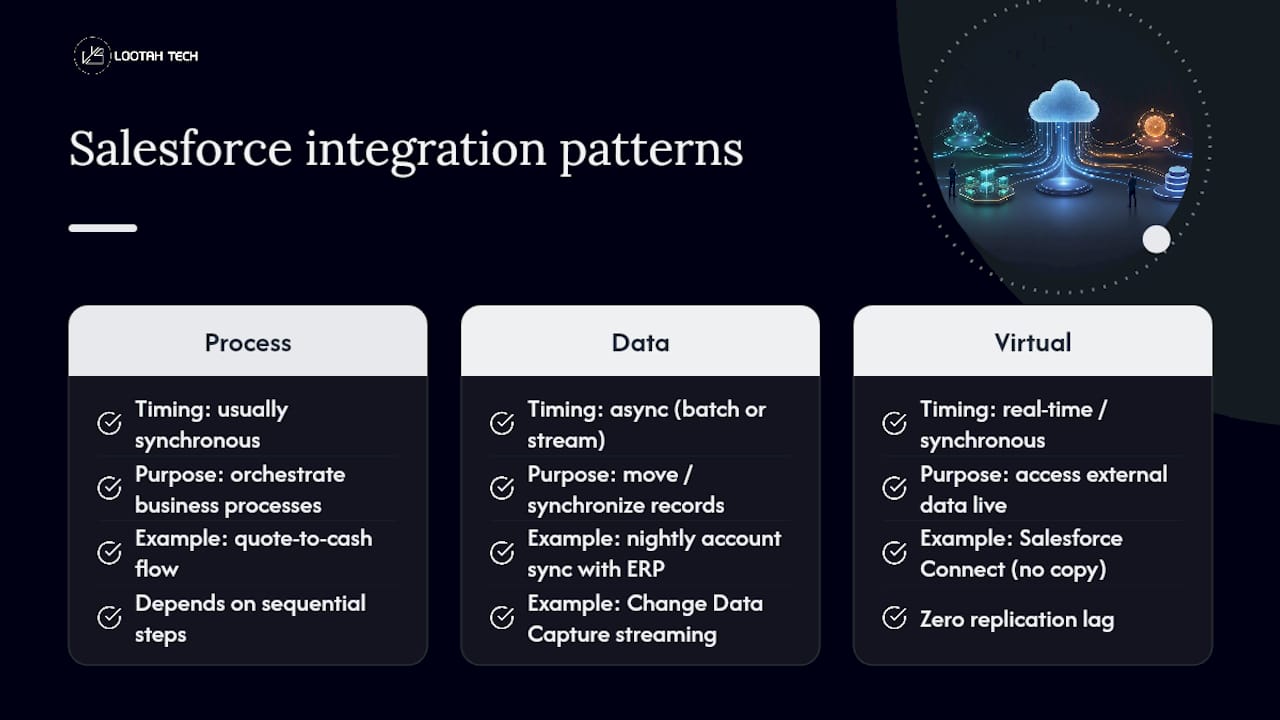
Process patterns orchestrate a business process across systems. Think of a quote-to-cash flow that touches Salesforce, a billing system, and a fulfillment platform in sequence, each step depending on the last. These are usually synchronous, because the business logic itself is sequential: you can't generate an invoice before the quote is approved.
Data patterns move or synchronize records between systems. Batch sync, bulk data movement, and Change Data Capture streaming all fall here. The goal isn't orchestration, it's consistency. A classic example is syncing account records between Salesforce and an ERP nightly, or streaming order updates into a data lake as they happen.
Virtual patterns let Salesforce access external data without owning a copy of it. Salesforce Connect is the flagship implementation: it exposes external tables as if they were native Salesforce objects, queryable in real time, with zero replication lag because there's nothing to replicate.
Synchronous vs. asynchronous: the timing axis that decides everything
Synchronous integration means the caller waits for a response before moving on. A checkout flow calling a tax calculation service is synchronous by necessity, the transaction can't complete without a tax figure. Asynchronous integration decouples sender and receiver: the caller fires a message and moves on, trusting the receiver to process it eventually. Platform Events and CDC notifications work this way.
The tradeoff is blunt. Synchronous calls give you immediate consistency but couple your uptime to every downstream system in the chain, if the tax service is down, checkout is down. Asynchronous patterns buy you resilience and throughput at the cost of eventual, not immediate, consistency.
- Synchronous request-reply: best for transactional, user-facing calls needing an immediate result (payment authorization, address validation).
- Asynchronous fire-and-forget: best for notifications and events where the sender doesn't need or want a reply.
- Batch/bulk async: best for large volume moves where near-real-time isn't required.
- Remote call-in: external systems calling into Salesforce, typically via REST or SOAP APIs, synchronous by design.
One number worth internalizing: enterprise integration landscapes rarely settle on a single middleware platform. Salesforce's own developer guidance on Salesforce integration architecture describes hybrid deployments where multiple middleware tools each own a slice of the pattern space, one for orchestration, another for bulk ETL, another for event routing. Expecting one tool to cover every pattern well is the single most common architecture mistake we see in review cycles.
When to Use Each Integration Pattern
Pattern selection gets easier once you stop asking "which tool is best" and start asking "what does this specific use case actually require." Here's how four common enterprise scenarios map to patterns, with the reasoning behind each choice.
- Exposing millions of external records in a Salesforce UI without replicating them. Use Data Virtualization via Salesforce Connect. Copying a 50-million-row product catalog into Salesforce just so agents can search it is expensive, creates a sync burden, and introduces staleness the moment the source system updates. Salesforce's Data Integration decision guidance explicitly recommends virtualizing over replicating whenever the read pattern allows it, and for very large, rarely-written datasets, it almost always does.
- Near-real-time updates to a data warehouse. Use Change Data Capture paired with a middleware consumer that handles sequencing. CDC emits change events the moment a record is created, updated, or deleted, but the events don't arrive in guaranteed order across all cases. Middleware needs to consume the sequence number in the changeEventHeader and re-sequence events before writing to the warehouse, otherwise you risk overwriting a newer state with an older one.
- A user-facing screen that needs to look up and write back to an external system. This is a hybrid case: use Virtual patterns for the lookup (read) and a synchronous Request-Reply call for the writeback (confirm). Trying to force both directions through the same mechanism usually ends in either laggy UIs or fragile custom code.
- Cross-org synchronization between two Salesforce instances (common after a merger or a multi-org strategy). Platform Events or CDC streamed through an event bus, consumed by both orgs, tends to outperform point-to-point batch jobs because it scales horizontally as more orgs join the mesh.
Legacy and on-prem systems complicate all four scenarios. A mainframe that only speaks a fixed-width flat file format, or an on-prem ERP sitting behind a firewall with no public endpoint, forces you into a hybrid design: a lightweight connector or agent inside the DMZ, talking outward to your middleware layer, which then normalizes the data before it ever reaches Salesforce. Don't force a 1990s protocol to talk directly to a modern API gateway. Put a translation layer between them and keep that translation logic out of Salesforce entirely.
Pro Tip: Before greenlighting a Data Virtualization approach, run a query volume estimate against the external system's actual capacity. Salesforce Connect performance is only as good as the source system's response time, and a virtualized pattern will surface every slow query the source system has been quietly tolerating for years.
What Does a Scalable Reference Architecture Look Like?
A durable Salesforce integration architecture separates concerns into distinct layers rather than letting Salesforce or any single system own all the logic. A minimal but scalable design typically includes five components, each with a narrow job.
- API gateway: the single entry point for external callers, handling authentication, rate limiting, and request routing before anything touches Salesforce or middleware.
- Middleware/orchestration layer: where transformation, business rule application, and multi-step orchestration live, kept deliberately out of Salesforce Apex where possible to avoid governor limit fights.
- Message queue or event bus: buffers asynchronous traffic, absorbs load spikes, and enables replay if a downstream consumer goes offline temporarily.
- Data hub or integration database: a staging layer for data that needs reconciliation, deduplication, or historical tracking before it lands in its final system.
- Salesforce org(s): the CRM layer itself, ideally treated as one participant in the mesh rather than the hub everything else revolves around.
Placing transformation logic in middleware instead of Salesforce matters for a concrete reason: Apex has governor limits on CPU time, heap size, and SOQL queries per transaction, limits that exist to protect the multi-tenant platform, not your integration. Push heavy transformation, especially anything involving large payloads or complex mapping, into the middleware layer where you control the compute budget.
Fault tolerance comes from three mechanisms working together. Queueing absorbs traffic spikes so a downstream system's temporary slowness doesn't cascade into dropped messages. Buffering at the API gateway level protects Salesforce's own API limits from being exhausted by a burst of calls. Replay capability, built into your event bus or CDC consumer, lets you reprocess a window of events after an outage instead of manually reconstructing lost state.

Connecting on-prem systems safely means never exposing an internal system directly to the public internet just to satisfy an integration requirement, leveraging solutions like Salesforce Commerce Cloud SEO Automation to optimize commerce workflows securely. Route on-prem connectivity through a DMZ with a hardened connector, or use a secure agent pattern where an on-prem process initiates outbound connections to your middleware, rather than opening inbound firewall rules. This is also where a lot of security review time gets spent, and for good reason.
When Do You Need Middleware Instead of Native APIs?
Native Salesforce APIs, REST, SOAP, Bulk, are enough for a huge share of point-to-point integrations. A single external system calling Salesforce for a straightforward CRUD operation doesn't need a middleware layer sitting in between adding latency and cost. Add middleware when you have more than two systems in the conversation, when you need transformation logic that shouldn't live in either endpoint, or when you need centralized monitoring and retry logic across many integrations rather than reimplementing it per connection.
Middleware tooling splits into a few functional categories, and enterprise environments usually run several of them side by side rather than picking one:
- iPaaS/ESB platforms handle orchestration and mediation, routing and transforming messages between systems, often with visual flow designers. MuleSoft's Anypoint Platform is the most commonly referenced example in Salesforce ecosystem guidance for API-led integration.
- ETL/bulk data movers are built for scheduled, high-volume data transfer rather than real-time orchestration. Informatica is frequently cited in this category for enterprise data management workloads.
- Streaming/event routers move Platform Events and CDC notifications to external event buses in near real time, often using Salesforce's Event Relays or the Pub/Sub API over gRPC/HTTP2.
- API gateways sit at the perimeter, handling authentication, throttling, and traffic shaping before requests reach any backend system.
Sizing decisions come down to a few concrete numbers you should pin down before signing a contract or provisioning infrastructure: expected throughput in transactions per second, Bulk API batch sizes for large loads (Salesforce processes Bulk API jobs in batches, and undersizing them creates unnecessary job overhead), concurrent connection limits your middleware platform enforces, and connection pool sizing against Salesforce's own API call limits. Undersize any of these and you'll hit a wall during a seasonal traffic spike, not during testing.
Building a Pattern Selection Checklist for Design Reviews
Every architecture review should walk through the same short list of prompts before a pattern gets approved. Skipping this step is how teams end up defending an integration choice after it's already in production, which is a much harder conversation.
- What's the SLA? Sub-second, minutes, or hours? A sub-second requirement rules out batch immediately; an hours-tolerant requirement almost always favors batch for cost reasons.
- What's the data cardinality? Tens of records or tens of millions? High cardinality pushes you toward virtualization or streaming, not synchronous point-to-point calls.
- What's the frequency? Continuous stream, scheduled batch, or on-demand lookup? This determines whether you need an event bus at all.
- Where does the data need to reside? Data residency and compliance requirements sometimes force virtualization even when replication would be technically simpler, because the data legally can't leave its system of record.
- What's the security and compliance posture? Does this data touch PII, financial records, or regulated health information? That answer determines your authentication model before it determines your pattern.
- Does the target system need replay? If a downstream consumer can be offline for maintenance, you need an event bus with retention, not fire-and-forget.
- Is idempotency required? Any pattern that can redeliver a message, which is most asynchronous patterns, needs a deduplication strategy on the receiving end.
Turn the answers into a decision nudge: if SLA is sub-second and volume is low, prefer Request-Reply. If SLA is minutes and volume is high, prefer CDC with a queue. If the data never needs to leave the source system, prefer virtualization regardless of volume. Write the decision down. An Architectural Decision Record that captures the SLA, volume, and compliance inputs alongside the chosen pattern saves the next architect from re-litigating a decision that was already made for good reasons.
Pro Tip: File the ADR before implementation starts, not after. Teams that write ADRs retroactively tend to rationalize whatever got built rather than documenting the actual tradeoff that was weighed, which defeats the entire purpose of the record.
How Should You Handle Security, Errors, and Monitoring?
Authentication in a Salesforce integration should almost never involve a hardcoded username and password sitting in a configuration file. Use OAuth 2.0 flows appropriate to the caller type, JWT bearer flow for server-to-server integrations, and Named Credentials to store endpoint URLs and auth details outside of Apex code where they can be rotated without a deployment. For system-to-system connections carrying sensitive data, mutual TLS adds a layer of certificate-based trust on top of OAuth.
Idempotency and sequencing deserve more attention than most teams give them. CDC events carry a sequence number in the changeEventHeader specifically so consumers can detect and correct out-of-order delivery, and any middleware writing CDC data downstream needs to either respect that sequence or implement its own re-sequencing logic. Pair that with dedupe keys on the receiving system, because at-least-once delivery guarantees mean every consumer will eventually receive a duplicate message.
- Build retries with exponential backoff, not fixed intervals, to avoid hammering a struggling downstream system.
- Route messages that exhaust their retry budget to a dead-letter queue for manual inspection rather than silently dropping them.
- Design compensation logic for partial failures in multi-step processes, so a failed step three doesn't leave steps one and two in an inconsistent state.
- Instrument distributed tracing across every hop so a single failed integration doesn't require correlating logs across five separate systems by hand.
- Alert on business-meaningful metrics (failed order syncs, stalled queues), not just infrastructure metrics like CPU.
- Write runbooks for your three most common failure modes before you need them at 2 a.m.
Testing needs to go beyond unit tests on individual Apex classes. Contract tests verify that both sides of an integration agree on payload shape before a schema change breaks production silently. Replay tests confirm your event consumers can catch up correctly after an outage. Chaos testing, deliberately taking a downstream dependency offline in a staging environment, tells you whether your retry and dead-letter logic actually works, rather than just looking correct on paper.
Pro Tip: Run a chaos test against your least-reliable downstream system before go-live, not your most reliable one. The integration that fails first in production is almost always the one nobody stress-tested because it "never goes down."
What Governance Structure Keeps Integrations Consistent?
A Center of Excellence doesn't need to be a large team, but it does need clear review checkpoints: a lightweight architecture review before build starts, and a pre-production check that the ADR, monitoring, and error handling are all in place. Skipping the second checkpoint is how "temporary" integrations become permanent, undocumented liabilities.
Standardize a small set of artifacts across every team building integrations:
- An API catalog listing every exposed endpoint, its owner, and its consumers, so nobody deprecates an API without knowing who depends on it.
- SLA templates that force every new integration to declare its latency and availability targets up front.
- ADR examples from real past decisions, so new architects have a pattern to follow rather than starting from a blank page.
- Naming and versioning rules that make backward compatibility explicit, a v2 endpoint should never silently replace v1's contract without a deprecation window.
Track a handful of governance metrics over time: the number of point-to-point integrations bypassing the catalog, average time from design review to production, and the percentage of integrations with a documented runbook. Those three numbers tell you more about integration health than any dashboard of uptime percentages.
What Has YS Lootah Tech Learned From Regional Implementations?
Every enterprise Salesforce integration project eventually runs into the same tension: the theoretically cleanest pattern isn't always the one the client's existing systems can support. Yslootahtech has worked through this repeatedly across custom software and enterprise application integration engagements, where a legacy ERP or an on-prem finance system forces a hybrid design that a textbook architecture diagram wouldn't predict.
The recurring lesson isn't which pattern is "best." It's that virtualization looks free until you query it against a source system that was never built for real-time load, and replication looks safe until the sync job silently falls a day behind and nobody notices until a customer complains.
That tradeoff, virtualize versus replicate, shows up in nearly every project that connects Salesforce to an existing enterprise application stack, and it's rarely obvious which way to go without profiling the source system first.
The Pattern-First Mindset Architects Keep Underrating
Most integration failures we've analyzed didn't come from picking the wrong tool. They came from picking a pattern before anyone wrote down the actual SLA. Teams jump straight to "which platform should we buy" when the real question, what latency does this business process actually require, never got answered with a number attached to it.
The conventional wisdom treats middleware selection as the hard part. It isn't. The hard part is the fifteen minutes of discipline it takes to interrogate cardinality, frequency, and compliance before touching a vendor comparison. Skip that step and you'll build a technically elegant integration that solves the wrong problem, usually discovered six months in when the "real-time" dashboard everyone assumed was real-time turns out to be running on a nightly batch job someone forgot to mention.
If there's one thing to prioritize first, it's writing the ADR before the build, not after. That single habit forces the SLA conversation to happen when it's still cheap to change your mind.
— YS
Get Expert Help Designing Your Salesforce Integration
If your team is weighing Data Virtualization against replication, or trying to figure out whether CDC and a message queue can actually meet your SLA, that's exactly the kind of design decision Yslootahtech works through with enterprise clients every day. Unlike hiring a generalist agency that treats integration as an afterthought to a bigger project, Yslootahtech builds the middleware, API layers, and enterprise application integration work as the core deliverable, with the reference architecture and governance practices covered above baked into the engagement from the first design review.

That means you get an architecture that matches your actual SLA and compliance requirements, not a generic template retrofitted to your systems after the fact. Yslootahtech's application development team handles everything from the initial pattern selection and ADR through middleware configuration, security implementation, and the monitoring layer that keeps the integration observable in production. If you're planning a Salesforce-to-ERP integration or a broader enterprise application overhaul, reach out to Yslootahtech for a scoped architecture review before committing to a pattern.
Sources
- Integration Patterns | Data 360 and Integration
- How to Align Integration Patterns to Use Cases - Salesforce blog
- Integration Architecture for the Salesforce Platform | Salesforce Developers Blog