Budget 15–20% Annually: Mobile App Maintenance Playbook for CTOs

Mobile app maintenance keeps an app fast, secure, and profitable after launch. The immediate move: commission a maintenance audit or turn on crash monitoring this week, before the next OS update forces your hand.
TL;DR:
- Regular crash monitoring and prompt triage of critical issues can prevent user churn and protect revenue streams.
- Conducting ongoing preventive maintenance reduces technical debt, making future updates and OS migrations smoother.
- Budgeting 15–20% of initial app development cost annually, with higher costs in year one, covers typical dependency, platform, and compliance needs.
- Prioritizing daily crash reviews, weekly dependency updates, and quarterly major upgrades maintains app health and reduces emergency fixes.
- Using staged over-the-air updates limits native code changes, requiring app store review for some fixes, and supports quick deployment with rollback options.
Table of Contents
- What Does Mobile App Maintenance Actually Protect?
- What Are the Types of Mobile App Maintenance?
- How Much Should You Budget for App Maintenance?
- What Are the Warning Signs Your App Needs Attention?
- Maintenance Playbook: Daily, Weekly, Monthly, and Quarterly Cadence
- What Can Over-the-Air Updates Fix, and What Can't They?
- In-House, Outsourced, or Hybrid: Choosing a Maintenance Model
- Maintenance Checklist and KPIs Leadership Should Track
- Lessons From Enterprise Maintenance Work
- Managed App Maintenance With Predictable Budgets and SLAs
- Sources
What Does Mobile App Maintenance Actually Protect?
Every crash costs you more than a bad review. Apps that load slowly or crash frequently lose users fast, and those users rarely come back to give a second chance. Retention is the whole game once acquisition budgets get spent, and a broken app is the fastest way to burn through the customers you already paid to acquire.
Security is the other half of the equation. An unpatched dependency or an expired API certificate doesn't just create a bug ticket. It creates exposure. Payment processors, health data platforms, and any app touching personal information carry regulatory weight that grows heavier every year as privacy law tightens globally. Skipping preventive maintenance on that front doesn't save money. It defers a much larger bill, usually one that arrives with a breach notification attached.
There's a third cost people underweight: the compounding cost of neglect. An app that hasn't touched its dependencies in 18 months isn't just outdated. It's often unmaintainable without a rewrite, because every skipped update makes the next one harder. Teams that treat maintenance as ongoing infrastructure, not a one-time fire drill, ship features faster over time because they aren't constantly digging out from technical debt first.
Maintenance done right gives you three concrete things:
- Fewer crashes and faster load times, which studies consistently link to stronger retention and higher in-app revenue.
- Lower breach risk and cleaner compliance posture, especially for apps handling payments or health data.
- The ability to ship new features on a predictable cadence instead of constantly firefighting.
Pro Tip: Crash monitoring is arguably the single highest-leverage investment in ongoing app health. Teams that review crash dashboards daily catch regressions before they show up in app store reviews, not after.
What Are the Types of Mobile App Maintenance?
Maintenance isn't one activity. It's four distinct categories, each with a different trigger and a different urgency level. Mapping your work to the right category keeps your engineering time from getting consumed entirely by whichever fire is loudest that week.
- Corrective maintenance fixes bugs and crashes after they surface in production. This is reactive by nature: a user reports broken checkout, a crash log spikes, and your team patches the defect. Triage speed matters more than anything else here.
- Adaptive maintenance responds to changes outside your control, mainly new OS releases, updated device hardware, and third-party API changes. Apple and Google both push mandatory SDK targets on a yearly cycle, and missing that window can get your app pulled from the store.
- Preventive maintenance upgrades dependencies, refactors aging code, and pays down technical debt before it causes an incident. This is the work nobody notices when it's done right, and everybody notices when it's skipped.
- Evolutionary maintenance covers small UX improvements and feature enhancements driven by user feedback or usage data. It's not a rewrite, just steady refinement based on what real usage patterns show you.
- Emergency response is its own category: a security CVE, a payment outage, or an OS update that breaks core functionality. These get triaged ahead of everything else, with a runbook that defines who gets paged and how fast a fix has to ship.
Most teams underinvest in preventive maintenance because it has no obvious deadline. That's exactly why it becomes the emergency category later.
How Much Should You Budget for App Maintenance?
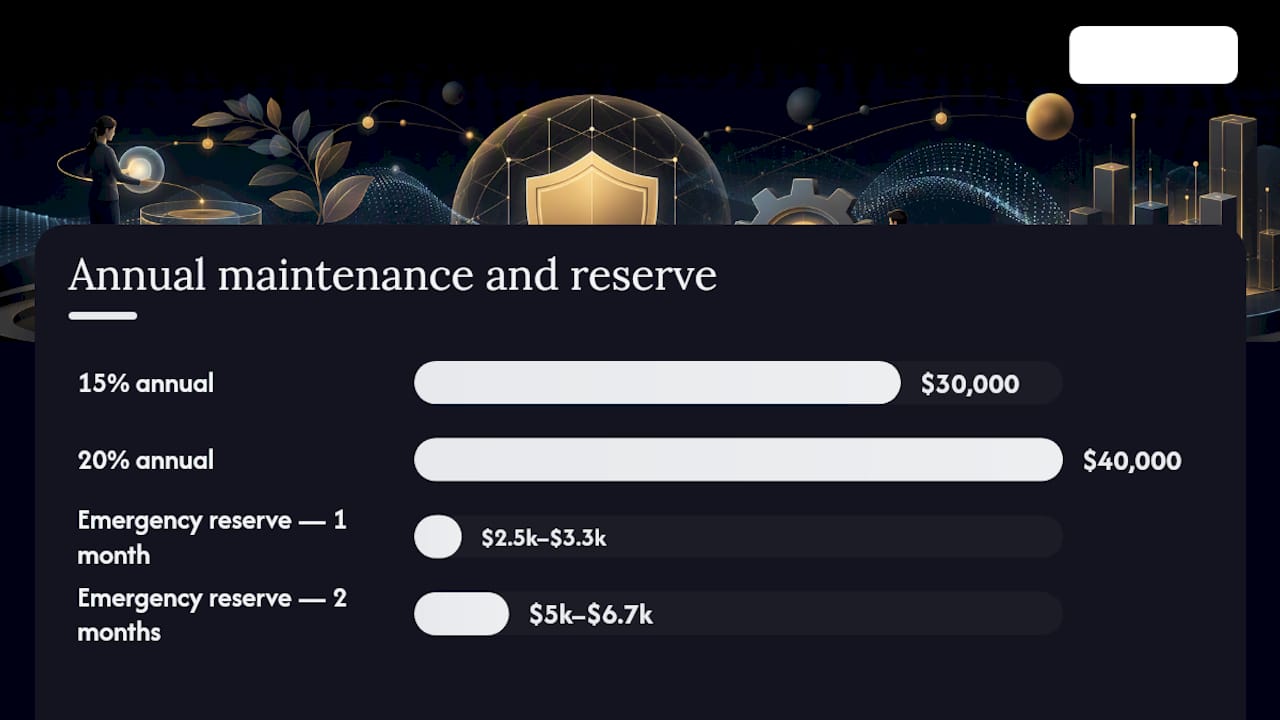
The standard rule of thumb: budget 15–20% of your original development cost annually for ongoing maintenance, according to industry cost analysis. If your app cost $200,000 to build, plan on roughly $30,000 to $40,000 a year to keep it healthy going forward.
Year 1 breaks that rule. Post-launch stabilization, the same pricing research puts realistic Year 1 maintenance spend at 30–50% of the original build cost. New apps surface bugs that only real users find, hit unexpected device fragmentation issues, and often need a round of performance tuning that wasn't visible in QA.
Sample monthly maintenance ranges by app complexity, drawn from the same cost benchmarking data:
- Simple MVP apps: roughly $1,000–$2,000 per month, covering basic bug fixes and OS compatibility.
- Moderate-complexity apps with a handful of integrations: roughly $2,000–$4,000 per month.
- Complex or enterprise apps with heavy backend integration, custom infrastructure, or regulatory requirements: often $6,000–$10,000 per month or more.
Multiply the monthly figure by 12 and compare it against your original build cost.
Four cost drivers explain most of the variance between apps in the same tier:
- Integration count. Every third-party API you depend on (payments, mapping, push notification services) is a dependency someone else can break without warning.
- Platform count. Native iOS and Android apps roughly double maintenance surface compared with a single cross-platform codebase.
- Regulatory exposure. Apps in health, finance, or any sector touching personal data carry ongoing compliance maintenance that generic apps don't.
- Team model. In-house engineers converting hours into a monthly retainer typically run more expensive per hour than an outsourced maintenance contract, but come with faster context switching on urgent fixes.
The rule of thumb is a starting point, not a ceiling. Audit your actual dependency stack early, rather than assuming your app fits the average.
Build a separate emergency reserve line, distinct from your planned maintenance budget. A security vulnerability disclosure or a store policy change that breaks your submission doesn't wait for next quarter's budget cycle. A reserve equal to roughly one to two months of your standard maintenance spend covers most emergency scenarios without derailing planned work.
What Are the Warning Signs Your App Needs Attention?
Some signals demand action within hours. Others can wait for the next sprint. Knowing the difference is the entire skill of triage.
Watch for these symptoms, roughly in order of how much revenue risk they carry:
- Rising crash rate, especially any spike correlated with a specific OS version or device model.
- App store rating trending downward over a rolling 30-day window, particularly with reviews mentioning specific bugs.
- Third-party service failures, such as a payment gateway or authentication provider returning errors.
- Store removal or rejection notices from Apple or Google, which take priority over almost everything else.
- Performance regressions, like load times creeping up after a recent release.
A practical triage order, informed by maintenance playbook guidance, runs: app store removal risk first, then critical crashes affecting core flows, then disclosed security vulnerabilities, then OS-release-blocking issues, then everything else.
Fix timelines vary by category. A JavaScript-layer bug pushed through an over-the-air update can ship within hours once identified. A fix requiring native code changes has to go through app store review, which typically runs one to three days on both major platforms, sometimes longer during holiday review slowdowns. Security patches touching native code follow the same store timeline, which is exactly why staged rollouts and rollback plans matter so much for anything touching payment or authentication code.
Maintenance Playbook: Daily, Weekly, Monthly, and Quarterly Cadence
Most maintenance failures aren't caused by a lack of skill. They're caused by a lack of cadence. Teams that check things sporadically miss the small regression that becomes the outage. A structured maintenance rhythm fixes that by turning maintenance into a routine instead of a reaction.
- Daily: crash dashboard review. Someone on the team checks crash reports and error logs every single day, without exception. New crash signatures get triaged same day. This single habit catches most regressions before they escalate into a wave of one-star reviews.
- Weekly: dependency and security advisory check. Review any new CVE disclosures affecting your SDKs and third-party libraries. Allocate roughly 10–15% of engineering time specifically to dependency hygiene, tracking current version, latest available version, and end-of-life dates in a simple matrix. This is the work that prevents emergency migrations later.
- Monthly: performance review and release planning. Pull load time metrics, memory usage, and battery drain data. Decide what ships in the next release window based on what the data actually shows, not on whoever complained loudest that month.
- Quarterly: code health audit and major SDK upgrades. This is where you tackle the bigger refactors, major version bumps on core frameworks, and anything that needs dedicated focus time rather than a quick patch.
Set SLA targets around severity: critical crashes affecting core revenue flows get a same-day response commitment, while cosmetic bugs can sit in a normal sprint backlog.
Pro Tip: Crash monitoring alone, checked daily rather than weekly, catches the majority of regressions before users file a single support ticket. It's the cheapest maintenance habit that pays the biggest dividend.
What Can Over-the-Air Updates Fix, and What Can't They?
Over-the-air updates let you ship fixes without waiting for app store review, but only for a specific slice of your codebase. EAS Update from Expo can push changes to JavaScript, styling, and asset files directly to installed apps. Native code changes, new permissions, and anything touching the compiled binary still require a fresh app store submission and review cycle.
That boundary matters more than most teams realize when they first adopt OTA tooling. A logic bug in your JavaScript layer can go out in minutes. A bug in native camera permission handling cannot, no matter how urgent it feels.
Staged rollouts are the safety net that makes OTA updates usable in production. Managed CodePush through Bitrise supports exactly this pattern: staged rollouts, instant rollback if metrics degrade, and CI/CD integration so releases and patches flow through the same automated pipeline. Capgo offers a similar model with release channels and compatibility checks, aimed at teams that want live update control while still respecting native store review for binary changes.

The practical workflow: integrate OTA into your existing CI/CD pipeline so patches aren't a separate manual process. That way a JavaScript fix for a production incident follows the same tested, staged path as a routine feature release, and a rollback is one click away rather than an emergency all-hands.
In-House, Outsourced, or Hybrid: Choosing a Maintenance Model
Three models exist, and each trades cost for control differently.
In-house maintenance gives you the tightest control and the fastest institutional knowledge, since your engineers already understand the codebase. It also costs the most per hour once you account for salary, benefits, and the opportunity cost of pulling feature engineers into maintenance work.
Outsourced maintenance through a dedicated partner typically lowers cost per hour and gives you access to a broader bench of specialists, including security and compliance expertise you might not have in-house. The trade-off is onboarding time and a dependency on the vendor's documentation and communication discipline.
Hybrid models keep core product knowledge in-house while outsourcing routine monitoring, dependency updates, and after-hours incident response. This is increasingly the default for growing companies that need 24/7 coverage without staffing a night shift internally.
Whichever model you choose, evaluate vendors and internal teams against the same criteria:
- Defined SLA response times for critical versus cosmetic issues.
- A real monitoring stack, not just "we'll check occasionally."
- Security and compliance credentials relevant to your industry.
- Demonstrated CI/CD experience, since manual releases are where most delays hide.
Before signing anything, insist on a contract checklist: an onboarding audit of your current codebase, documented repository access procedures, a written incident runbook, explicit SLA terms, and clarity on whether pricing is hourly, retainer-based, or tiered by severity.
Pro Tip: Ask any vendor how they handle a critical production incident at 2 a.m. on a Saturday. Vague answers or a shrug are the clearest red flag you'll get in the entire evaluation process.
Maintenance Checklist and KPIs Leadership Should Track
A working maintenance program needs six things in place before you can call it operational:
- Active crash and performance monitoring across all supported platforms.
- Automated backups with a tested restore process, not just a backup that's never been verified.
- A dependency matrix tracking version, latest release, and end-of-life dates.
- A published release schedule aligned to your maintenance cadence.
- Scheduled security audits, at minimum annually, more often for regulated apps.
- A written emergency runbook naming who responds and how fast.
Report these numbers to leadership monthly, with a deeper quarterly review that ties technical debt trends back to the budget line. A dashboard nobody looks at is worse than no dashboard at all.
Lessons From Enterprise Maintenance Work
The pattern that shows up again and again across enterprise engagements: the companies with the fewest fire drills are the ones that made crash monitoring and dependency hygiene boring, routine habits rather than special projects. Teams that treat maintenance as an occasional sprint, squeezed in whenever feature work slows down, end up paying for it twice: once in engineering hours during the eventual emergency migration, and again in the user trust they lose while the app is visibly broken.
The second lesson is about budgeting honesty. It falls apart fast for anything touching payments, health data, or a dozen third-party APIs, and pretending otherwise just moves the shortfall to a worse moment. Yslootahtech's work across mobile app development engagements consistently shows the same thing: an early, honest audit of your actual dependency stack beats an optimistic budget every time. If you want a clearer picture of where your app stands, requesting an audit is the fastest way to find out.
— YS
Managed App Maintenance With Predictable Budgets and SLAs
Yslootahtech runs maintenance as a managed program, not a string of one-off tickets, which means you get a fixed budget and a defined SLA instead of surprise invoices every time something breaks.

The package covers crash and performance monitoring, incident triage with committed response times, regular dependency and security updates, and compliance support for apps handling regulated data. Because Yslootahtech builds custom software, cloud infrastructure, and AI and machine learning solutions for enterprise clients across industries. The same team maintaining your app already has the security, cloud, and integration depth most standalone maintenance shops don't carry. That end-to-end capability matters most when a fix touches more than just the app itself, such as backend infrastructure or a compliance requirement tied to your industry. If your current maintenance setup feels reactive rather than planned, request a maintenance audit from Yslootahtech and get a clear picture of what a predictable annual budget would actually look like for your app.