Build a Data Loss Prevention Strategy That Works

A data loss prevention strategy is a business-aligned program of discovery, classification, policy, and enforcement designed to prevent unauthorized exposure of sensitive data. Start by inventorying your crown-jewel data, mapping its flows, and running a simulation period before you flip any enforcement switch.
Three actions to take before anything else:
- Identify your highest-value data assets (PII, PHI, financial records, IP) and document where they live.
- Map every data flow: who accesses what, from which devices, and through which channels.
- Schedule a stakeholder kickoff with security, legal, compliance, HR, and at least two business unit owners.
Day 1 operational checklist:
- Pull a current asset inventory or initiate a discovery scan.
- Assign a DLP program owner with authority to escalate to the CISO.
- Block the first 90 days as simulation-only. No enforcement yet.
- Set a 30-day checkpoint to review false-positive rates from the simulation.
- Schedule a pilot review meeting with all stakeholders at day 60.
Key Takeaways
A successful data loss prevention strategy requires discovery and classification before any enforcement is enabled, a 90-day simulation pilot to tune policies, and continuous business ownership of classification tiers to keep the program current.
| Point | Details |
|---|---|
| Sequence before tools | Map data flows and build a classification schema before configuring any DLP platform. |
| Simulate for 90 days | Run all policies in monitor-only mode for 90 days to tune rules and reduce false positives before enforcement. |
| Govern with business owners | Assign business unit owners to approve classification tiers and authorized data flows, not just the security team. |
| Integrate for context | Connect DLP to your SIEM and identity provider so every alert includes user, device, and role context. |
| Yslootahtech for end-to-end delivery | Yslootahtech covers the full DLP program lifecycle, from discovery and classification through managed tuning and Shadow AI controls. |
Table of Contents
- What does a DLP strategy actually cover?
- Why your organization needs a DLP strategy now
- What types of DLP solutions should you deploy?
- What are the core components of an effective DLP program?
- How do you plan a DLP program from scratch?
- How to implement DLP in phases without breaking the business
- What technical controls and integrations does DLP require?
- How do you measure DLP program success?
- What challenges will you face, and how do you fix them?
- How do you select the right DLP tools for your environment?
- What does the research say about phased rollouts and Shadow AI?
- What security teams get wrong about DLP, and how to fix it
- Yslootahtech can build and manage your DLP program
- Sources
What does a DLP strategy actually cover?
Data loss prevention is simultaneously a practice, a technology layer, and a governance program. The practice defines what counts as sensitive data and who is authorized to handle it. The technology enforces those decisions across channels. The governance layer keeps classification current, manages exceptions, and owns accountability when something goes wrong.
Scope is defined by three data states, each requiring distinct controls:
- Data at rest: Files sitting in storage, databases, file shares, or cloud repositories. Controls here focus on discovery scanning, encryption, and access restrictions.
- Data in use: Content actively being opened, edited, copied, or printed on an endpoint. Endpoint agents monitor clipboard activity, screen captures, and USB transfers.
- Data in transit: Information moving across networks, email, web uploads, API calls, or messaging platforms. Network inspection and email gateway policies apply here.
The scope decision that trips up most programs is cloud-first versus on-premises-first. If your workforce is predominantly SaaS-based (Microsoft 365, Google Workspace, Salesforce), start with cloud API controls before deploying endpoint agents. On-premises-heavy environments with legacy file servers need discovery scanning and network DLP earlier in the sequence.
Pro Tip: Before you write a single policy, draw a one-page data-flow diagram showing where your top three sensitive data categories originate, where they travel, and where they land. That diagram will expose gaps in your coverage plan faster than any vendor demo.
Why your organization needs a DLP strategy now
The business case for a data leakage prevention program rests on four concrete benefits: reduced exposure of regulated data, support for U.S. compliance obligations, protection of intellectual property, and lower incident response costs when something does go wrong.
Core benefits security and executive teams care about:
- Reduced risk of regulatory fines under HIPAA, GLBA, and CCPA/CPRA.
- Documented evidence of controls for auditors and cyber insurance underwriters.
- Protection against insider threats, both malicious and accidental.
- Faster incident triage when alerts carry user and device context.
- Reduced blast radius when credentials are compromised, because exfiltration paths are monitored.
U.S. compliance touchpoints DLP directly supports:
- HIPAA: Requires covered entities to safeguard electronic protected health information (ePHI). DLP policies that flag or block ePHI transmission outside authorized channels satisfy a significant portion of the Security Rule's technical safeguard requirements.
- GLBA: Financial institutions must protect nonpublic personal information. DLP monitoring of email and file-sharing channels supports the Safeguards Rule's requirement for a written information security program.
- CCPA/CPRA: California's privacy law requires organizations to know what personal information they hold and to limit its use. DLP discovery and classification tools directly support data mapping obligations under CPRA's expanded requirements.
Three risk scenarios that a mature DLP program catches before they become incidents: an employee accidentally attaches a spreadsheet containing 40,000 customer records to an external email; a contractor copies source code to a personal cloud drive before their last day; a developer pastes internal API credentials into a public AI chatbot. Each of these is a real, common event. Without monitoring and policy enforcement, none of them generate an alert.
What types of DLP solutions should you deploy?
Four control planes cover the full attack surface. The right deployment order depends on where your highest-risk data actually lives.
Network DLP inspects traffic at the perimeter or inline, catching data moving through email gateways, web proxies, and API egress points. It works well for structured data like credit card numbers and Social Security numbers, where regex and pattern matching are reliable. Its blind spot is encrypted traffic and endpoint-to-cloud transfers that bypass the perimeter entirely.
Endpoint DLP deploys agents on laptops, desktops, and servers to monitor file operations, clipboard activity, USB transfers, and application-level data handling. It catches what network DLP misses: the employee who copies a confidential file to a personal USB drive while connected to a VPN. The tradeoff is agent management overhead and the performance impact on endpoints.
Cloud/SaaS DLP (CASB-style API controls) connects directly to SaaS platforms via API, inspecting content already stored in or shared through Microsoft 365, Google Drive, Salesforce, Slack, and similar tools. This approach does not require inline traffic inspection, so it avoids TLS decryption complexity. It is the fastest path to coverage for organizations with a large SaaS footprint.
Discovery and DSPM (Data Security Posture Management) scans repositories to find sensitive data you did not know existed. Think of it as the reconnaissance phase: before you can enforce policy, you need to know where the data is. DSPM tools add a continuous posture layer, alerting when new sensitive data appears in unexpected locations.
Recommended coverage order by risk:
- Cloud storage and SaaS platforms (highest volume of uncontrolled sharing).
- Email (outbound attachments and forwarding to personal accounts).
- Endpoint (USB, local copy, print-to-PDF).
- Web and API egress (uploads to unsanctioned services, AI tool inputs).
Enforcement controls by type:
| DLP Type | Monitor-Only | Alert + Justify | Block |
|---|---|---|---|
| Network DLP | Email metadata logging | Require business justification | Block outbound PII over HTTP |
| Endpoint DLP | File copy audit trail | Prompt user before USB write | Block USB write for restricted data |
| Cloud/SaaS DLP | Sharing audit log | Notify user and manager | Revoke external share link |
| Discovery/DSPM | Exposure report | Alert data owner | Quarantine file from public access |
What are the core components of an effective DLP program?
Tools come last. The components that determine whether a DLP program succeeds or fails are governance, classification, and policy architecture. Get those right and the technology becomes straightforward to configure.
Stakeholder governance model
A DLP program without clear ownership stalls within six months. You need a steering group with decision authority, not just a mailing list. The minimum viable governance structure includes:
- Security team: Owns policy configuration, alert triage, and incident response.
- Legal and compliance: Defines which data categories are regulated and what the obligations are.
- HR: Owns policies governing employee monitoring, acceptable use, and exception handling.
- Business unit owners: Approve classification tiers for their data and sign off on authorized data flows.
- IT/infrastructure: Manages agent deployment, network integration, and tool licensing.
The business unit owner role is the one most programs skip, and it is the one that causes the most false positives. When security teams classify data without input from the people who use it daily, they inevitably flag legitimate workflows as violations.
Policy architecture and classification tiers
Map every policy to a classification tier before you write a single rule. A four-tier model works for most enterprises:
- Public: No restrictions on sharing or distribution.
- Internal: Authorized for internal use; external sharing requires approval.
- Confidential: Restricted to named roles or teams; encryption required in transit.
- Restricted: Highest sensitivity (ePHI, trade secrets, financial records); block-mode enforcement, strict access logging.
Palo Alto Networks' DLP framework guidance makes the point clearly: classification must be treated as a continuous, business-owned process, not a one-time IT exercise. Tiers need quarterly review as data categories evolve and new SaaS tools enter the environment.
Pro Tip: Set a false-positive budget before you go live. Decide in advance that you will accept no more than, say, 5 false positives per 1,000 policy matches during the pilot. That number gives your tuning team a concrete target and prevents the program from being shut down because it blocked a legitimate sales workflow on day three.
How do you plan a DLP program from scratch?
Planning is where most programs either gain organizational momentum or quietly die. The goal of the planning phase is to produce three deliverables before any tool is configured: a program charter with measurable goals, a data-flow map, and a compliance obligation matrix.
Setting measurable program goals
Vague goals ("improve data security") produce vague results. Concrete goals produce accountability. Examples of measurable DLP program objectives:
- Reduce unauthorized external sharing of confidential files by 80% within 12 months of enforcement.
- Achieve a false-positive rate below 5% within 90 days of pilot launch.
- Cover 100% of email and cloud storage channels within 6 months.
- Detect and respond to suspected exfiltration events within 4 hours (MTTR target).
U.S. compliance mapping checklist
| Regulation | Key Obligation | DLP Control That Supports It |
|---|---|---|
| HIPAA Security Rule | Protect ePHI in transit and at rest | Email DLP, encryption enforcement, endpoint agent |
| GLBA Safeguards Rule | Written information security program | Policy documentation, audit logging, access controls |
| CCPA/CPRA | Know what personal data you hold; limit use | Discovery scanning, data-flow mapping, classification |
Data-flow mapping and stakeholder roles
Before enforcement, document every authorized data flow. A data-flow map answers: what data, from where, to where, by whom, and through which channel. Yale University's DLP program documentation is a useful reference for how institutions communicate authorized handling options to users, including secure email, encrypted file shares, and secure printing.
Stakeholder roles and ownership:
- Security team: owns policy rules and alert triage.
- Legal/compliance: approves regulated data categories and exception criteria.
- Business unit owners: approve authorized flows for their data and sign off on classification tiers.
- HR: owns acceptable-use policy and employee communication.
- IT: owns deployment, integration, and agent lifecycle.
How to implement DLP in phases without breaking the business
The single most reliable way to avoid a failed DLP rollout is sequencing. Microsoft's planning guidance recommends starting in simulation mode, moving to notification and alerting, then progressing to selective enforcement. A 90-day tuning window is the standard recommendation for an effective pilot.
Phase 1: Discovery and baseline (weeks 1–4)
Run discovery scans across cloud storage, file shares, and email archives. The goal is not to enforce anything. The goal is to understand what you have and where it lives. Document the volume of sensitive data found per location, and flag any repositories that contain restricted-tier data with no access controls.

Phase 2: Simulation pilot (weeks 5–16, approximately 90 days)
Deploy policies in monitor-only mode. Every policy match is logged but nothing is blocked. Track:
- Total policy matches per week.
- False-positive rate (matches that were legitimate business activity).
- Top five policy rules generating the most noise.
- Channels with the highest match volume.
Tune aggressively during this phase. Adjust thresholds, refine regex patterns, and work with business unit owners to document authorized flows so they can be excluded.
Phase 3: Alerting and user notification (weeks 17–24)
Shift the highest-confidence, lowest-false-positive policies from monitor-only to alert mode. Users receive a notification when a policy triggers. Some tools support a "justify and proceed" workflow, where the user must enter a business reason before the action completes. This creates an audit trail without blocking legitimate work.
Phase 4: Selective enforcement (weeks 25–36)
Enable block-mode enforcement for restricted-tier data only. Confidential-tier data stays in alert mode until the false-positive rate is confirmed below your target threshold. Track MTTR for enforcement-triggered incidents and measure whether the escalation path works.
Phase 5: Full enforcement and continuous tuning
Expand block-mode to confidential-tier data. Establish a quarterly policy review cycle. Assign a tuning owner responsible for reviewing false-positive rates monthly and escalating classification disputes to business unit owners.
Pilot metrics to track:
- Policy matches per 1,000 events (baseline, then trend).
- False-positive rate per policy rule.
- MTTR from alert to analyst triage.
- User escalations and exception requests per week.
- Coverage percentage by channel (email, cloud, endpoint, web).
What technical controls and integrations does DLP require?
A DLP tool running in isolation produces alerts that no one acts on. The architecture that makes DLP operationally useful connects it to identity, endpoint detection, and SIEM so every alert carries context: who triggered it, on which device, from which role, at what time.
Fortinet's implementation guidance makes the case directly: DLP programs produce the most actionable signal when integrated with identity providers and SIEM, because that enrichment improves triage and reduces false positives. An alert that says "confidential file uploaded to external storage" is a starting point. An alert that says "confidential file uploaded to external storage by a contractor account that logged in from a new country 20 minutes ago" is an incident.
Recommended technical controls
- Encryption at rest and in transit: Enforce TLS for all data in transit; encrypt restricted-tier data at rest using AES-256 or equivalent.
- Endpoint agents: Deploy on all managed devices; integrate with EDR platforms (CrowdStrike Falcon, for example, provides endpoint telemetry that enriches DLP alerts with process and user context).
- API-based SaaS inspection: Connect cloud DLP to Microsoft 365, Google Workspace, and Salesforce via native API connectors; avoid inline inspection where API coverage is available.
- SIEM integration: Forward DLP alerts to your SIEM (Splunk, Microsoft Sentinel, or equivalent) with user and device metadata attached.
- IdP integration: Pull user role, department, and risk score from your identity provider (Okta, Azure AD/Entra ID) to enrich every DLP event.
- IAM and least-privilege access: Restrict access to sensitive data repositories to named roles; review access quarterly.
- Logging and telemetry: Retain DLP event logs for a minimum of 12 months to support forensic investigation and compliance audits.
A unified orchestration approach that applies a single classification decision across endpoints, cloud, email, and web reduces policy gaps and prevents the scenario where a file blocked on email can still be uploaded freely through a web browser.
Sample incident playbook: suspected data exfiltration
- DLP alert fires: "Restricted file transferred to unsanctioned cloud storage."
- SIEM correlates alert with user's recent login anomaly (new IP, off-hours).
- Analyst pulls IdP context: user is in a high-risk role with access to financial records.
- EDR telemetry confirms large file transfer from the endpoint 10 minutes before the DLP alert.
- Analyst escalates to IR team; account is suspended pending investigation.
- IR team preserves endpoint image and reviews 30-day activity log.
- Incident closed or escalated to legal depending on findings.
How do you measure DLP program success?
A DLP program that cannot report on its own performance will not survive its first budget cycle. Leadership needs numbers. The SOC needs operational metrics. Compliance teams need audit evidence.
Recommended KPIs
| KPI | What It Measures | Target Benchmark |
|---|---|---|
| Policy match rate | Volume of sensitive data activity detected | Establish baseline in simulation; track trend |
| False-positive rate | Percentage of matches that were legitimate | Below 5% per policy rule after 90-day tuning |
| Incidents prevented | Confirmed exfiltration attempts blocked | Track monthly; report to CISO quarterly |
| MTTR (alert to triage) | Speed of analyst response to DLP alerts | Under 4 hours for restricted-tier alerts |
| Channel coverage | Percentage of data channels under active policy | 100% of email, cloud, endpoint within 12 months |
Maturity model
- Level 1 (Ad hoc): No formal DLP policy; reactive response to incidents only.
- Level 2 (Defined): Discovery completed; classification schema documented; policies written but not enforced.
- Level 3 (Managed): Simulation pilot complete; alerting active; false-positive rate tracked; stakeholders engaged.
- Level 4 (Enforced): Block-mode active for restricted-tier data; SIEM and IdP integration live; quarterly tuning cycle in place.
- Level 5 (Optimized): Continuous classification; Shadow AI detection active; KPIs reported to board; program adapts to new data types and channels within 30 days.
Report to the SOC weekly on false-positive rates and MTTR. Brief the CISO monthly on incidents prevented and coverage gaps. Provide compliance teams with a quarterly audit package showing policy coverage mapped to regulatory obligations.
What challenges will you face, and how do you fix them?
Every DLP program hits the same set of walls. Knowing them in advance is half the battle.
False positives are the most common reason programs stall. When legitimate business workflows trigger block-mode policies, employees escalate to IT, managers complain to the CISO, and the program gets rolled back. The fix is the simulation phase: tune until your false-positive rate is below target before you enable enforcement.
Lack of business ownership produces classification schemas that do not reflect how data actually moves. Security teams label everything "confidential" and then wonder why every policy fires. Bring business unit owners into the classification process from day one and make them accountable for approving authorized flows.
Blocking legitimate workflows is a variant of the false-positive problem, but it is organizational rather than technical. Document authorized data flows before enforcement. If a sales team legitimately sends customer data to a partner, that flow needs an exception rule before block-mode goes live.
Vendor integration gaps appear when your DLP tool does not have a native connector for a SaaS platform your teams use. Audit your SaaS footprint before selecting a vendor and confirm API coverage for your top 10 applications.
Shadow AI: the leakage vector most programs miss
Employees pasting confidential data into ChatGPT, Gemini, or other public AI tools is now one of the most common unmonitored exfiltration paths in enterprise environments. Cloudflare's AI security guidance identifies the key defenses: visibility into AI tool use, Shadow AI detection, data minimization, anonymization, and output filtering to prevent sensitive data from appearing in model outputs or being trained into public models.
Practical Shadow AI mitigation steps:
- Inventory which AI tools employees are using (sanctioned and unsanctioned).
- Add AI tool domains to your web DLP policy to detect data uploads.
- Implement output filtering for any internally deployed AI models.
- Sanitize training datasets before they are used to fine-tune internal models.
- Use AI visibility tools to audit what data may be surfacing through AI-generated outputs.
Pro Tip: Enable prompt logging for any AI tools your organization has sanctioned. Prompt logs are the audit trail for AI-related data leakage. Without them, you cannot investigate whether an employee shared restricted data with a model, and you cannot prove to an auditor that you have controls in place.
How do you select the right DLP tools for your environment?
Vendor selection should follow program design, not precede it. Once you know your coverage requirements, data states, and integration needs, the selection criteria become specific enough to evaluate vendors honestly.
Selection checklist
Before issuing an RFP or scheduling a vendor demo, confirm your requirements against these dimensions:
- Cloud API inspection: Does the tool connect natively to your SaaS platforms without requiring inline traffic inspection?
- Endpoint agent coverage: Does the agent support your OS mix (Windows, macOS, Linux) and integrate with your existing EDR?
- DSPM integration: Can the tool scan unstructured data repositories and surface sensitive data exposure posture?
- SIEM and IdP integration: Does the tool forward enriched alerts to your SIEM and pull user context from your identity provider?
- Enforcement granularity: Can you configure monitor, alert, justify, and block modes per policy rule and per data classification tier?
- Licensing model: Is pricing per user, per data volume, or per channel? Understand total cost of ownership across all control planes.
When to prefer cloud-native DLP
Cloud-native DLP (such as Microsoft Purview for Microsoft 365 environments) is the right starting point when your organization is predominantly SaaS-based, your workforce is remote or hybrid, and you want to avoid the complexity of inline network inspection. Microsoft Purview integrates natively with Teams, SharePoint, OneDrive, and Exchange, and its simulation mode aligns directly with the phased rollout approach described in this guide.
IBM Security DLP suits organizations with complex on-premises environments and a need for deep content inspection across structured and unstructured data. It integrates with IBM's broader security portfolio, including QRadar SIEM, which simplifies the alert enrichment architecture for IBM-heavy shops.
CrowdStrike's endpoint protection platform adds DLP-adjacent capabilities through its Falcon platform, particularly for endpoint telemetry and file activity monitoring. For organizations already running CrowdStrike for EDR, extending to its data protection features reduces agent sprawl and provides unified endpoint visibility.
When to prefer on-premises or hybrid DLP
On-premises or hybrid deployment makes sense when your most sensitive data never leaves your data center, when regulatory requirements restrict cloud processing of certain data types, or when your network architecture makes API-based cloud inspection impractical. In these scenarios, network DLP appliances and endpoint agents with on-premises policy servers give you control without routing sensitive data through a cloud policy engine.
Evaluation dimensions to use in vendor scoring:
- Best for (enterprise size and primary use case).
- Deployment coverage (endpoint, network, cloud, or all three).
- Enforcement modes available (monitor, alert, block, justify-and-proceed).
- Integration depth with your SIEM, EDR, and identity provider.
- Licensing shape and total cost of ownership at your scale.
What does the research say about phased rollouts and Shadow AI?
The evidence base for phased DLP rollout is clear and consistent. Microsoft's planning documentation explicitly recommends starting in simulation mode before moving to notification and then enforcement, with a tuning window of approximately 90 days for an effective pilot. That 90-day window is not arbitrary. It takes roughly that long to see enough policy match volume across all channels to identify which rules are generating noise and which are catching real violations.
The simulation-first approach also protects organizational trust. When enforcement goes live before tuning is complete, the first blocked legitimate workflow becomes a political problem. A 90-day simulation period gives the security team evidence to show business owners: "Here is what we would have blocked, here is what was legitimate, and here is how we adjusted the rules before going live."
On Shadow AI, Cloudflare's research identifies prompt logging and retrieval-augmented generation (RAG) context filtering as two controls most DLP programs have not yet added. RAG pipelines that pull from internal knowledge bases can inadvertently surface restricted data in AI-generated responses. Filtering the context window before it reaches the model is the control that prevents this.
Practical tuning guidance from the field:
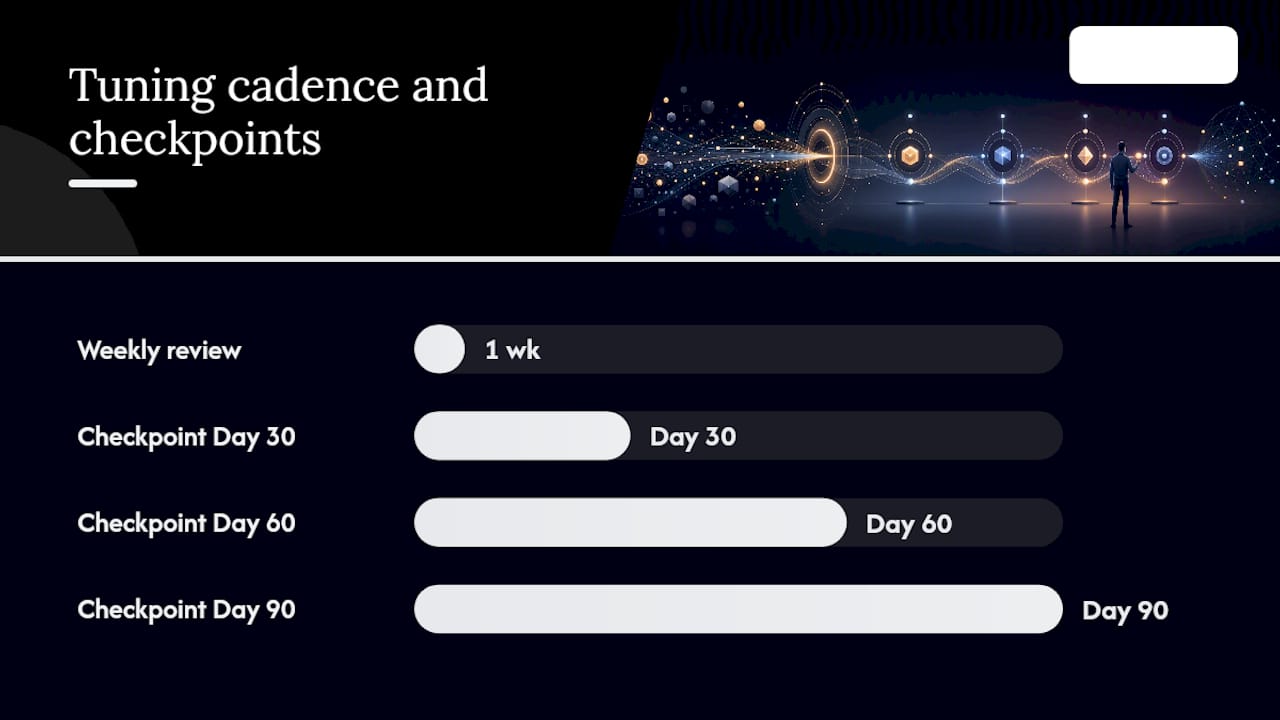
- Review false-positive rates weekly during the first 90 days.
- Set a tuning checkpoint at day 30, day 60, and day 90 with documented pass/fail criteria.
- Expand enforcement channel by channel, not all at once. Email first, then cloud storage, then endpoint.
- Keep a tuning log that records every rule change, the reason for it, and the before/after false-positive rate.
- Do not expand to the next phase until the current phase's false-positive rate is below your target threshold.
For AI-specific controls, AI search audit tools can help security teams understand what data is surfacing through AI-generated outputs and identify unsanctioned model use patterns before they become incidents.
What security teams get wrong about DLP, and how to fix it
The most consistent mistake is buying the tool before building the program. A DLP platform configured without a classification schema, a data-flow map, or stakeholder buy-in will generate thousands of alerts that no one acts on, and the program will be quietly abandoned within a year.
The second mistake is treating classification as a one-time project. Data environments change constantly. New SaaS tools appear, new data types are created, and business processes evolve. Classification schemas that are not reviewed quarterly become stale, and stale classification produces both false positives and missed detections.
The third mistake is ignoring business owners. Security teams that classify data in isolation, without input from the people who use it, create policies that block legitimate work. That friction erodes the program's credibility faster than any technical failure.
Two things security leads can do this week:
- Schedule a 30-minute meeting with one business unit owner and ask them to walk you through how their team shares sensitive data externally. You will learn more about your actual risk surface in that conversation than in a week of log analysis.
- Pull your current DLP alert volume and calculate the false-positive rate for your top three rules. If any rule is above 20%, pause it and retune before it damages user trust.
The programs that succeed treat DLP as a continuous business process, not a technology deployment. The technology is the easy part.
Yslootahtech can build and manage your DLP program
Implementing a DLP strategy that actually reduces risk requires more than a tool license. It requires discovery, classification, policy design, phased rollout, and ongoing tuning, all aligned to your specific data environment and U.S. compliance obligations.

Yslootahtech delivers end-to-end data protection services that cover the full program lifecycle: from initial data discovery and classification through pilot design, SIEM and IdP integration, and managed tuning after go-live. For organizations facing Shadow AI risks, Yslootahtech's AI and machine learning security services include AI-risk assessments, prompt logging architecture, and output filtering controls that most standalone DLP tools do not address out of the box. A typical engagement runs from initial assessment through managed tuning in roughly six months, with measurable KPIs at every phase gate. Contact Yslootahtech to schedule a DLP readiness assessment and get a scoped engagement plan for your environment.
Sources
These sources were used throughout this guide and are worth bookmarking for implementation planning and compliance justification:
- Plan for data loss prevention (DLP) - Microsoft Learn
- Building an Effective DLP Strategy: Framework, Governance, and Implementation - Palo Alto Networks
- Data Leakage: Risk, Causes, and Prevention | Snyk
- How to implement a DLP strategy - Fortinet