Cloud Migration Process: A 2026 Guide for IT Leaders

TL;DR:
- The cloud migration process involves multiple structured phases aimed at maintaining business continuity and achieving operational benefits. Effective planning, strategy selection, and validation are essential to avoid costly failures and ensure long-term success.
The cloud migration process is the structured transfer of data, applications, and workloads from on-premises or legacy systems to cloud environments through a multi-phase plan designed to maintain business continuity and deliver long-term operational gains. Industry standards in 2026 define 5 to 7 distinct phases for a complete migration, from initial discovery through post-migration optimization. The 6 Rs framework — Rehost, Replatform, Refactor, Repurchase, Retire, and Retain — gives IT teams a decision model for matching each workload to the right migration path. Getting this right requires more than technical execution. It demands planning, governance, and a clear sequence that protects operations at every step. This guide walks you through each phase, strategy selection, execution models, and the prerequisites that separate successful migrations from costly failures.
What are the key phases of the cloud migration process?
A structured, multi-phase framework with 5 to 7 phases produces clear deliverables and prevents the ad-hoc decisions that cause outages. Each phase builds on the last, and skipping any one of them compounds risk in the phases that follow.
Phase 1: Prepare and discover
The Prepare phase is where you build the foundation. Your team conducts a full application inventory, maps dependencies between systems, and establishes baseline utilization metrics. Skipping this assessment leads directly to outages, compliance failures, and operational fragility after go-live. Automated discovery tools like AWS Application Discovery Service and Azure Migrate reduce the risk of missing hidden integration points that would otherwise cause failures mid-migration.

Phase 2: Plan and define strategy
With a complete inventory in hand, your team selects migration strategies for each workload using the 6 Rs framework. This phase also covers organizational readiness: skills gaps, compliance requirements, and security controls all need documentation before any workload moves. The output is a migration plan with prioritized workload waves, timelines, and defined success criteria.
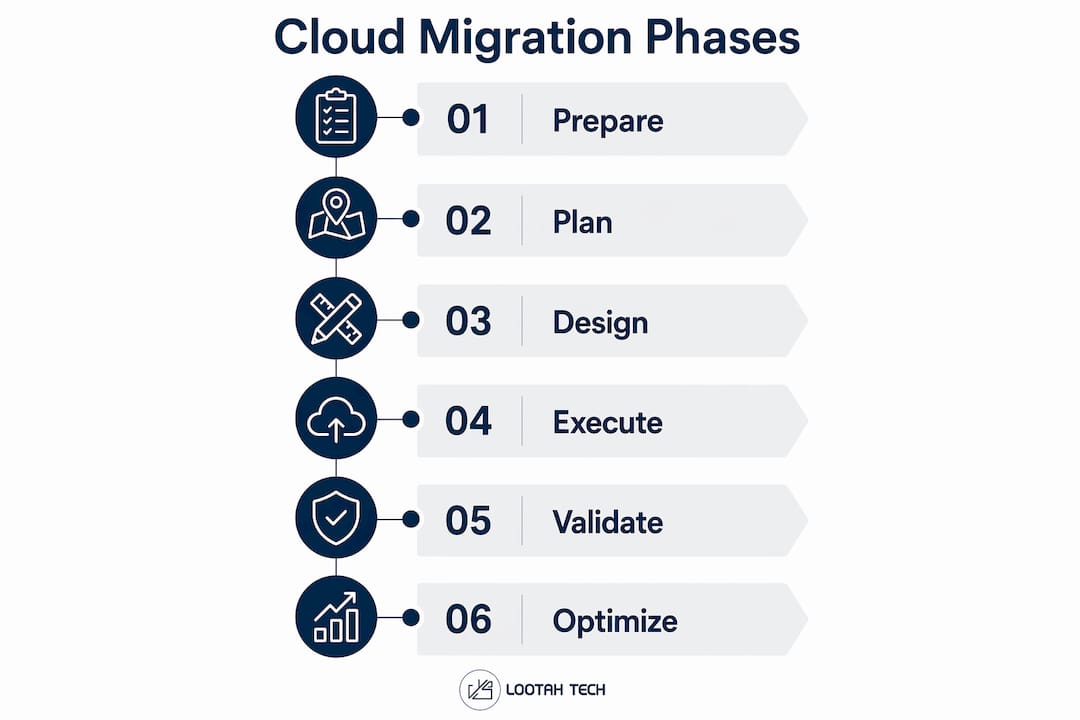
Phase 3: Architecture design
Architecture design translates the migration plan into a technical blueprint. Your team defines the target cloud environment, network topology, identity and access management structure, and data residency requirements. This phase also determines which monitoring and observability tools will be in place before go-live, not after.
Phase 4: Migration execution
Execution follows the wave plan established in Phase 2. Teams migrate workloads in sequenced batches, starting with low-risk applications and progressing to business-critical systems. Each wave requires a validated rollback plan before the team proceeds. Validation checkpoints confirm that migrated workloads meet performance and security baselines before the next wave begins.
Phase 5: Validation and go-live
Validation is not a formality. Your team runs functional tests, load tests, and security scans against the migrated environment. Only workloads that pass all defined criteria move to production. This phase also includes a formal cutover plan with communication protocols for internal teams and external stakeholders.
Phase 6: Post-migration optimization
Optimization is ongoing, not a one-time event. Your team reviews cloud spend, right-sizes compute resources, and tunes performance based on real usage data. Continuous optimization drives the cost and performance improvements that justify the migration investment.
Pro Tip: Document the rationale for every architecture decision during Phases 2 and 3. Teams that skip this step lose institutional knowledge when personnel change, and that gap becomes expensive during the optimization phase.
How to select the right cloud migration strategy using the 6 Rs
The 6 Rs framework gives you a structured way to match each workload to a migration path based on budget, timeline, application complexity, and performance requirements. No single approach fits every workload in a portfolio.
| Strategy | What it means | Best for |
|---|---|---|
| Rehost | Lift and shift to cloud with no code changes | Legacy apps with tight timelines |
| Replatform | Minor optimizations without full rearchitecting | Apps needing managed services |
| Refactor | Redesign for cloud-native architecture | High-value apps requiring performance gains |
| Repurchase | Replace with a SaaS product | Commodity functions like CRM or HR |
| Retire | Decommission unused or redundant systems | Applications with no active users |
| Retain | Keep on-premises for now | Regulated or latency-sensitive workloads |
Most enterprise portfolios use a mix of all six approaches. A common pattern applies Rehost to the majority of workloads for speed, Refactor to the top 10–15% that drive the most business value, and Retire to the systems that no longer serve a purpose.
The most common selection mistake is defaulting to Rehost for every workload because it feels safe. Rehosted applications carry their on-premises inefficiencies into the cloud, which means you pay cloud prices for on-premises performance. The decision to Refactor requires more time and budget upfront, but it delivers the performance and cost profile that cloud environments are designed to produce.
- Rehost works when speed to cloud matters more than optimization.
- Replatform works when you want managed services without rewriting code.
- Refactor works when the application is a revenue driver and performance is a constraint.
- Repurchase works when the application is a commodity and a SaaS alternative exists.
- Retire works when usage data shows the application has no active users.
- Retain works when regulatory requirements or latency constraints make cloud hosting impractical.
Pro Tip: Document the business rationale for each workload's assigned strategy in a decision log. When leadership changes or auditors ask why a system was decommissioned, that log protects your team.
What execution strategies minimize disruption during migration?
Migration timing should align with business risk tolerance rather than fixed deadlines. Three execution models cover most scenarios: big bang, phased waves, and the strangler fig pattern.
The big bang model migrates all workloads in a single cutover event. It minimizes the time your team operates a hybrid environment, but it concentrates all risk into one window. This model suits smaller environments with low system complexity and a high tolerance for a defined downtime window.
The phased wave model migrates workloads in sequenced batches over weeks or months. Each wave is treated as an independent migration with its own rollback plan and validation checkpoint. This is the most common model for enterprise migrations because it limits the blast radius of any single failure.
The strangler fig pattern runs the old and new systems in parallel. Traffic shifts gradually from the legacy environment to the cloud environment until the old system can be decommissioned. This model suits large, complex applications where a hard cutover carries unacceptable risk. Minimizing operational disruption through parallel operation is the core advantage of this approach.
Regardless of the model you choose, these execution principles apply:
- Start with low-risk, non-critical workloads. Beginning with low-risk applications builds team competence and exposes process gaps before high-stakes systems are on the line.
- Require a validated rollback plan for every wave. A tested rollback plan is the mandatory condition for proceeding with any migration wave.
- Run validation checkpoints after each wave before starting the next.
- Communicate cutover schedules to all affected teams at least 48 hours in advance.
- Use a pilot migration to validate your tooling and process before the first full wave begins.
A pilot-first approach validates your migration tooling and uncovers issues that no amount of planning will reveal. It is the single highest-return activity in the execution phase.
What are the prerequisites and best practices for cloud migration?
Prerequisites determine whether your migration succeeds or stalls. Teams that skip the readiness checklist discover their gaps during execution, which is the worst possible time.
| Prerequisite | Why it matters |
|---|---|
| Full application inventory | Prevents surprise dependencies from breaking migrated workloads |
| Baseline utilization data | Enables accurate right-sizing in the cloud environment |
| Security and compliance review | Identifies controls that must be in place before go-live |
| Skills readiness assessment | Reveals training gaps before they become execution bottlenecks |
| Cost model including egress fees | Prevents budget overruns from unmodeled data transfer costs |
Unmodeled egress costs can consume 15–25% of expected cloud savings. Cost modeling that excludes egress fees produces a business case that falls apart after go-live.
Strong governance frameworks covering change management, access control, and incident response are necessary to prevent budget overruns and security vulnerabilities. Governance is not a post-migration activity. It must be in place before the first workload moves.
Automated discovery and dependency mapping tools like AWS Application Discovery Service and Azure Migrate significantly reduce the risk of outages caused by undiscovered integration points. Manual discovery misses dependencies that automated tools surface in hours.
Pro Tip: Run your cost model twice: once with current on-premises utilization data, and once with projected cloud utilization after right-sizing. The gap between those two numbers is your realistic savings estimate, not the vendor's headline figure.
For teams building a cloud adoption business case, the prerequisites checklist also serves as the evidence base for leadership approval. A completed readiness assessment answers the questions executives ask before signing off on migration budgets.
Key Takeaways
A successful cloud migration requires a structured, phased framework aligned with the 6 Rs strategy model, validated rollback plans at every wave, and continuous post-migration optimization to realize the full financial and operational benefits.
| Point | Details |
|---|---|
| Follow a phased framework | Use 5 to 7 defined phases from discovery through optimization to maintain control and reduce risk. |
| Apply the 6 Rs to every workload | Match each application to the right migration path based on budget, complexity, and business value. |
| Start with low-risk workloads | Build team confidence and expose process gaps before migrating critical systems. |
| Require rollback plans per wave | Never authorize a migration wave without a tested and documented rollback procedure. |
| Model egress costs before you start | Unmodeled data transfer fees can eliminate 15–25% of projected cloud savings. |
What I've learned about cloud migration after working through the hard parts
The planning phase always takes longer than teams expect, and that is actually a good sign. Teams that rush through discovery and strategy selection to get to execution are the ones who call me six months later with cost overruns and performance problems they cannot explain.
The most underestimated challenge is not technical. Organizational resistance and skills gaps derail more migrations than architecture decisions do. When a team's cloud skills are not ready for the workloads they are migrating, they make conservative decisions that preserve on-premises habits in a cloud environment. That produces the worst outcome: cloud costs with on-premises performance.
The second thing I have seen consistently is that rollback plans get treated as a formality. Teams document them, but they do not test them. A rollback plan that has never been executed is not a safety net. It is a false sense of security. Test every rollback procedure in a staging environment before the wave goes live.
My honest recommendation: treat the strangler fig pattern as your default for any application that touches revenue. The extra time running parallel environments is cheap compared to the cost of a failed cutover on a business-critical system. Speed is not the goal. Continuity is.
Cloud migration is also not a one-time project. The teams that get the most value from cloud adoption treat optimization as a permanent function, not a cleanup task after go-live. Right-sizing, reserved instance planning, and architecture refinement should be on someone's calendar every quarter.
— YS
How Yslootahtech supports your cloud migration goals
Yslootahtech works with business leaders and IT teams across industries to plan and execute cloud migrations that align with real business objectives, not just technical checklists.

Yslootahtech's AI and machine learning services apply directly to cloud migration planning, from automated workload analysis and dependency mapping to post-migration cost modeling and performance monitoring. These capabilities reduce the manual effort in the Prepare and Optimization phases, where human error is most costly. If your team is building a migration plan or working through a stalled migration, Yslootahtech offers consultation and end-to-end support tailored to your environment, industry, and timeline. Reach out to discuss where your migration stands and what the next phase requires.
FAQ
What is cloud migration?
Cloud migration is the process of moving data, applications, and workloads from on-premises or legacy infrastructure to a cloud environment. The process follows a structured, multi-phase framework designed to maintain business continuity throughout the transition.
How many phases does a cloud migration process have?
Industry standards in 2026 define 5 to 7 phases, typically covering discovery, strategy planning, architecture design, migration execution, validation, and post-migration optimization.
What are the 6 Rs of cloud migration?
The 6 Rs are Rehost, Replatform, Refactor, Repurchase, Retire, and Retain. Each represents a different migration path matched to a workload's complexity, business value, and technical requirements.
How do you reduce risk during cloud migration execution?
Start with low-risk workloads, require a validated rollback plan for every migration wave, and run a pilot migration before committing to full-scale execution. These three practices catch the majority of issues before they affect production systems.
Why do cloud migrations go over budget?
The most common cause is unmodeled data egress costs, which can consume 15–25% of projected cloud savings. Incomplete application inventories and underestimated skills gaps are the next most frequent drivers of budget overruns.