Cloud Disaster Recovery: A Practical Guide for IT Leaders

Cloud disaster recovery is the practice of using cloud infrastructure to restore systems and data after an outage, attack, or failure. The single most important design decision is sequencing: classify every workload by business impact first, define its recovery time and recovery point objectives second, then pick the cheapest architecture that hits those targets. Skip that order and you either overspend on systems nobody urgently needs or under-protect the ones that keep the business running. The core building blocks are replication, orchestration, immutable offsite copies, and validation before any cutover.
TL;DR:
- Cloud disaster recovery requires tailored RTO and RPO targets based on system criticality, with some systems demanding recovery within minutes and others acceptable within hours or days.
- Active-active architectures ensure near-instant failover but are costly, while cold standby remains the most affordable option, suitable for less critical workloads.
- Implementation must involve detailed classification, infrastructure-as-code, automated orchestration, and validated runbooks to ensure reliability during actual incidents.
- Protect backups with immutable storage, isolated recovery environments, and strict credential separation to prevent ransomware attacks from compromising recovery options.
- Regular testing, including monthly automated checks for critical systems and annual full rehearsals, is essential to verify recovery processes and meet business continuity requirements.
Table of Contents
- What Does Cloud Disaster Recovery Actually Cover?
- How Do You Set RTO and RPO Targets?
- Which Architecture Fits Your Recovery Targets?
- How Do You Actually Implement Cloud Disaster Recovery?
- How Do You Harden Backups Against Ransomware?
- How Often Should You Test Your Disaster Recovery Plan?
- What Should You Check Before You Trust a Recovery?
- How Does YS Lootah Tech Support Cloud Disaster Recovery Projects?
- What Actually Determines Whether a DR Program Works?
- Ready to Build a Cloud Disaster Recovery Program That Holds Up?
- Sources
What Does Cloud Disaster Recovery Actually Cover?
Cloud disaster recovery is not just "backups in the cloud." It's a system of moving parts, each solving a different failure mode, and missing any one of them leaves a gap you won't discover until an actual incident.
The components that make up a working program include:
- Backups: periodic or continuous copies of data, stored separately from production.
- Replication: real-time or near-real-time data mirroring to a secondary region or provider.
- Orchestration: automated sequencing of failover steps, so recovery doesn't depend on someone remembering the right order at 2 a.m.
- Runbooks: documented, versioned procedures for each recovery scenario.
- Validation: automated checks confirming a restored system is actually usable, not just present.
The benefits of moving DR to the cloud over a traditional secondary data center are concrete. You pay for standby capacity only when you use it, rather than carrying a second facility year round. You get geographic diversity without negotiating a colocation contract in another city. Provisioning a recovery environment that once took weeks now takes hours, sometimes minutes, when the infrastructure is defined as code.
Cloud DR typically runs through three stages: analysis, implementation, and testing, and that scalability and flexible pricing model is what makes it attractive compared with maintaining a full duplicate on-premise environment.
That said, cloud DR isn't automatically the right answer for everything. Organizations with strict data residency mandates, extremely latency-sensitive workloads, or existing sunk investment in a secondary facility sometimes run a hybrid model, keeping certain regulated systems on-premise while pushing everything else to cloud-based recovery. The decision hinges on what you're protecting, not on a blanket cloud-versus-on-premise preference.
How Do You Set RTO and RPO Targets?
Recovery Time Objective (RTO) is how long a system can be down before the business takes real damage. Recovery Point Objective (RPO) is how much data loss, measured in time, you can tolerate. A payment processing system with a four-hour RTO must be back online within four hours of failure. An RPO of fifteen minutes means you can lose at most fifteen minutes of transactions.
These two numbers, not the technology catalog, should drive every architecture decision that follows.
Statistic to keep in view: backup and disaster recovery guidance recommends monthly restore testing for critical systems and a full annual DR rehearsal to confirm those targets hold up outside of theory.
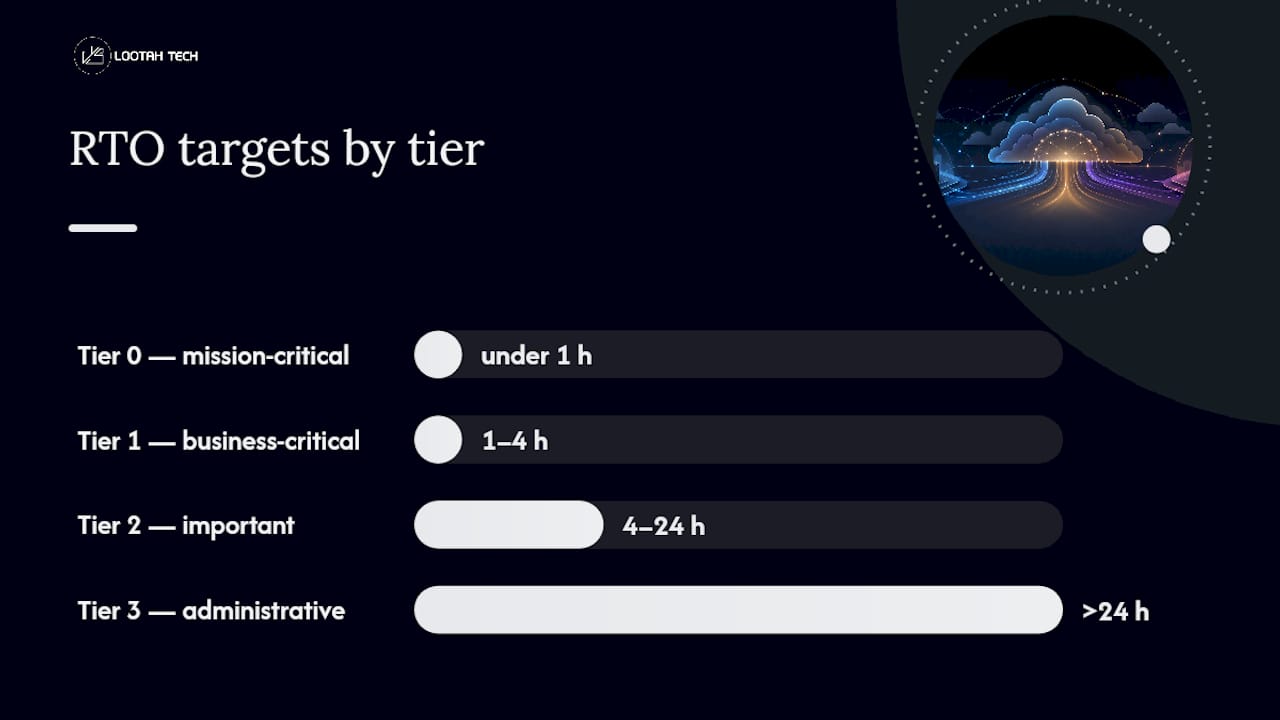
A practical tiering framework looks like this:
- Tier 0, mission-critical: RTO under 1 hour, RPO under 15 minutes. Payment systems, core transactional databases, authentication services.
- Tier 1, business-critical: RTO of 1 to 4 hours, RPO of 15 to 60 minutes. Order management, CRM, customer-facing apps.
- Tier 2, important: RTO of 4 to 24 hours, RPO of 1 to 4 hours. Internal reporting, HR systems, secondary databases.
- Tier 3, administrative: RTO beyond 24 hours, RPO of a day or more. Archived records, internal wikis, low-traffic tools.
Tier 0 typically demands active replication and automated failover. Tier 3 can survive on nightly snapshot backups with a manual restore process. The mistake most organizations make is applying Tier 0 spending to a Tier 2 problem, or worse, the reverse. Microsoft's Azure Well-Architected guidance is explicit on this point: criticality is a business decision, not an engineering guess, and the tiering exercise should happen with finance and operations leaders in the room, not IT alone.
Which Architecture Fits Your Recovery Targets?
Three architectural patterns cover most cloud DR scenarios, and each carries a different price tag attached to a different speed of recovery.
Active-active runs full production workloads in two or more regions simultaneously, with traffic distributed across both. Failover is near-instant because there's nothing to "fail over" to. It's the most expensive pattern by a wide margin, since you're paying for full duplicate capacity around the clock, and it's usually reserved for Tier 0 systems where downtime costs outstrip infrastructure costs.
Warm standby keeps a scaled-down but running version of the environment in a secondary region. During failover, that environment scales up to full capacity. Recovery takes minutes to a couple of hours, and cost sits well below active-active because you're not paying for full-size idle capacity.
Cold standby keeps infrastructure defined but not running, typically as infrastructure-as-code templates and stored backups. Recovery means standing up the environment from scratch, which can take several hours. It's the cheapest option and fits Tier 2 and Tier 3 workloads well.
A few selection heuristics simplify the choice:
- If downtime costs more per hour than the infrastructure costs per month, lean toward active-active or warm standby.
- If your RPO tolerance is measured in hours rather than minutes, cold standby with frequent snapshots is usually sufficient.
- If regulatory or contractual SLAs specify a recovery window, work backward from that number to the architecture, not forward from what's cheapest.
Cross-region and multi-cloud replication introduce a subtler problem: consistency. Asynchronous replication across regions or providers can leave you with a secondary copy that's technically present but logically behind, especially for databases with heavy write volume. Teams running a multi-cloud strategy need to test not just whether data arrived, but whether it arrived in the right order and state. A warm standby database that's five minutes stale is fine for most Tier 1 workloads; the same lag on a Tier 0 financial ledger is a real problem.
How Do You Actually Implement Cloud Disaster Recovery?
Implementation follows a sequence, and skipping steps to get to the "real work" of replication is how DR programs end up expensive and unreliable.
- Inventory and business-impact assessment. Catalog every application, its dependencies, its data volume, and who in the business actually owns the decision about how much downtime it can tolerate. This is where the Tier 0 through Tier 3 classification gets applied to real systems, not hypothetical ones.
- Design the replication and consistency approach. Near-synchronous replication suits databases where RPO is measured in seconds. Continuous data protection (CDP) captures every write and fits systems where even a few minutes of loss is unacceptable. Scheduled snapshots are sufficient, and far cheaper, for anything in Tier 2 or below.
- Implement infrastructure-as-code and orchestration. Recovery environments defined in code, not built by hand during an incident, are what make failover deterministic. This is also where automated failback, returning traffic to the primary region once it's healthy, needs to be built and tested, not improvised.
- Build runbooks and automation triggers. Every recovery scenario needs a documented trigger condition and a stepwise procedure, version-controlled like any other piece of infrastructure. Cloud vendor guidance consistently stresses automating failover rather than relying on manual intervention under pressure.
Pro Tip: Write your runbooks assuming the person executing them is not the person who wrote them. If a step requires tribal knowledge to complete, it's not a runbook yet, it's a to-do list.
Teams modernizing legacy applications during this process often find application modernization work pairs naturally with DR redesign, since both require the same dependency mapping.
How Do You Harden Backups Against Ransomware?
Backups are no longer a passive safety net. Ransomware operators actively target backup infrastructure first, because destroying your recovery option is what forces payment. Hardening backups has to assume an attacker is already inside your network.

Immutable, isolated storage is non-negotiable for critical tiers. Object storage with write-once-read-many (WORM) policies prevents anyone, including a compromised admin account, from altering or deleting a backup within its retention window. Pair this with the 3-2-1 principle: three copies of data, on two different media types, with one copy offsite, as the baseline structure beneath any modern backup strategy.
An isolated recovery environment (IRE) changes how validation happens. Rather than restoring directly into production and hoping for the best, AWS's cyber-resilience guidance recommends restoring into a separate, deletion-protected environment first, where the data can be validated before it ever touches a live system.
Credential separation closes the loop. Backup system credentials should never share an identity provider or privilege tier with production admin accounts. Multi-party approval for any bulk deletion or retention-policy change adds friction exactly where friction is useful.
Validation itself needs two layers. Generic checks (malware and ransomware signature scans) catch known threats. Workload-specific checks, database consistency checks, application-level smoke tests, catch the subtler problem: attackers who modified legitimate files rather than encrypting them outright, which a signature scan alone will miss. Teams building out these controls in more depth should review cloud security best practices alongside their backup architecture, since the two disciplines overlap more than most org charts reflect.
How Often Should You Test Your Disaster Recovery Plan?
A DR plan that's never been tested is a hypothesis, not a plan. Testing cadence should match the criticality tier, not a single company-wide calendar date.
- Monthly automated restore checks for Tier 0 and Tier 1 systems. These don't need to be full-scale rehearsals, but they need to confirm a specific restore point is recoverable and passes basic integrity checks.
- Quarterly partial DR tests covering a subset of applications, exercising the orchestration and runbook steps without a full-scale cutover.
- Annual full DR rehearsal involving an actual failover of critical systems, with defined success criteria (did the RTO/RPO targets hold?) and a communication plan for stakeholders during the exercise.
Automated, continuous verification scales far better than manual spot-checks once you're managing dozens or hundreds of systems, and it catches drift between what the runbook says and what the infrastructure actually does.
Runbooks themselves belong in version control, reviewed on the same cycle as the tests that exercise them. Every test, successful or not, should produce a short report: what worked, what missed the target RTO, and what gets remediated before the next cycle. Skipping the remediation step is the most common reason organizations run the same test and hit the same failure two years running.
What Should You Check Before You Trust a Recovery?
Run this checklist during any real incident or test cutover before declaring a system recovered:
- Restore point validated: confirm the specific backup or replica used passes both malware scanning and application-level consistency checks.
- Secrets and credentials rotated: following a Rebuild-Restore-Rotate approach, rebuild infrastructure from code, restore validated data, then rotate every credential and API key touched during the incident.
- Dependency mapping confirmed: verify upstream and downstream systems can actually reach the recovered environment, and that access policies weren't left wide open during the rebuild.
- Smoke tests and monitoring active: run functional smoke tests, confirm monitoring and alerting are live on the recovered system, and get sign-off from actual users before calling it done.
Pro Tip: Treat "the app loads" as the weakest possible acceptance criterion. A recovered system that loads but returns stale or corrupted data is a failed recovery wearing a green checkmark.
How Does YS Lootah Tech Support Cloud Disaster Recovery Projects?
Yslootahtech works with IT teams across custom software development, cloud computing, and cybersecurity to build DR programs that match the tiering approach outlined above rather than a one-size-fits-all template. Typical engagements start with a classification workshop that maps business-critical systems to RTO/RPO tiers, followed by infrastructure-as-code templates for replication and failover, documented runbooks, and a scheduled DR exercise to validate the design before it's needed for real.
For organizations mid-migration, this work often overlaps with broader cloud migration planning, since recovery architecture and migration architecture answer overlapping questions about dependencies and data flow. The engagement path runs assessment, then design, then implementation, then testing, mirroring the same four phases IT teams should apply internally regardless of who builds it.
What Actually Determines Whether a DR Program Works?
Most DR conversations get pulled toward the technology first: which replication method, which region pair, which orchestration tool. That's backward. The programs that hold up under real incidents are the ones that spent their first real effort on classification and validation, not on chasing the lowest possible latency between regions.
Validation and runbooks are unglamorous, and they're also where the return on investment is highest. A perfectly replicated environment that nobody has tested is a liability with good intentions. Start with a pilot: pick your five or six genuinely critical systems, tier them honestly, and prove the recovery works before expanding the program. Everything else can wait.
— YS
Ready to Build a Cloud Disaster Recovery Program That Holds Up?
Getting cloud disaster recovery right takes more than provisioning a second region and calling it done. Yslootahtech runs the full sequence, workload classification, RTO/RPO design, replication architecture, and DR exercises, so recovery targets are backed by tested infrastructure instead of assumptions. For teams weighing DevOps hires against a fixed-scope engagement, working with a team that already builds the infrastructure-as-code templates and runbooks means fewer surprises during an actual incident.

Data platform specialists like DLH.io show what well-architected recovery use cases look like in practice, and Yslootahtech applies that same rigor to client environments across custom software, cloud, and security engagements. If your recovery plan has never been stress-tested against a real RTO target, that's the gap worth closing first. Request a DR assessment through the application development team to scope a classification workshop and get a costed recovery architecture on the table.
Sources
- Disaster recovery guidance — Microsoft Azure Well-Architected
- Cyber resilience on AWS: A reference approach for recovery from ransomware and destructive events
- Backup strategy: design one that protects you — Kaseya
- Understanding disaster recovery in the cloud — Cloudian