Application Modernization Strategy for IT Leaders

An application modernization strategy is a documented plan that scores every legacy workload, assigns each one a modernization path, and sequences the work against measurable business goals. It is not a migration ticket queue. Before anything else, run an inventory this week and score each application on business value and technical health, because that scoring is what turns a vague mandate to "modernize" into an actual roadmap.
A workable strategy needs three things: a rationalization framework for deciding what happens to each workload (the 6 Rs), a prioritized sequence of waves, and governance metrics that prove the work is paying off.
Get the right people in the room before you score anything:
- An executive sponsor who owns the budget and the business outcome
- The application owner who knows what the system actually does, not just what the diagram says
- Security, for data sensitivity and identity implications
- Platform or operations staff who will run the thing after cutover
Pro Tip: Score every application on a simple 1 to 5 scale for business value and technical health before you touch a single line of code. The two-by-two grid that results tells you more about sequencing than any vendor pitch will.
Key Takeaways
An effective application modernization strategy scores every workload with the six Rs, sequences work into measurable pilots, and ties every wave to delivery and cost metrics before scaling further.
| Point | Details |
|---|---|
| Start with scoring | Rate each application on business value and technical health before assigning a strategy. |
| Mix strategies across the portfolio | Rehost urgent low-debt apps now, refactor critical ones later, retire the rest. |
| Sequence in waves | Use pilots with clear entry and exit criteria before scaling to the rest of the portfolio. |
| Use AI for discovery, not rewrites | Apply AI to test generation and rule extraction, then validate with human review. |
| Yslootahtech supports execution | Discovery, architecture, and pilot execution are areas where Yslootahtech works directly with IT teams. |
Table of Contents
- What Application Modernization Means for Your Bottom Line
- The Six Rs: Picking the Right Path for Each Workload
- Building Your Application Modernization Roadmap Step by Step
- IaaS, PaaS, Hybrid, or Multicloud: Choosing Where Workloads Run
- What Modernization Actually Costs and Where It Goes Wrong
- Where AI Actually Helps in Modernization
- Your One-Week Application Modernization Checklist
- Getting Your Organization Ready to Modernize
- Keeping Modernized Applications Improving After Go-Live
- Frequently Asked Questions
- Sources
What Application Modernization Means for Your Bottom Line
Modernization and migration get used interchangeably, and that's a mistake. Migration just moves a workload somewhere else. Modernization changes the platform, language, architecture, or runtime so the application actually gets easier to run and cheaper to change. A rehosted mainframe app on a cloud VM has migrated. It hasn't modernized until someone touches its architecture.
The business case usually comes down to four things:
- Lower total cost of ownership by retiring redundant licenses and idle infrastructure
- Faster release cycles because deployments no longer require a change-advisory board and a weekend
- Elastic scalability that matches actual demand instead of peak-provisioned hardware
- Stronger security posture and easier compliance audits on current, patched runtimes.
Track outcomes with delivery metrics like deployment frequency and mean time to recovery, plus a cost-per-transaction figure that tells finance whether the investment is working. Programs that skip this measurement step tend to drift into endless refactoring with no proof of value, according to modernization execution playbooks.
The Six Rs: Picking the Right Path for Each Workload
Every serious modernization roadmap comes back to the same rationalization framework: Rehost, Replatform, Refactor, Rearchitect/Rebuild, Retire, and Retain. Each answers a different business question, and mixing paths across your portfolio is normal, not a sign of an incomplete strategy.
Rehost ("lift and shift") moves an app as-is to new infrastructure. It's fastest and cheapest upfront, but it carries every existing bug and inefficiency with it. Replatform makes small adjustments, like swapping a self-managed database for a managed service, without touching the core architecture. Refactor restructures code for cloud-native patterns, which costs more time and money but pays off in agility over multiple years. Rearchitect or rebuild throws out the old design entirely, usually for applications that can't scale or integrate no matter how much you patch them. Retire removes redundant or unused systems outright. Retain leaves an application alone, usually because it's low-risk, low-value, or facing a hard compliance constraint that blocks change.
| Strategy | Best fit indicator | Typical trade-off |
|---|---|---|
| Rehost | High urgency, low technical debt tolerance for change | Fast, but preserves existing flaws |
| Replatform | Moderate technical health, need for managed services | Some benefit, limited architecture change |
| Refactor | Business-critical app, team has cloud skills | High effort, strong long-term ROI |
| Rearchitect/Rebuild | Poor technical health, scaling failure | Highest cost and timeline, biggest payoff |
| Retire | Redundant or unused functionality | Immediate cost savings, no engineering |
| Retain | Compliance lock-in or genuinely low value | Zero disruption, defers the decision |
A trade-off analysis of lift-and-shift versus replatform versus refactor confirms the same pattern most teams discover the hard way: speed and long-term value pull in opposite directions. Hosting reference points like Microsoft Azure, AWS, and VMware all support this full spectrum, from simple lift-and-shift to fully managed platform services, so the hosting decision rarely blocks the strategy choice.
Pro Tip: Don't force one strategy across your whole portfolio. A payment gateway might get refactored this year while an internal reporting tool gets rehosted now and refactored in eighteen months, once the team has bandwidth.
Building Your Application Modernization Roadmap Step by Step
A defensible roadmap follows a sequence, not a single big-bang decision. Skipping steps is how programs end up rewriting the same application twice.
- Discover and inventory. Combine automated dependency scanning with interviews of the people who actually run each system. Map data flows and integration points you won't find in any architecture diagram.
- Assess and score. Rate each application on business value and technical health using the same matrix from the Cloud Adoption Framework. This produces your first-pass R assignment per workload.
- Prioritize. Weight scores against executive priorities and set gating criteria, so nothing moves forward without sign-off from the app owner and security.
- Pilot. Choose one or two workloads with clear entry and exit criteria. Define what "success" looks like in numbers before you start, not after.
- Execute in waves. Sequence the rest of the portfolio using the strangler fig pattern, blue/green deployments, and feature flags to cut over gradually with a rollback path always available.
- Operate and measure. Fold the modernized application into your SRE or DevOps model with real observability and cost governance, then keep optimizing.
- Track deployment frequency and change failure rate weekly during early waves.
- Require a rollback plan before any pilot gets a go/no-go decision.
- Report cost-per-transaction to sponsors every quarter, not just at project close.
Pro Tip: Treat the pilot as a controlled experiment, not a soft launch. If you can't define what failure looks like in advance, you're not ready to migrate the next ten applications.
IaaS, PaaS, Hybrid, or Multicloud: Choosing Where Workloads Run
Hosting choice shapes cost and operations as much as the modernization strategy itself. IaaS gives you the most control and is the default for rehosted workloads that need to keep custom configurations intact. PaaS trades some of that control for speed, since the provider handles patching, scaling, and much of the operational burden, which fits replatformed and refactored applications well. Hybrid and multicloud setups exist mainly for resilience and to avoid over-dependence on one vendor, though that resilience comes at the cost of more complex monitoring and cost allocation.

| Model | Best for | Main trade-off |
|---|---|---|
| IaaS | Compliance-heavy or custom-configured rehosts | More control, more operational overhead |
| PaaS | Replatformed and refactored apps needing speed | Less ops burden, less low-level control |
| Hybrid | Sensitive data with cloud burst needs | Resilience against outages, added integration work |
| Multicloud | Avoiding vendor lock-in across critical systems | Redundancy, but harder cost and monitoring governance |
Rehosted apps usually land on IaaS, replatformed ones move to PaaS, and rebuilt applications tend to go fully cloud-native. If you're running multicloud, put centralized monitoring and a single cost-allocation model in place before you scale it, not after.
What Modernization Actually Costs and Where It Goes Wrong
Cost shape follows strategy. Rehosting is the cheapest option upfront and can close in weeks to a few months. Refactoring or rebuilding costs more upfront and stretches into months or years, but it's the path that actually pays down technical debt rather than just relocating it, per direct comparisons of lift-and-shift, replatform, and refactor approaches.
Timelines blow out for predictable reasons:
- Discovery missed a dependency, and it surfaces mid-migration
- Testing coverage was thin, so regressions weren't caught until production
- No rollback plan existed when the first wave hit a snag
- Teams resisted new tooling because nobody managed the change
Mitigate these with live dependency mapping instead of static diagrams, characterization tests that capture current behavior before you touch it, shadow traffic to validate new systems against real load, and phased rollouts that limit blast radius.
Pro Tip: Budget a significant portion of your timeline for discovery on any application older than ten years. Skipping this is the single most common reason refactor projects run over.
Where AI Actually Helps in Modernization
AI earns its keep in the discovery phase: parsing legacy codebases, surfacing embedded business rules nobody documented, and generating characterization tests fast. It's also useful for mechanical, repetitive translation work, like converting boilerplate adapters between formats.
Where it gets dangerous is when teams treat it as a full automated rewrite tool. Practitioner guidance warns that an AI-generated rewrite of a poorly structured application often just migrates the same technical debt into a new language, faster than a human would have.
- Use AI first for discovery: rule extraction, dependency detection, test generation
- Apply it next for bounded, mechanical transformations, not architectural decisions
- Follow every AI-assisted change with human review and behavioral comparison
- Validate with shadow traffic and differential testing before cutover, a workflow AI-assisted modernization guidance recommends over blind trust in generated code
Pro Tip: If an AI tool can't explain why it made a specific architectural change, don't ship that change. Explanation is the test for whether you're modernizing or just relocating risk.
Your One-Week Application Modernization Checklist
Start with an inventory sheet covering owner, runtime, dependencies, data sensitivity, business value score, and technical health score for every application in scope.
Apply these decision thresholds once scoring is done: retire anything with near-zero business value, retain anything low-value but compliance-locked, rehost anything urgent with decent technical health, replatform anything needing managed services, and reserve refactor or rebuild for business-critical systems with poor technical health.
- Assign an owner to the inventory this week.
- Score the top 10 applications by business value and technical health.
- Confirm rollback plans and observability exist before naming a pilot.
- Get security and stakeholder sign-off before the pilot kicks off.
Getting Your Organization Ready to Modernize
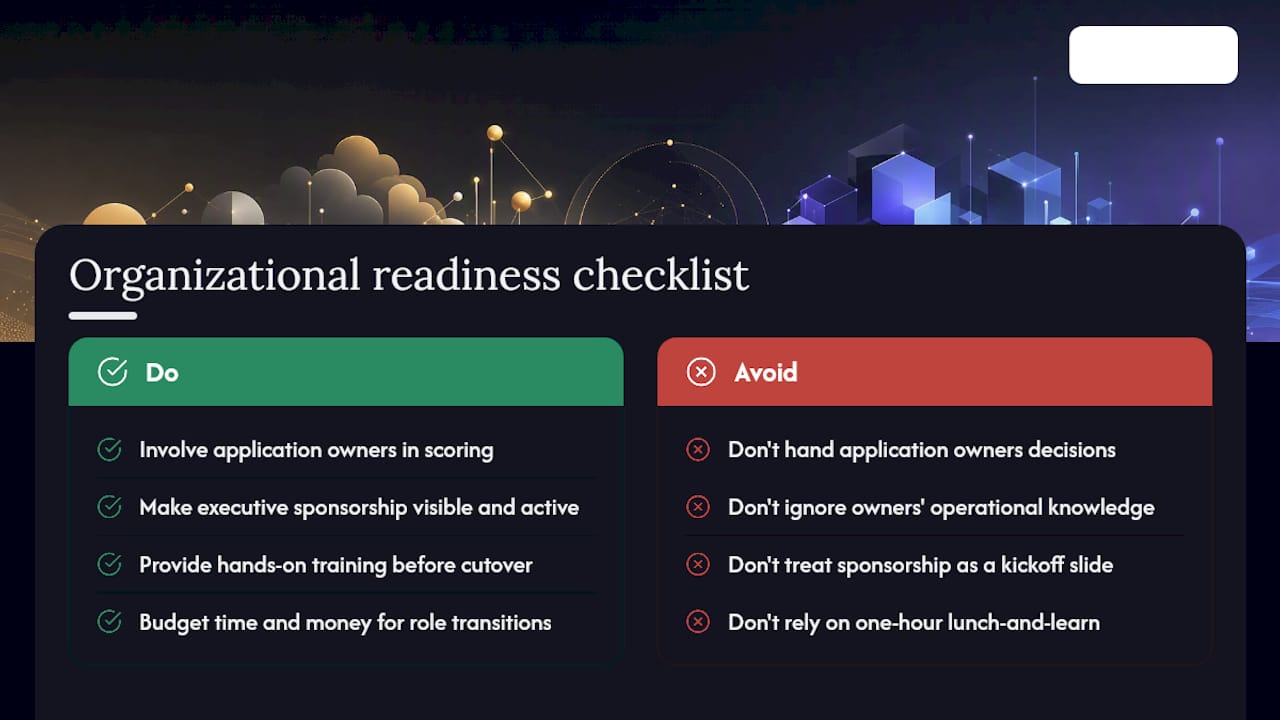
The technical plan is rarely what kills a modernization program. Resistance from the people who run the legacy system day to day is. Application owners who've kept a fragile system alive for a decade often see modernization as a judgment on their work, and that reaction shows up as slow-walked approvals and quiet noncompliance.
Address it directly. Bring application owners into the scoring process instead of handing them a decision. Their operational knowledge usually surfaces dependencies that automated discovery tools miss entirely, and involving them early converts a threatened stakeholder into a useful one.
Executive sponsorship needs to be visible and specific, not a slide in a kickoff deck. Sponsors should review pilot results and unblock resourcing when a wave stalls, not just approve the initial budget. Training matters just as much: teams moving from monolithic deployments to a wave-based, feature-flagged release process need real practice before their first production cutover, not a one-hour lunch-and-learn.
Set expectations early that some roles change. Ops staff who spent years managing a mainframe may need to build cloud-native monitoring skills, and that transition takes months, not a single certification. Programs that budget time and money for this shift see far less friction in later waves than programs that treat organizational readiness as an afterthought to the technical roadmap.
Keeping Modernized Applications Improving After Go-Live
Cutover isn't the finish line. A modernized application that gets no further attention drifts back toward the same brittleness that justified the original project, just with newer syntax.
Build a continuous improvement loop around the delivery metrics you started tracking in the pilot phase: deployment frequency, change failure rate, and mean time to recovery. If those numbers stall or regress a few months after go-live, that's a signal the operating model needs adjustment, not just the code.
Cost governance deserves the same ongoing attention. Cloud spend has a habit of creeping upward as teams add resources without decommissioning what they replaced. Set a recurring cost review, monthly for critical workloads, quarterly for everything else, and tie it to the cost-per-transaction baseline you established during the pilot.
Feedback loops from actual usage matter more after modernization than before. A refactored application built cloud-native gives you the observability to see exactly which features get used and which don't, information legacy systems rarely exposed. Use it to retire unused functionality rather than carrying it forward into the next architecture.
Finally, treat your first modernization wave as a template, not a one-off. Document what worked in your pilot's entry and exit criteria, rollback approach, and testing strategy, then reuse that playbook for the next wave instead of rebuilding the process from scratch each time.
Publisher Perspective: A Pragmatic Stance on Modernization
Phased waves beat big-bang rewrites almost every time. A pilot proves value in weeks; a two-year rebuild proves nothing until it ships. Rehosting first and refactoring later is often the sane choice, not a compromise. At Yslootahtech, we've supported discovery, architecture, and execution work across these engagements, and the pattern holds: technology decisions only matter when they move a metric the business actually cares about.
Ready to Turn This Roadmap Into a Pilot
You've got the framework. Turning a scoring matrix into a working pilot is where most internal teams stall, usually because discovery and architecture decisions eat months nobody budgeted for. Yslootahtech runs that discovery and architecture work directly, so your first wave gets built on a real dependency map instead of guesswork about what the old system actually does.

If you're staring at a legacy portfolio and not sure where to start scoring, a focused application development engagement can take your top candidate application from inventory to working pilot. If the modernization also touches how users interact with the system, our UX/UI design team can fold interface improvements into the same wave instead of a separate project later. Reach out to scope a discovery conversation for your highest-priority workload.
Frequently Asked Questions
What is the difference between application modernization and cloud migration? Cloud migration moves a workload to new infrastructure. An application modernization strategy goes further, changing the architecture, code, or runtime so the application becomes easier and cheaper to maintain, not just relocated.
How long does modernizing legacy applications usually take? Rehosting can finish in weeks to a few months. Refactoring or rebuilding a business-critical system typically runs from several months to a couple of years, depending on technical debt and team capacity.
Should we rehost or refactor first? Neither is universally correct. Rehost low-risk, urgent workloads first to build momentum and free up budget, then refactor business-critical systems once your team has proven the process on a smaller pilot.
Can AI replace developers in a modernization project? No. AI works well for discovery, dependency mapping, and test generation, but architectural decisions and behavioral validation still need human judgment, especially on systems with undocumented business rules.
What is the strangler fig pattern? It's a technique for replacing a legacy system gradually by routing traffic to new components piece by piece, rather than cutting over all at once, which limits risk during migration execution.
Sources
- The 6 Rs of application modernization
- Select a cloud migration strategy
- How to Modernize a Legacy Application with AI Without Turning It Into a Rewrite
- How to Modernize Legacy Applications: A Step-by-Step Guide | Catio
- Lift-and-Shift Vs Replatform Vs Refactor: How To Choose